Breadcrumbs

Upgrade FileCloud

Administrators must keep FileCloud Server up-to-date with the latest version to take advantage of the new features, enhancements, and fixes for issues found in previous versions.

How do I know if an upgrade is available?

  • FileCloud will always inform customers when a new upgrade is available.

  • When you log on to the Admin Portal, the Admin Dashboard will also alert you to the fact that you can install an update.


Where is the notification on the Admin Dashboard?

The Version section is right next to the License section on the Dashboard.
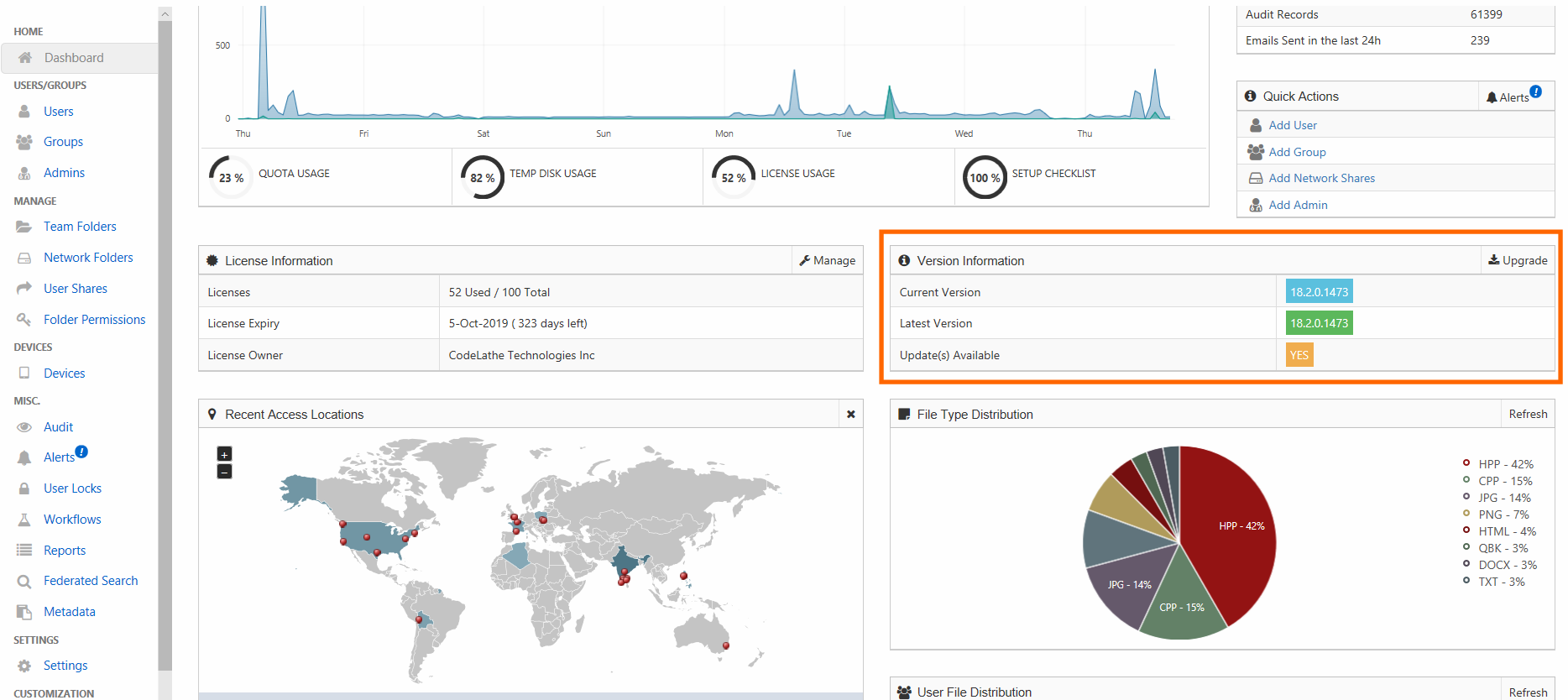
upgradecard.png
How do I enable the weekly email?

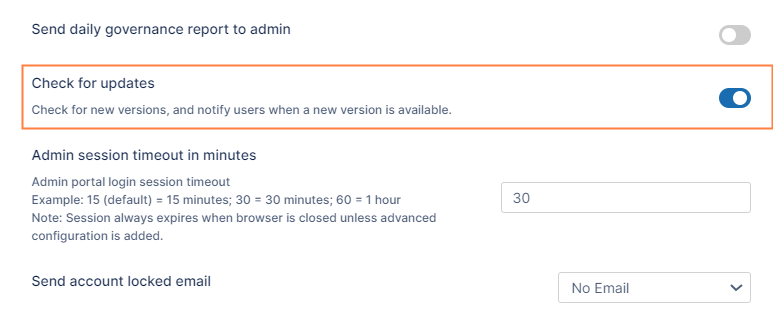
To check for updates on a weekly basis:

  1. In the FileCloud admin portal's left navigation bar, scroll down and click Settings. Then, on the Settings navigation page, click Admin adminicon.png .
    The Admin settings page opens.

  2. Scroll down to Check for updates, and enable it.
    CheckForUpdates.png

  3. Click Save.

https://fileclouddocs.atlassian.net/wiki/s/1623602073/6452/05f502871a457750e4d6a5e1f585bce5603b62b2/_/images/icons/emoticons/lightbulb_on.png To stop receiving the weekly email, disable this setting.


Remember to back up FileCloud before upgrading.

For releases that DO NOT require a full system upgrade: Upgrade using Admin Portal

For releases that DO require a full system upgrade: WINDOWS: Update Tool or Upgrade FileCloud on Linux

Custom settings in configuration files that are replaced during upgrade are not reset in the new configuration files.

Check If the following files are replaced with newer versions during upgrade, and in the case that they are replaced, reconfigure any custom settings after upgrade:

C:\xampp\apache\conf\httpd.conf
C:\xampp\apache\conf\extra\httpd-filecloud.conf

Release

Upgrade Scenarios

Upgrade Notes

Release Notes

23.252

Please see the upgrade notes.

Upgrade Notes for FileCloud 23.252 or Later

FileCloud Version 23.252 Release Notes

23.251

Please see the upgrade notes.

Upgrade Notes for FileCloud 23.251 or Later

FileCloud Version 23.251 Release Notes

23.242

Upgrading from FileCloud versions 22.1 through 23.232.1:

  • If you are running FileCloud in FIPS mode or you have enabled managed store encryption, you must change your storage encryption from RC4, which has been deprecated, to AES-256 prior to FileCloud upgrade. Follow the pre-upgrade instructions listed in Upgrade Notes for FileCloud 23.241 or Later.

  • The Message Queue system is a required service that needs to be running for FileCloud to be functional from 19.1 onwards.

  • Please ensure the Message Queue Service is running after upgrade before opening up for live access.

  • You CANNOT upgrade Windows and Linux using the Admin Portal.

  • If your installation of FileCloud uses admin portal user access restrictions, please see Restricting Access To Admin UI Based On IP Addresses for updated instructions.

Upgrading from a version of FileCloud less then 22.1:

Note: You can no longer use the Linux upgrade script to upgrade, see Upgrade FileCloud on Linux.

Upgrade Notes for FileCloud 23.242 or Later

FileCloud Version 23.242 Release Notes

23.241

Upgrading from FileCloud versions 22.1 through 23.232.1:

  • If you are running FileCloud in FIPS mode or you have enabled managed store encryption, you must change your storage encryption from RC4, which has been deprecated, to AES-256 prior to FileCloud upgrade. Follow the pre-upgrade instructions listed in Upgrade Notes for FileCloud 23.241 or Later.

  • The Message Queue system is a required service that needs to be running for FileCloud to be functional from 19.1 onwards.

  • Please ensure the Message Queue Service is running after upgrade before opening up for live access.

  • You CANNOT upgrade Windows and Linux using the Admin Portal.

  • If your installation of FileCloud uses admin portal user access restrictions, please see Restricting Access To Admin UI Based On IP Addresses for updated instructions.

Upgrading from a version of FileCloud less then 22.1:

Note: You can no longer use the Linux upgrade script to upgrade, see Upgrade FileCloud on Linux.

Upgrade Notes for FileCloud 23.241 or Later

FileCloud Version 23.241 Release Notes

23.232

Upgrading from ANY VERSION to 23.232

  • New Message Queue System is a REQUIRED service that needs to be running for FileCloud to be functional from 19.1 onwards

  • Please ensure the Message Queue Service is running after upgrade before opening up for live access

  • You CANNOT upgrade Windows and Linux using the Admin Portal.

  • If your installation of FileCloud uses admin portal user access restrictions, please see Restricting Access To Admin UI Based On IP Addresses for updated instructions.

    Note: You can no longer use the Linux upgrade script to upgrade, see Upgrade FileCloud on Linux.

Upgrade Notes for FileCloud 23.232 or Later

FileCloud Version 23.232 Release Notes