Breadcrumbs

Define a THEN Action

Not all THEN actions are compatible with all IF conditions. Please see the table below for compatible settings.

Once you select an IF Condition, compatible THEN Actions can be selected.

  • Actions are performed if the associated Condition is triggered. 

 Some Actions may require you to specify parameters, such as a specific date or time.


Where do I set up the Action?

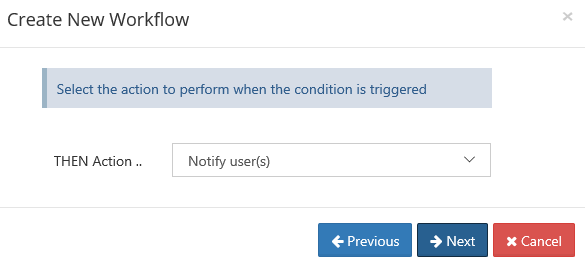
When you create a new Workflow, after you select a condition and specify parameters, then you can select an Action.
FC iftt3.png
Where do I add my parameters?

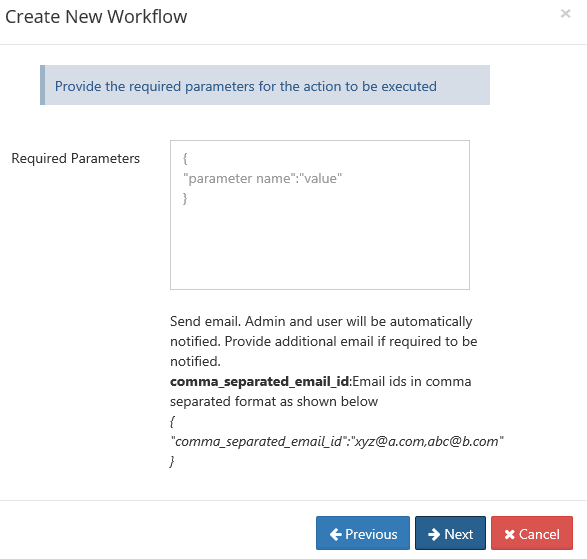
After you select an Action, then you can enter any parameters, such as a date or time.

If you need more information about what parameters are required, look below the Required Parameters box.
fc iftt4.png


THEN Actions

Notifications

Action

Parameters

Details

Compatible IF conditions 

Notify the file actions to user(s)


"comma_separated_email_id":"xyz@a.com,abc@b.com
}

Sends an email with information about the file and the action performed. 
comma_separated_email_id - email ids in comma separated format

Click to see If conditions

If a file is created

If a file is updated

If a file is deleted

If a file is downloaded

If a file was not modified for specified days

If a file is added or updated

If a file uploaded is bigger than expected size

If a file downloaded is bigger than expected size

If a folder is created

If a folder is deleted

If a comment is added

Notify the user that the account may be deactivated soon

None

Notifies the user that the account may be disabled or deleted due to inactivity.su

Click to see If conditions

If a user's last login is older than . . . 

If a new user is created

If a user's create date is older than

If a user's account is near its expiration date

Notify user(s)


"comma_separated_email_id":"xyz@a.com,abc@b.com
}

Sends a notification to users matching the criteria and sends an email to the admin and the specified addresses with information about the users who were sent notifications.
comma_separated_email_id - email ids in comma separated format

Click to see If conditions

If a user's last login is older than . . . 

If a new user is created

If a user's create date is older than

If a user's account is near its expiration date

If a new client app connects

Send an email

{  
"subject": "Subject of the email",
"body": "Body of the email in HTML format.",
"is_html": 1,
"users": "user1,user2",
"groups": "group1,group2"
}

Sends a customized email to the users and/or groups indicated

subject - Subject of the email

body - Body of the email

is_html (optional) - 1 if the body is in HTML format; 0 if the body is in plain text format. Default is 0. 
Note: If is_html=1, HTML tags are interpreted and the body of the email is formatted. For example, you can insert <b></b> tags to make text bold.

users (optional) - Comma separated list of users to send the email to.

groups (optional) - Comma separated list of groups to send the email to.

notify (optional) - 1 to automatically send the email to users impacted by the related action; 0 to not automatically send them the email. Default is 0.

If no users or groups are specified, the email is sent to the admin.

Click to see if conditions

If a file is created

If a folder is created

If a file is updated

If a file is deleted

If a folder is deleted

If a file is downloaded

If a comment is added

If a file was not modified for specified days

If a file is added or updated

If the file uploaded is bigger than the expected size

If the file uploaded is bigger than the expected size

Perform an action periodically at specified time and interval

Perform an action on the specified date

Perform an action periodically

If a new user is created

If a user's account is older than

If a user's last login is older than

If a user's account is near its expiration date

File actions

Action

Parameters

Details

Compatible IF conditions 

Copy the file(s) to some location


"target_path":"/usera/folderb/", 
"allow_overwrite":"1",
"keep_folder_structure":"1"
}

Copies files. 
target_path - path to copy the file to.

  • This path must be in the same storage type

  • Files cannot be copied from managed storage to network shares or vice versa.

allow_overwrite - (Added in FileCloud 20.1) Optional. Allow file to overwrite existing files with the same name in the target path. If allow_overwrite is not included, overwrites are allowed. 

keep_folder_structure (Optional): Keep folder structure while copying files.
Valid values are 0 (do not keep folder structure) or 1 (keep folder structure). Default is 0 if not provided.


The placeholders. %who, %when, %path, %how, %filename are available for this action.

Click to see If conditions

If a file is created

If a file is updated

If a file is deleted

If a file is downloaded

If a file was not modified for specified days

If a file is added or updated

If a file uploaded is bigger than expected size

If a file downloaded is bigger than expected size

If a folder is created

If a folder is deleted

If a comment is added

Delete the file(s)


"excluded_users":"user1,user2,user3",
"delete_empty_folders":true,
"notify_owner":false,
"comma_separated_email_id":"email1@email.com,email2@email.com"
}

Deletes matching files.

excluded_users (Optional): Users whose files will be excluded from deletion. Names must be provided in a comma separated format.
delete_empty_folders (Optional): When files are deleted, delete the parent folder as well if it is empty.
notify_owner (Optional): When the files are deleted, send an email to the owners.
comma_separated_email_id (Optional): Email ids in comma separated format.

Click to see If conditions

If a file is created

If a file is updated

If a file is deleted

If a file is downloaded

If a file was not modified for specified days

If a file is added or updated

If a file uploaded is bigger than expected size

If a file downloaded is bigger than expected size

If a folder is created

If a folder is deleted

If a comment is added


Move the file(s) to some location


"target_path":"/usera/folderb/", 
"allow_overwrite":"1",
"keep_folder_structure":"1"
}

Moves files. 
target_path - Path to the new file location (where it should be moved). 

  • This path must be in the same storage type

  • Files cannot be moved from managed storage to network shares or vice versa.

allow_overwrite - (Added in FileCloud 20.1) Optional. Allow file to overwrite existing files with the same name in the target path. If allow_overwrite is not included, overwrites are allowed. 

keep_folder_structure (Optional): Keep folder structure while moving files.
Valid values are 0 (do not keep folder structure) or 1 (keep folder structure). Default is 0 if not provided.


The placeholders. %who, %when, %path, %how, %filename are available for this action.

Click to see If conditions

If a file is created

If a file is updated

If a file is deleted

If a file is downloaded

If a file was not modified for specified days

If a file is added or updated

If a file uploaded is bigger than expected size

If a file downloaded is bigger than expected size

If a folder is deleted

If a comment is added

Release locks
(added in FileCloud 22.1)

{ "days": 7 }

Releases locks on files and folders.

days - Number of days after a lock was created on a file or folder to release it.

Click to see if conditions

Perform an action periodically at specified time and interval

Perform an action on the specified date

Perform an action periodically

If a user's create date is older than

Verify file integrity and generate admin alert on mismatch

{
"ignore_file_size_in_mb":"10 "
}

Attempts to identify the file type based on its content and checks if it matches the extension.

  • If the file type does not match, then generate admin portal alert.

Optional

ignore_file_size_in_mb: - Do not scan files larger than this limit specified in megabytes.


Note:By default, plain text files must have the extension txt, dat, log or csv to pass the integrity check.
However, You may add additional allowable extensions for text files by adding the setting TONIDO_TEXT_FILE_EXTENSIONS to your cloudconfig file.
See File Content Heuristic Engine.


Click to see If conditions

If a file is created

If a file is updated

If a file is deleted

If a file is downloaded

If a file was not modified for specified days

If a file is added or updated

If a file uploaded is bigger than expected size

If a file downloaded is bigger than expected size

If a folder is created

If a folder is deletedIf a comment is added

Verify file integrity and delete on mismatch

 {
"ignore_file_size_in_mb":"10"
}

Attempts to identify file type based on its content and checks if it matches its mime type.

  • A MIME type is a string identifier composed of two parts: a "type" and a "subtype".

  • If the file type does not match, then

    • the latest version is deleted

    • users listed in the parameter are notified

Optional

ignore_file_size_in_mb: - Do not scan files larger than this limit specified in megabytes.

Note: By default, plain text files must have the extension txt, dat, log or csv to pass the integrity check.
However, You may add additional allowable extensions for text files by adding the setting TONIDO_TEXT_FILE_EXTENSIONS to your cloudconfig file.
See File Content Heuristic Engine.


Click to see If conditions

If a file is created

If a file is updated

If a file is deleted

If a file is downloaded

If a file was not modified for specified days

If a file is added or updated

If a file uploaded is bigger than expected size

If a file downloaded is bigger than expected size

If a folder is created

If a folder is deleted

If a comment is added

Reporting

Action

Parameters

Details

Compatible IF conditions 

Run a report

{
"report_name":"my_report",
"comma_separated_email_id":"a@x.com,b@y.com"
}

Opens a saved report, runs it, and then sends the results in email.

https://fileclouddocs.atlassian.net/wiki/s/1623602073/6452/05f502871a457750e4d6a5e1f585bce5603b62b2/_/images/icons/emoticons/lightbulb_on.png This action requires you to have already created the report from the Admin dashboard.

Create a Custom Report

report_name: Name of the report to run. The report must already be created in the reports section and that exact report name must be provided here.

comma_separated_email_id: Comma separated email ids to be notified after report is run

Click to see If conditions

If a file is created

If a file is updated

If a file is deleted

If a file is downloaded

If a file was not modified for specified days

If a file is added or updated

If a file uploaded is bigger than expected size

If a file downloaded is bigger than expected size

If a folder is created

If a folder is deleted

If a user's last login is older than . . . 

If a new user is created

If a user's create date is older than

If a user's account is near its expiration date

If a comment is added

Perform an action periodically at specified time and interval

Perform an action on the specified date

Perform an action periodically

Generate an email report


"comma_separated_email_id":"xyz@a.com,abc@b.com
}

Sends an email to the specified addresses with information about the users matching the criteria. 
comma_separated_email_id - email ids in comma separated format

Click to see If conditions

If a user's last login is older than . . . 

If a new user is created (if the user account was created by the user; not applicable if the user account was created by an admin)

If a user's create date is older than

If a user's account is near its expiration date


Running commands

Action

Parameters

Details

Compatible IF conditions 

Execute a command

{
"command_line":"rm -rf /tmp/scratch"
}

Executes the command line.

command_line: -  Command line syntax to be executed. Admin is notified after the command runs.
The following placeholders are available: %who, %when, %path, %how, %filename. See Set Advanced Workflow Options.

The placeholders. %who, %when, %path, %how, %filename are available for this action.

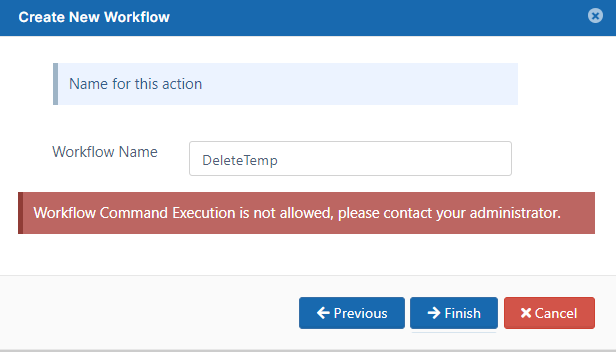
Beginning in FileCloud 23.1, by default, the Execute a command action is not available for admin users.
If an admin user selects the action and tries to save the workflow, the following warning appears:
2023-06-22_13h09_48.png

To enable admin users to choose the Execute a command option, add:

  1. Open cloudconfig.php:
    Windows Location: XAMPP DIRECTORY/htdocs/config/cloudconfig.php
    Linux Location: /var/www/config/cloudconfig.php

  2. Add the following:

    define("TONIDOCLOUD_ALLOW_ADMIN_WORKFLOW_COMMAND_EXECUTION",1);


Click to see If conditions

If a file is created

If a file is updated

If a file is deleted

If a file is downloaded

If a file was not modified for specified days

If a file is added or updated

If a file uploaded is bigger than expected size

If a file downloaded is bigger than expected size

If a folder is created

If a folder is deleted

If a user's last login is older than . . . 

If a new user is created

If a user's create date is older than

If a comment is added

Perform an action periodically at specified time and interval

Perform an action on the specified date

Perform an action periodically

Modifying users 

Action

Parameters

Details

Compatible IF conditions 

Disable user account


"comma_separated_email_id":"xyz@a.com,abc@b.com
}

Disables the user account and then sends an email with information about the action performed. 
comma_separated_email_id - email IDs in comma separated format

donot_email_user (optional): Do not send email to the  user affected (1 or 0). Default 0.

Note: To customize the email sent to the user, go to Customization > Email Templates and edit the template Workflow Auto Disable Account Email Template.

Click to see If conditions

If a user's last login is older than . . . 

If a new user is created

If a user's create date is older than

If a user's account is near its expiration date

Delete user account


"comma_separated_email_id":"xyz@a.com,abc@b.com
}

Deletes the user account and then sends an email with information about the action performed.  
comma_separated_email_id - email IDs in comma separated format

donot_email_user (optional): Do not send email to user affected (1 or 0). Default 0.

Click to see If conditions

If a user's last login is older than . . . 

If a new user is created

If a user's create date is older than

If a user's account is near its expiration date

Change user status

{ "user_status": "USER_ACCOUNT_LIMITED_ACCESS", "mark_as_verified": 0, "comma_separated_email_id": "xyz@a.com,abc@b.com", "donot_email_user": 0 }

user_account_type - type of account. You must use one of the following values:

  • USER_ACCOUNT_DISABLED_ACCESS

  • USER_ACCOUNT_FULL_ACCESS

  • USER_ACCOUNT_GUEST_ACCESS

  • USER_ACCOUNT_LIMITED_ACCESS (external access)

mark_as_verified (optional) - marks the account as verified, so that the user can log in immediately without waiting for the admin to send the verification email.

comma_separated_email_id - email IDs in comma separated format

donot_email_user (optional) - prevents an email from being sent to the user affected when the status is changed

  • 1 = Does not send an email

  • 0 = Sends an email

  • If nothing is specified, the default is 0

Click to see If conditions

If a user's last login is older than . . . 

If a new user is created

If a user's create date is older than

If a user's account is near its expiration date

Set user group

{
"group_name":"Group1,Group2"
}

Assigns user to groups.

group_name - Comma separated list of groups to assign user to.

Click to expand...

If a new user is created

If a user's create date is older than

If a user's account is near its expiration date

Set user policy

{
"policy_name":"SamplePolicyName",
"comma_separated_email_id": "",
"donot_email_user": 0
}

Sends an email notification to the listed users that the user's policy was set as the specified policy

policy_name - Name of policy to set

comma_separated_email_id - email ids in comma separated format

donot_email_user
0 (default) send the emails
1 do not send the emails

Click to expand...

If a user's last login is older than . . . 

If a new user is created

If a user's create date is older than

If a user's account is near its expiration date

Set user properties

{
"policy_name":"SamplePolicyName",
"user_status":"USER_ACCOUNT_LIMITED_ACCESS",
"comma_separated_email_id": "",
"donot_email_user": 0
}

Sends an email notification to the listed users that the user's policy was set as specified and the user access was set as specified

policy_name: Name of policy to set.

user_status (optional): User status to set. (USER_ACCOUNT_FULL_ACCESS, USER_ACCOUNT_GUEST_ACCESS, USER_ACCOUNT_LIMITED_ACCESS (external access))

comma_separated_email_id (optional): Comma separated emails to notify of workflow action.

donot_email_user (optional): Set to 1 to prevent system from notifying user.

Click to expand...

If a user's last login is older than . . . 

If a new user is created

If a user's create date is older than

If a user's account is near its expiration date

Share actions

Action

Parameters

Details

Compatible IF conditions 

Delete the share(s)

None

Delete the share.

Click to see If conditions

If a share has not been accessed for specified days

Device actions

Action

Parameters

Details

Compatible IF conditions 

Block the device for admin approval

None

Blocks the device and marks it with "Needs Approval" on the Manage Devices screen

Click to see If conditions

If a new client app connects