.svg)
Administrators can change the FileCloud storage type after FileCloud has been installed but BEFORE any data has been stored.
-
When changing the storage type from local to Scality, the files and folders that have been already stored in the local storage will not be automatically moved to S3 storage.
-
In this case, the administrator has to manually export files and folders from local storage before changing storage type and manually import them after changing the storage type.
WARNINGS:
-
Only change the FileCloud storage type for new installations.
-
Do not change the FileCloud storage type if FileCloud has been in use and data is already stored.
-
Be very careful when changing the storage path, If done improperly it could lead to data loss.
-
The Scality Bucket should NEVER be modified outside of FileCloud subsystem
-
Do not add, edit, or modify files directly using Scality tools. Doing so will destabilize your FileCloud installation.
To change the FileCloud storage path from LOCAL to SCALITY:
1. Enable Scality object storage
NOTES:
Although FileCloud does not have an explicit connector for Scality, the Amazon S3 connector can be used.
In this step you will need to access WWWROOT. It is typically located at:
|
Windows |
Linux |
|---|---|
|
c:\xampp\htdocs |
/var/www/html |
To enable Scality storage as the backend:
-
To make sure that your server does not have any time variations, set up the time on your server to be synchronized.
-
Open the following file for editing:
WWWROOT/config/cloudconfig.php -
Find the following line:
define("TONIDOCLOUD_STORAGE_IMPLEMENTATION", "local"); -
Change it to this line:
define("TONIDOCLOUD_STORAGE_IMPLEMENTATION", "amazons3"); -
Save and close the file.
-
Find the following file:
WWWROOT/config/amazons3storageconfig-sample.php -
Rename it to:
WWWROOT/config/amazons3storageconfig.php
Nothing needs to be added or edited in amazons3storageconfig.php
2. Configure Credentials
To configure Digital Ocean S3 Credentials:
-
In the FileCloud admin portal's left navigation bar, scroll down and click Settings. Then, on the Settings navigation page, click Storage

The Managed Storage settings page opens by default. -
Type in or select the settings for your environment. See the table below for information about each setting.
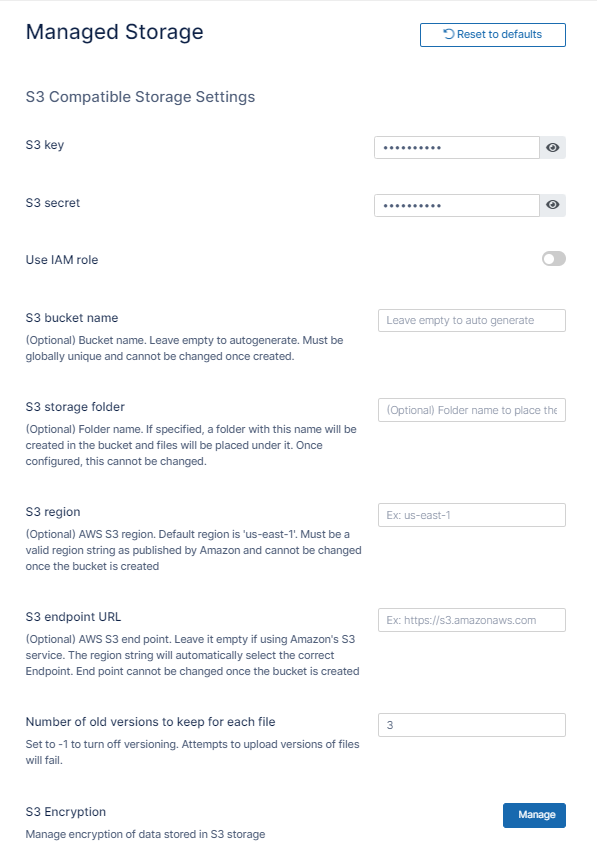
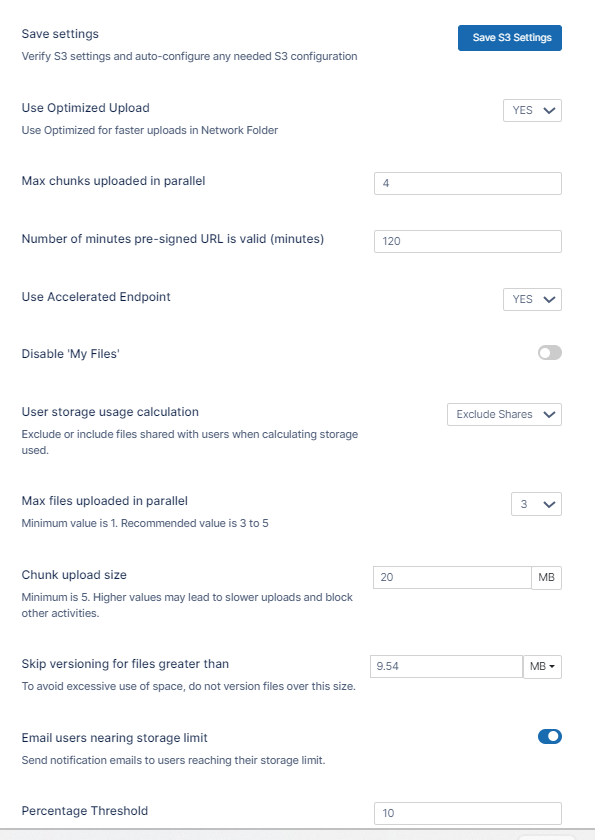
-
Click Save S3 Settings.
|
Field |
Description |
|---|---|
|
S3 Key |
This is your Scality authentication key. |
|
S3 Secret |
This is your Scality authentication secret. |
|
Use IAM role |
When checked, the S3 Key and S3 Secret fields disappear and the IAM role is used to connect to the S3 bucket. |
|
S3 Bucket Name |
Provide a bucket name. The bucket should be new (in some circumstance, previously used bucket in FileCloud could be used). It is very important that the S3 bucket is never modified outside of the FileCloud subsystem, the bucket name is case sensitive make sure you are using the exact name of the bucket. |
|
S3 Storage Folder |
Optional: All files will be stored inside this root storage folder (Will be created automatically). |
|
S3 Region |
Optional: Provide the region string. |
|
S3 End Point URL |
This is the S3 endpoint. note that for each region there is a specific Endpoint URL. |
-
To fill in the remainder of the settings, see Setting up FileCloud Managed S3 Storage.

Troubleshooting: