.svg)
ServerSync synchronizes changes from your local Windows file server to a remote FileCloud Server or FileCloud Online site.
To synchronize file permissions, you must log in with the account that owns the files. When syncing Team Folder files, use the Team Folder account credentials.
To log in to ServerSync:
-
Click the Windows icon on the taskbar.
-
Click FileCloudServerSync.
You are prompted to log in.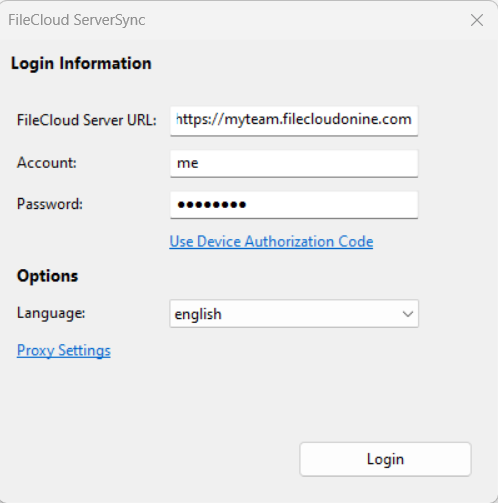
-
In FileCloud Server URL, enter your FileCloud server web address.
-
In Account, type in the name of the account that has access to the FileCloud server.
-
In Password, enter the account password
-
If you are using codes for extra security, click Use Device Authorization Code.
-
If you are using a language other than English, select it in Language.
-
Click Login.
The Login settings can also be accessed from:
-
The Home screen, in the Logged In As section by clicking Change.
-
The Settings screen, in the Account Settings section, by clicking Edit.