.svg)
Workflow triggers are the events that cause workflows to begin running. You choose the trigger for a workflow when you initiate workflow creation by clicking the arrow in the center of the Workflow screen.
The options for workflow triggers and their parameters are:
-
Automatically on a file activity - The workflow begins when a file on a specific path is created, updated, downloaded, or previewed, or when a folder on a specific path is created.
Parameter
Required/Optional
Description
Limited to Path
Required
Folder path on which the file action occurs.
File Event
Required
Choose from a list of events, such as If file is created or If file is downloaded or previewed.
-
Automatically on a share activity - The workflow begins when a share is created or updated, or when the share content is modified. You may limit the trigger to only set off the workflow when the share occurs on a certain path, such as a certain Team folder.
Parameter
Required/Optional
Description
Share Event
Required
Choose either:
If share is created or updated.
or
If share is created or updated or share content is modified.
Note: Share is updated when one of its share options changes. Share content is modified when content in the file shared changes, or, if the share is a folder, when a new file is added to the folder or a file within the folder is updated.
Limited to Path
Optional
Folder path on which the share action occurs.
-
Started by user on a file or folder - The workflow is triggered for a file or folder when a user in the user portal chooses it in the context menu for the file in the following manner:
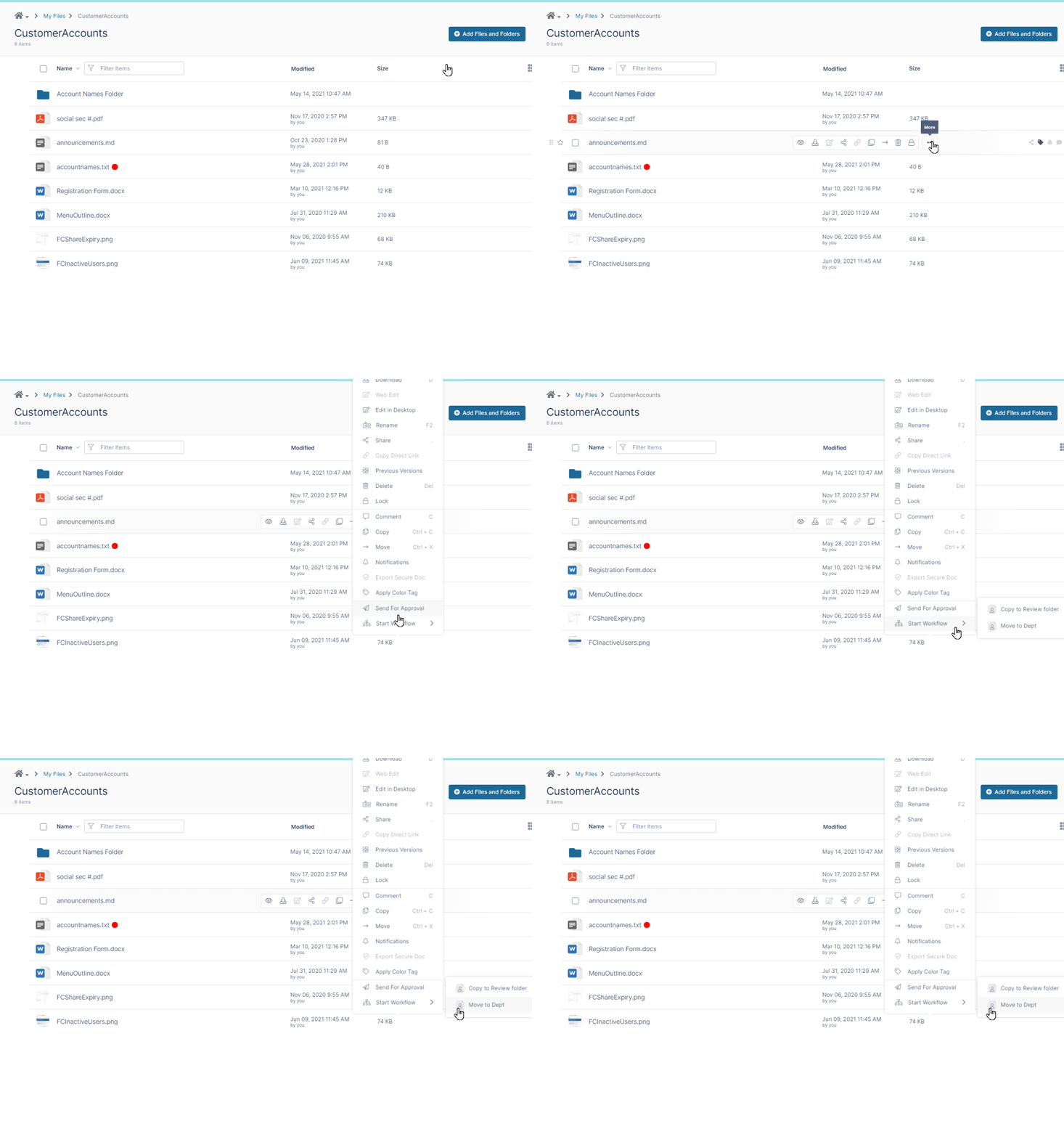
Parameter
Required/Optional
Description
User Action Initiated
Required
Whether the workflow applies when the user runs it On a file or On a folder.
Send Toast notifications on failures and approval steps
Optional - defaults to unchecked (do not send notifications).
Whether or not the workflow should send toast notifications to the user who initiated the workflow each time a workflow step is approved or if the workflow fails.
-
Started based on a timer - The workflow runs at a specified start time. You may also specify an end time and a frequency of once, daily, or weekly, or periodically (every 5 minutes).
Parameter
Required/Optional
Description
Start DateTime
Required
Date and time the workflow begins running.
Periodic
Optional - defaults to Run Once
How often the workflow runs. Options are Run Once, Periodically (every 5 minutes), Daily, or Weekly.
End DateTime
Optional
Date and time the workflow stops running.
-
Automatically on a metadata activity - The workflow is triggered when:
a specified metadata set is attached to a file or folder as in this example:
or
when the value of a specified attribute in the attached metadata set is updated, as in this example:
Parameter
Required/Optional
Description
Limited to Path
Required
Folder path on which the metadata action occurs.
Metadata Event
Required
Choose from a list of events:
-
If a metadata set is added - If the specified metadata set is added to a file or a folder
-
If a metadata attribute value is updated - In the metadata set attached to a file or folder, if the specified metadata attribute value is added or updated
-
if a metadata set is added or a metadata attribute value is updated - If either of these occur
Metadata Set
Required
Choose a metadata set.
Metadata Set Attribute
Required
Choose a metadata attribute within the chosen metadata set (only appears when If a metadata attribute value is updated or If a metadata set is added or a metadata attribute value is updated are chosen).
-