.svg)
Beginning in FileCloud 23.232, an updated version of the Smart Classification user interface is available. Please see Smart Classification to view instructions for the new user interface.
Overview
The Content Classification Engine (CCE) is a rule-driven content classification system that enables the generic labeling of files with metadata. This labeling enables key operations within FileCloud such as contextual file search and Data Leak Prevention.
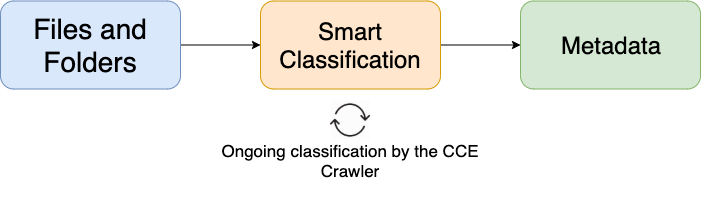
CCE automates, streamlines, and strengthens the overall level of data leak prevention for an organization. Administrators and users can upload files and folders with the knowledge that they can be automatically classified according to their content, which helps ensure that sensitive data is immediately covered by the criteria outlined in the DLP plan. CCE rules are also applied retroactively to data that was uploaded before the rules were created, helping organizations protect legacy data.
Smart Classification is only available for files that are 1MB or larger.
Read more about managing metadata.
Read more about Smart DLP.
Before You Start
CCE will only function properly if Solr has been configured and your storage has been indexed. Additionally, administrators must have created at least one set of metadata in order for the classification process to operate.
Caution
Configure Content Search for Managed Storage
Get Started with CCE
Creating and Managing Content Classification Engine Rules
CCE Crawler
The CCE Crawler is an automated tool that classifies files and folders after a rule has been enabled. This helps to ensure that all content is classified according to the defined and enabled rules regardless of when the upload occurred or will occur.
Automating the Crawler
To control the automation of the classification process, as well as choosing when the crawler runs, administrators can use Cron Jobs.
The CCE crawler will not run unless manually enabled or executed by a Cron job.
Manually Run the Crawler
To manually run the crawler, click the blue button on the row of the rule you would like the crawler to use for classification. The amount of time needed for the completion of the crawl will depend on the number and size of files being classified, as well as the complexity of enabled CCE rules.
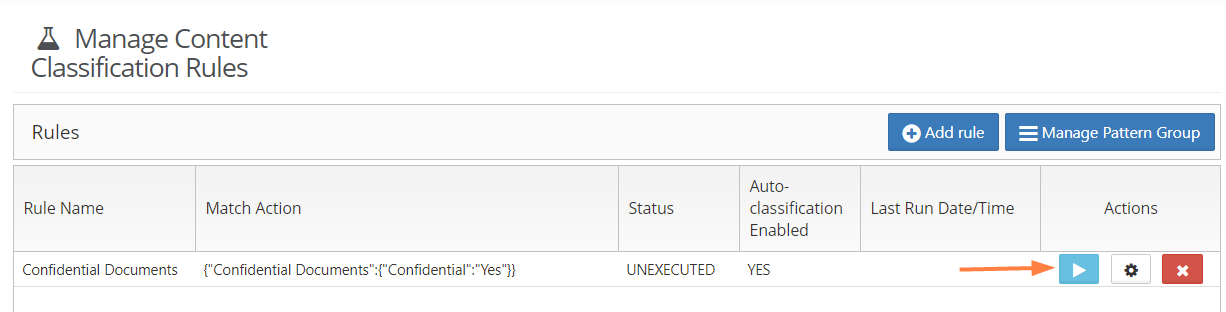
You may manually execute a rule that is not enabled (Auto-classification Enabled is FALSE). After you click the arrow, your screen displays the message This rule is disabled but it can classify files when manually executed. Proceed to execute the rule? Click OK to execute the rule.
If you edit a currently executing rule and click Save, rule execution is aborted and Status is set to Unexecuted.