.svg)
Keyword Definitions
Below are the keywords used in creating the rule definition:
|
Classifier |
Classifier used to classify the file content.
Also supported are:
|
|
Pre-condition |
Rules that must be met by a file before the file is evaluated through the classifier. |
|
Condition |
Criteria to take a match action or default action on the files. Currently it must be count(_classifications) > 0 that indicates the file contains the search pattern, or the file must have applied metadata based on the presence of unique numbers or values. |
|
Parameters |
Regular Expression search criteria. Regular Expressions can be specified using SEARCH_PATTERN_SET, SEARCH_PATTERN_NAME or SEARCH_PATTERN_GROUP. |
|
SEARCH_PATTERN_SET |
Any Valid Regular Expressions e.g. /[0-9]{9}/ |
|
SEARCH_PATTERN_NAME |
Regular Expression assigned a name through Manage Pattern Group - Available Patterns |
|
SEARCH_PATTERN_GROUP |
Regular Expressions grouped through Manage Pattern Group - Pattern Group. |
|
Match Action |
Actions taken when the classifier finds a file based on precondition, condition and parameters. For example, assign metadata set PII and metadata attribute Confidential to 1. |
|
Default Action |
Actions taken when the classifier finds a file based on precondition but did not meet the condition based on parameters. For example, assign metadata set PII and metadata attribute Confidential to 0. |
Creating and Editing CCE Rules
A CCE Rule is a self-contained specification for classifying one or more files.
To create a CCE rule:
-
To open the Manage Content Classification Rules page, in the Admin portal's navigation pane, click Smart Classification.
-
To add or create a new rule, click Add Rule.
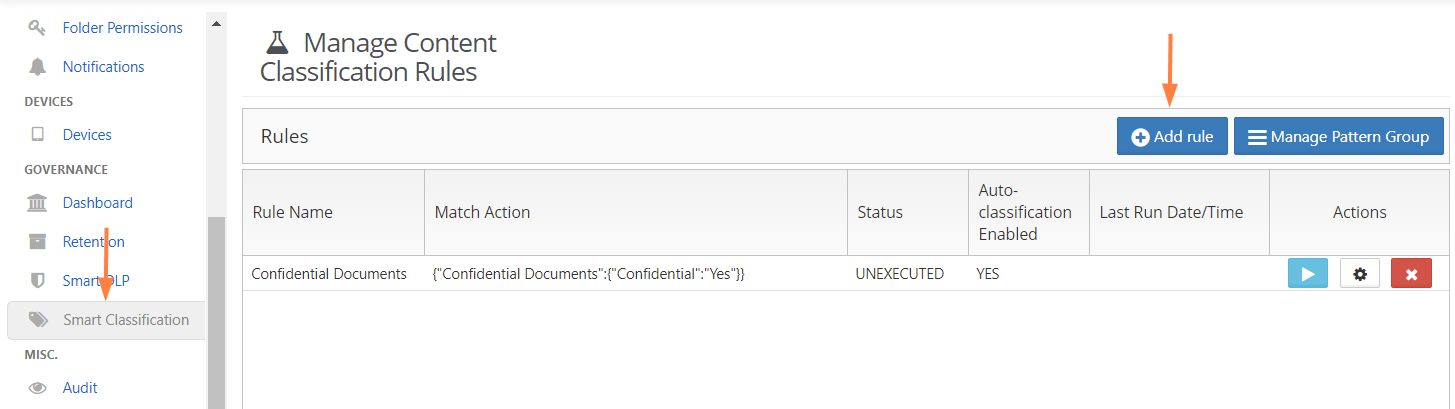
-
In the Add Rule dialog box, fill in the fields:
-
Name: Naming detail for the rule to be created.
-
Event Triggers: Criteria that enables the CCE to automatically execute rules for certain events.
-
Enable Auto-classification: When enabled, the rule defined will start classifying files based on the definition.
-
Definition: Set of rules which defines the action to be taken.
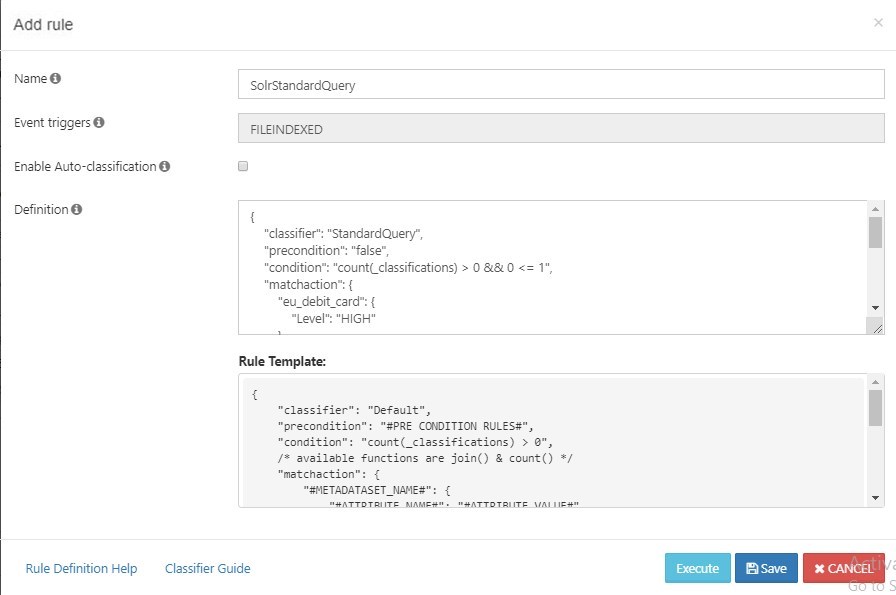
-
-
Click Save.
See Example Rules.
If you want the rule to immediately begin auto-classifying files when you save it, be sure to check the Enable Auto-classification box.