.svg)
FileCloud generates a number of messages for user actions. FileCloud comes with default messages and these can be customized.
The following messages can be changed
|
Message Type |
Description |
|---|---|
|
404 Error |
This is the HTML response shown to user in browser when URL requesting invalid received by FileCloud |
|
Email Subscribe Failure |
This is the error if a user email could not be subscribed for notifications |
|
Email Subscribe Success |
This is the message that will be displayed when user email is subscribed successfully |
|
Email Unsubscribe Failure |
This is the error displayed when user email unsubscribe fails. |
|
Email Unsubscribe Success |
This is the message shown when an user email is unsubscribed |
|
Account Verification Failure |
This is the error shown when a user email verification fails |
|
Account Verification Success |
This is the message shown when a user email verification succeeds |
|
Generic Message |
This is a message used for all other messages shown via the web browser UI |
|
Login Error Message |
This is a HTML message that will be display on user login failures.
|
To change a UI message:
-
Log into Administration Portal.
-
Click Customization on the left navigation panel.
-
Click the UI Messages tab.
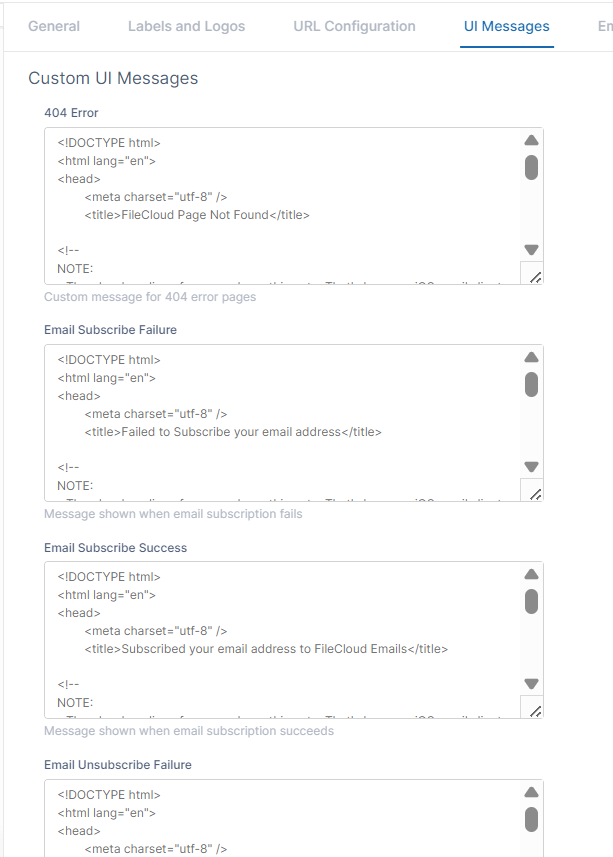
-
Change the entries as needed.
-
Click Save.