.svg)
There might be some operations that that you do not want logged because they fill your audit log with unnecessary information.
To configure what is logged:
Set a logging level
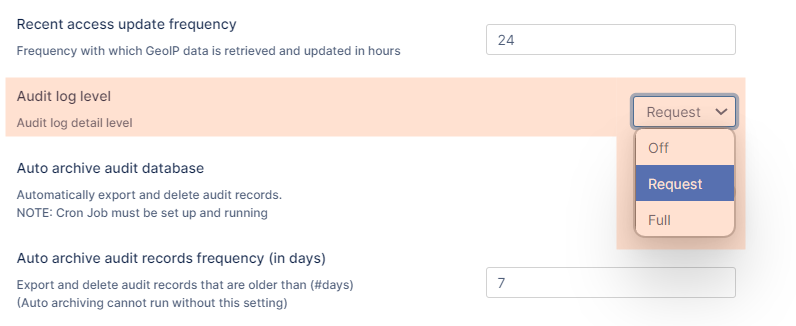
You can choose to set logging to one of the following levels:
-
Off - Records nothing in the audit log files
-
Request - Limits the logging to requests from agents or clients and the results of a request. Does not record the full response to the agent or client.
-
Full - Records entries for all requests from agents or clients, the full response, and the and the results of the request.
To set a log level:
-
In the FileCloud admin portal's left navigation bar, scroll down and click Settings. Then, on the Settings navigation page, click Admin

The Admin settings page opens. -
Scroll down and locate Audit log level. Set it to Off, Request, or Full.
-
Click Save.
Specify operations that don't get logged
To configure what information is logged:
-
On the FileCloud Server, navigate to the following folder:
WWWROOT\config
-
Open the following file for editing:
cloudconfig.php
-
Add the following lines:
Configuration Lines to add
Notes
Example
define("TONIDOCLOUD_AUDIT_IGNORE_OPS", "");
When specified, does not add audit logs for specific FileCloud requests. You can specify multiple requests by using a '|' symbol as a delimiter.
For example, if you add "deletefile|loginguest", both these operations would not be added to the audit log.
define("TONIDOCLOUD_AUDIT_IGNORE_OPS", "deletefile|loginguest|createfolder");
define("TONIDOCLOUD_AUDIT_IGNORE_AGENT", "");
When specified, does not add audit logs for any requests coming in from specified FileCloud clients. You can specify multiple clients by using a '|' symbol as a delimiter.
define("TONIDOCLOUD_AUDIT_IGNORE_AGENT", "Cloud Sync|Mozilla/5.0 (Windows NT 6.3; WOW64; rv:36.0) Gecko/20100101 Firefox/36.0|FileCloudDrive");
If both defines are specified, then only requests that match both conditions are excluded from the Audit Log.
For example:
define("TONIDOCLOUD_AUDIT_IGNORE_OPS", "deletefile|loginguest|createfolder");
define("TONIDOCLOUD_AUDIT_IGNORE_AGENT", "Cloud Sync");
The above configuration will skip adding audit logs when the Cloud Sync client requests to:
-
Delete File
-
Login Guest
-
Create Folder
Remember that the information in audit logs can be extremely important for troubleshooting. Be careful not to exclude too much information from your log files.