.svg)
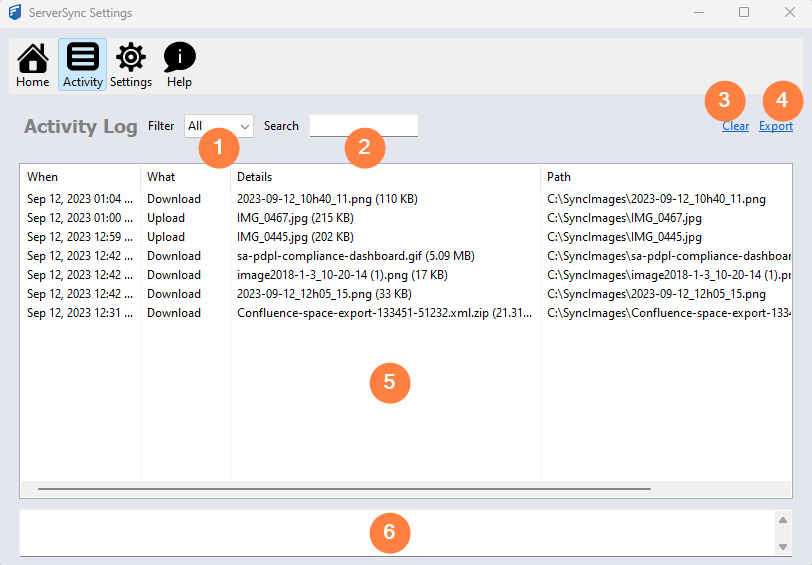
|
|
Option |
Notes |
|---|---|---|
|
1 |
Filter |
Allows you to change the display by selecting one of the following options:
After making a selection, the display is updated to show only details of a log entry that have a value in the What column of Errors or Skipped. To clear the filter, select All. |
|
2 |
Search |
Allows you to change the display by specifying a string of characters or numbers that may occur in any column of the log entry. To search:
For example, to search for:
After making a selection, the display is updated to show only details of a log entry that have a value in the What column of Errors or Skipped. |
|
3 |
Clear |
Removes all entries from the recent log display, the Activity log display, and the local log file. |
|
4 |
Export |
Opens a Save dialog so that you can choose the location and name of the file that will contain everything displayed in the Log Entries display. |
|
5 |
Log Entries |
Displays information about what actions ServerSync has taken. The information includes:
|
|
6 |
More Details |
Displays additional information about the selected row in the Log Entries. |