.svg)
Default Behavior
By default, when a user logs into FileCloud, their session remains authenticated for a specified amount of time.
|
Device |
Time Session is Valid |
|---|---|
|
User portal (web browser) |
Specified by the value in Session Timeout in minutes setting. If the browser is closed, the session expires.
|
|
All other apps and clients |
Doesn't expire. Session lasts until user logs out from app. |
Enabling Session Expiration for all Devices
If you want all login sessions on FileCloud user client devices to expire and require re-login, set the policy to Enforce session timeout for client devices.
-
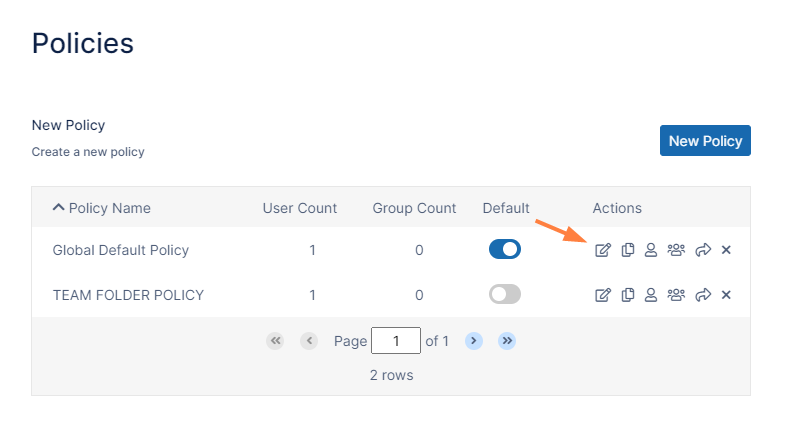
In the FileCloud admin portal's left navigation bar, scroll down and click Settings. Then, on the Settings navigation page, click Policies

The Policies settings page opens. -
Click the Edit icon in the row for the users' policy.
-
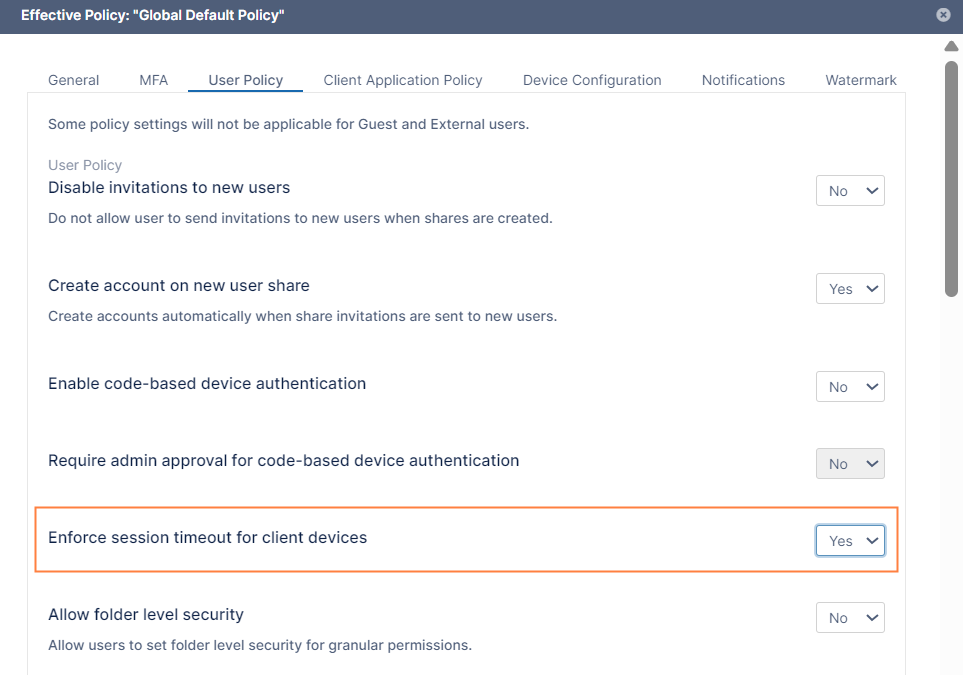
Click the User Policy tab.
-
Set Enforce session timeout for client devices to yes.
-
Click Save.
Note: We don't recommend requiring session expiration for devices and other clients as it might impact functionality and reduce user friendliness.
|
Device |
Time Session is Valid |
|---|---|
|
Web Browser |
Specified by the value in Session Timeout in minutes setting. If the browser is closed, the session expires. |
|
All other apps and clients |
Specified by the value in Session Timeout in minutes setting.
|
Disabling Session Expiry when Browser is closed
Session expiry time is valid until timeout setting expires or the browser is closed. If the browser is reopened, the user must log in again.
If session should be valid even when the browser is closed, set the following config parameter to extend the browser timeout setting. For correct behavior, set this value to be significantly larger than the session timeout value, for example, if the session timeout is 30 days, then set this configuration to 90 days.
define("TONIDOCLOUD_BROWSER_COOKIE_TIMEOUT", 86400); // time in seconds that browser remains logged in irrespective of whether browser is closed