.svg)
Beginning in FileCloud 23.263, to change an email template’s subject, promoted admin’s must be in roles with Customization/update permission. Prior to this, promoted admins required roles with System/update permission to change an email template’s subject.
FileCloud enables you to create admin roles with a set of administrator permissions. Users assigned to any of the admin roles that you have created become admin users and have the permissions assigned to the role.
Main Admin. The admin account that is created when FileCloud is installed. There is only one Main Admin account in FileCloud.
Admin User. User accounts that can access the FileCloud admin interface.
Admin Role. Role that defines the set of admin permissions for an admin user. If admin users have multiple admin roles, they have the combined admin permissions of all of the roles. For instructions on checking an admin user's permissions, see Managing Admin Users.
Creating admin roles and adding admin users
To create admin roles and add users to them:
-
Click Admins in the navigation panel.
-
In the Manage Admin Roles screen, click Add new role.
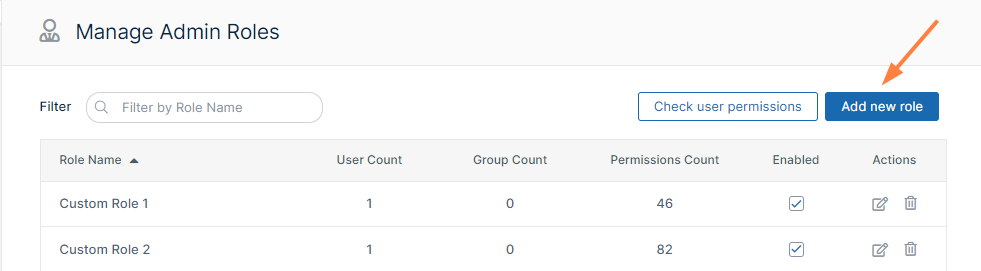
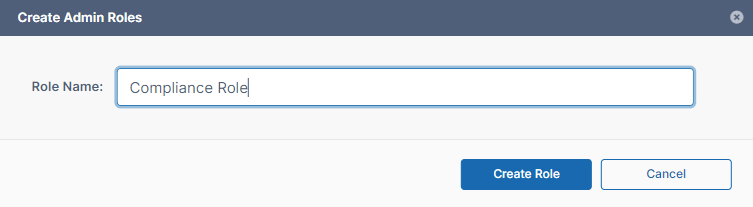
The Create Admin Roles dialog box opens. -
In Role Name, enter a name for the role.
-
Click Create Role.
The Manage Admin Roles dialog box opens to the first page of permissions. The new role is listed at the top of the dialog box.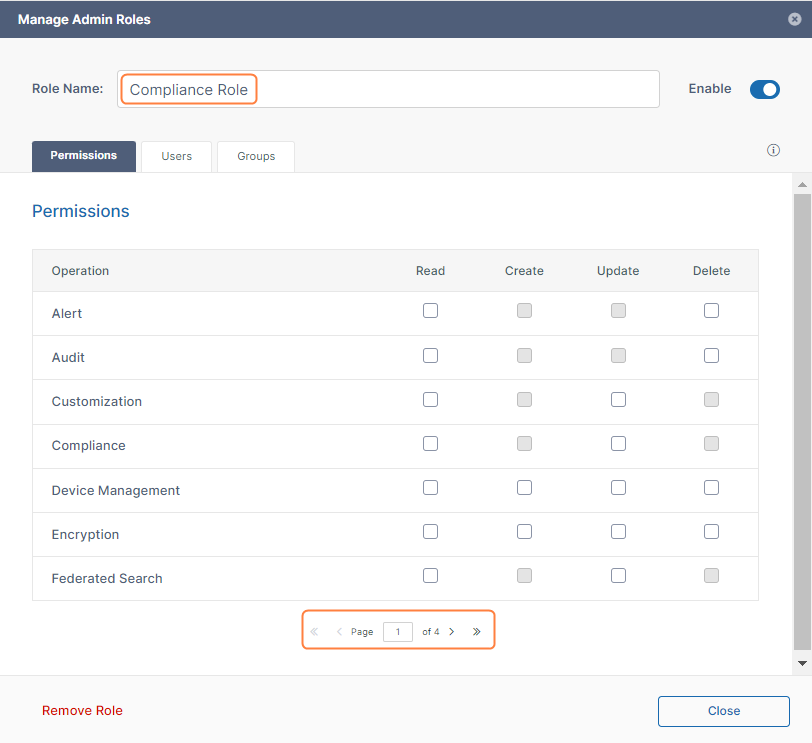
-
Go through each page of permissions, and check the permissions that you want to make available to the role.
-
When you have finished assigning permissions to the role, click the Users tab if you are ready to assign users to the role.
-
In Add Users to Role, enter each user that you want to add to the role. When the name appears, click Add.
You can add Full and Guest users to roles, but not External users.
If you add a user who is not an admin user to a role, the user automatically becomes and admin user.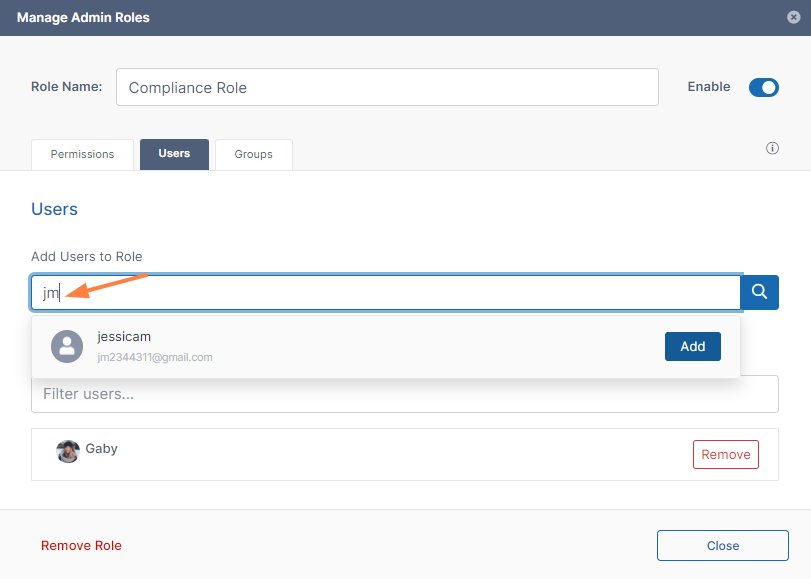
-
To add groups to the role, click the Groups tab.
-
In Add Groups to Role, enter each group that you want to add to the role. When the name appears, click Add.
Any users in a group who were not admin users automatically become admin users after the group is added to the role.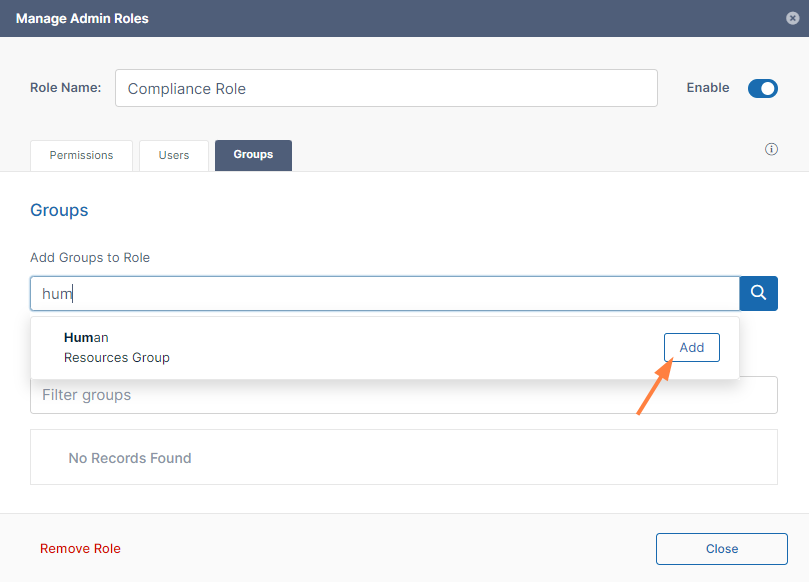
-
Click Close.
The new role is listed on the page with its user, group, and permissions counts. It is enabled by default.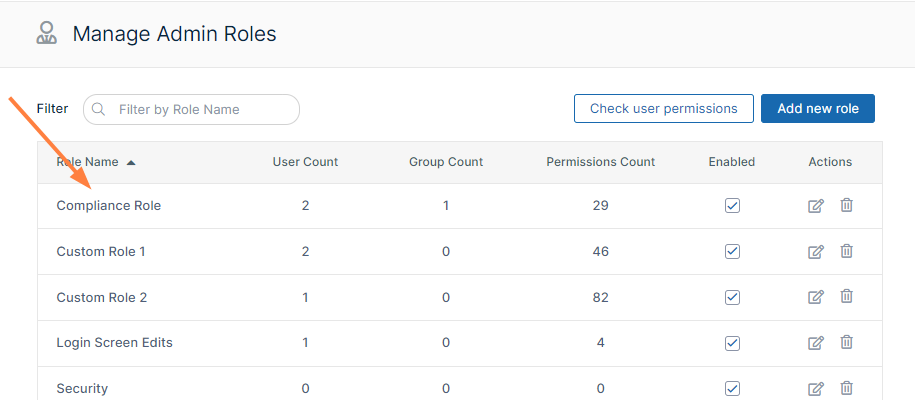
For instructions on removing an admin role, see Managing Admin Users.
The following permissions represent functions that admin users may be permitted to perform.
|
Operation |
Description |
|---|---|
|
Alert |
Alert item on the admin interface is visible. Authorization to view and clear alerts in admin interface. |
|
Audit |
Audit item on the admin interface is visible. Authorization to view, delete and export Audit Records. |
|
Compliance |
Compliance Dashboard on the admin interface is visible. Authorization to view and update compliance settings. |
|
Customization |
Customization item on the admin interface is visible. Authorization to customize the FileCloud interface.
|
|
Encryption |
Authorization to manage all Encryption at Rest settings. |
|
Federated Search |
Support to perform federated search through the admin interface. |
|
Files |
Manage Files. Authorization to view, dreate, modify, download, and delete user files. |
|
Folder Permissions |
Manage Folder Level Permissions. Authorization to view and manage Folder Permissions. |
|
Groups |
Groups menu item on the admin interface is visible. Authorization to view, create, modify and delete Groups. Manage group members. Import group members from Active Directory. |
|
Locks |
View , create, and delete Locks on Files and Folders in FileCloud. |
|
Manage Administrators |
Allows promoted admin users to manage the permissions of other promoted admin users. |
|
Metadata |
View, create, update and delete metadata set definitions, attributes and permissions. |
|
Network Share |
Network Folders item on the admin interface is visible. Authorization to view, create, modify and delete Network Folders. Manage User and Group Access to Network Folders. |
|
Notifications |
Notifications menu item on the admin interface is available. Add, edit, update, and delete notification rules. |
|
Reports |
Reports menu item on the admin interface is available. Add, execute, edit and delete reports. |
|
Retention |
Retention menu item on the admin interface is available. Add, edit, and delete retention policies. |
|
Rich Dashboard |
View rich dashboard view including tables and graphs on the admin UI dashboard. |
|
Settings |
Settings item on the admin interface is visible. Authorization to view and modify FileCloud Settings. |
|
Smart Classification |
Smart Classification menu item on the admin interface is available. Add, update, run, and delete content classification rules. |
|
Smart DLP |
Smart DLP menu item on the admin interface is available. Add, edit, and delete DLP rules. |
|
System |
System item on the admin interface is visible. Authorization to run system checks, install check, generate logs and UPGRADE FileCloud to new version. |
|
Team Folders |
Set up Team Folders, add, edit, delete and manage team folder and corresponding permissions. Note: The corresponding Folder Permission must be enabled to be able to perform a Team Folder operation. |
|
User Share |
User Shares item on the admin interface is visible. Authorization to view, create, modify and delete User Shares. |
|
Users |
Users menu item on the admin interface is visible. Authorization to view, create, modify and delete Users. Import New Users. Reset Password for Users. |
|
Watermark |
Watermark menu item on the admin interface is visible. Authorization to view, create, edit and delete watermarks. |
|
Workflow |
Workflow menu item on the admin interface is visible. Add, edit and delete workflows on FileCloud. |
Admin users can log in to the admin portal using either their username or email id.
MFA Settings for Promoted Admins
When a user is configured as an admin user, if 2FA is enabled for admins, by default, the MFA delivery mode set for the user account (in the user's policy) is used for the Admin account. If the setting TONIDOCLOUD_2FA_ADMIN_FLOW_FOR_PROMOTED_ADMINS is enabled, the 2FA method set for administrators is used for the admin account.
To use the 2FA method set for administrators:
-
Open the configuration file:
Windows: XAMPP DIRECTORY/htdocs/config/cloudconfig.php
Linux: /var/www/config/cloudconfig.php -
To use the 2FA method set for administrators, add the line:
define("TONIDOCLOUD_2FA_ADMIN_FLOW_FOR_PROMOTED_ADMINS", true);