.svg)
This option is available beginning in FileCloud 20.1
There are two types of emails you can send from the User Details window:
-
A forgot password email that sends the user a password newly generated using the Reset Password option in User Details.
-
An account welcome email that welcomes a new user to FileCloud. If the new user is not an AD user, the message includes a new password. If the new user is an AD user, the message does not include a new password.
To send an email from User Details:
-
Click Users in the navigation panel.
-
Locate the user in the user list.
-
Click the edit icon under Actions to the right of the user.
The User Details window opens. -
Click the Send Email icon.

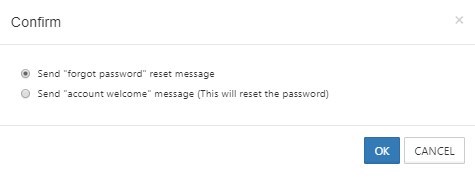
A dialog box for choosing the type of email opens.
Note: If the user has an AD account, there is no option to send a "forgot password" message. The dialog box only sends an account welcome message that does not include a new password.
-
Select Send "forgot password" reset message or Send "account welcome" message
-
To send the message, click OK.