.svg)
Administrators can allow AD or LDAP users to create a new FileCloud user account in one of the following ways:
-
Have FileCloud automatically create a new FileCloud account for AD or LDAP Users on first login (credentials are the same as their AD or LDAP credentials)
-
Active Directory or LDAP users create a new FileCloud account different from their AD or LDAP credentials
To allow an AD or LDAP user to create a new FileCloud user account:
-
Set up AD or LDAP based authentication following the instructions in Active Directory Authentication or LDAP Based Authentication.
-
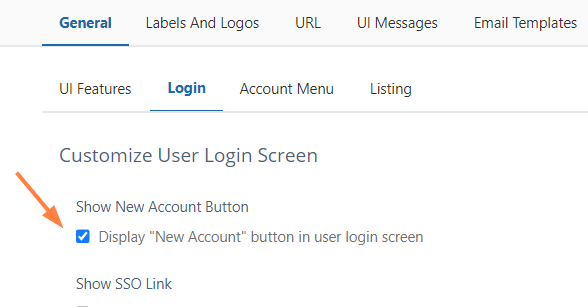
In the FileCloud admin portal, go to Customization > Login.
-
Check Show New Account Button.
-
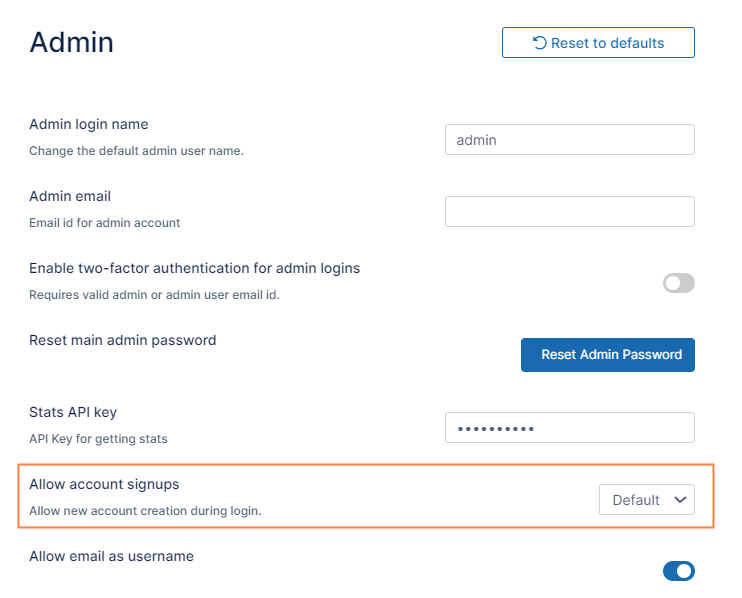
Now, in the FileCloud admin portal, go to Settings > Admin.
-
In Allow account signups, select Default.
-
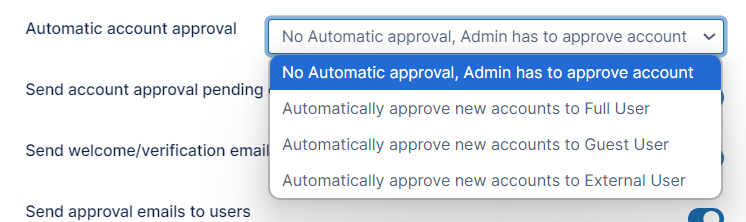
To set an approval method, in Automatic account approval, choose a value.
The user is notified by email when:
-
Trying to connect (when admin approval is pending)
-
When the admin has approved the device trying to connect
Table 1. The Settings
|
Setting |
Location |
Options |
Description |
|---|---|---|---|
|
Show New Account Button |
Customization > General > Login |
ENABLED = Displays New Account button on user log-in page. opens a window for the user to type in new account information DISABLED = Hides New Account button on user log-in page. |
This setting determines whether the New Account button appears on the user portal log-in page. If enabled, this setting works with two other settings to determine authentication and approval permissions:
|
|
|
|||
|
Allow account signups |
Admin settings page |
Specifies if a user can or cannot create a new FileCloud user account from the login page. by choosing:
Can Create an Account Prerequisite: Show New Account Button = Enabled
Default = AD and LDAP users can create their own accounts by logging in to the user portal (they do not have to click the New Account button).
True = Local users can create their own accounts
Cannot Create an Account
False = No users can create their own accounts
|
This setting controls if the user can create a new account. By default, the account is disabled until an administrator approves it. If you want the account to be automatically approved, use the Automatic Account Approval setting. Do I choose Default or True? Default
True
|
|
|
|||
|
Automatic Account Approval |
Admin settings page |
(Default) No automatic approval. Admin has to approve account. Automatically approve new accounts to Full User Automatically approve new accounts to Guest User Automatically approve new accounts to External User |
Prerequisites:
This setting determines:
|
You can allow AD and LDAP users to create accounts with their AD and LDAP credentials or with different credentials.
|
Admins want FileCloud to automatically create a new FileCloud account for their Active Directory or LDAP Users on first login |
|
Active Directory or LDAP Users create a new FileCloud account different from their AD or LDAP credentials The Admin can configure the approval process
|
|---|---|---|
|
|
|
|
Settings, Authentication settings Customization > Login Settings, Admin settings |
Settings, Authentication settings Customization > Login Settings, Admin settings |
For more information:
Configuring a Scenario
FileCloud supports the following authentication modes:
-
Default authentication
-
Active Directory based authentication
-
LDAP based authentication
The following table describes how each authentication mode impacts the users' ability to create a new account.
|
|
Default Authentication |
AD |
LDAP |
|---|---|---|---|
|
Authentication |
Performed by FileCloud Server |
In AD Server |
In LDAP Server |
|
Users can Create Accounts |
Permitted |
Not Permitted |
Not Permitted |
|
User Account Types |
Full, Guest, External |
Full, Guest |
Full, Guest |
Prerequisites
-
Active Directory or LDAP service must be accessible from FileCloud (IP and Port must be accessible)
-
Active Directory or LDAP must support Simple Authentication Method (Anonymous or Name/Password Authentication Mechanism of Simple Bind)
-
Active Directory or LDAP users must have an email attribute