.svg)
Built-in is a special type of metadata set that is automatically created for you.
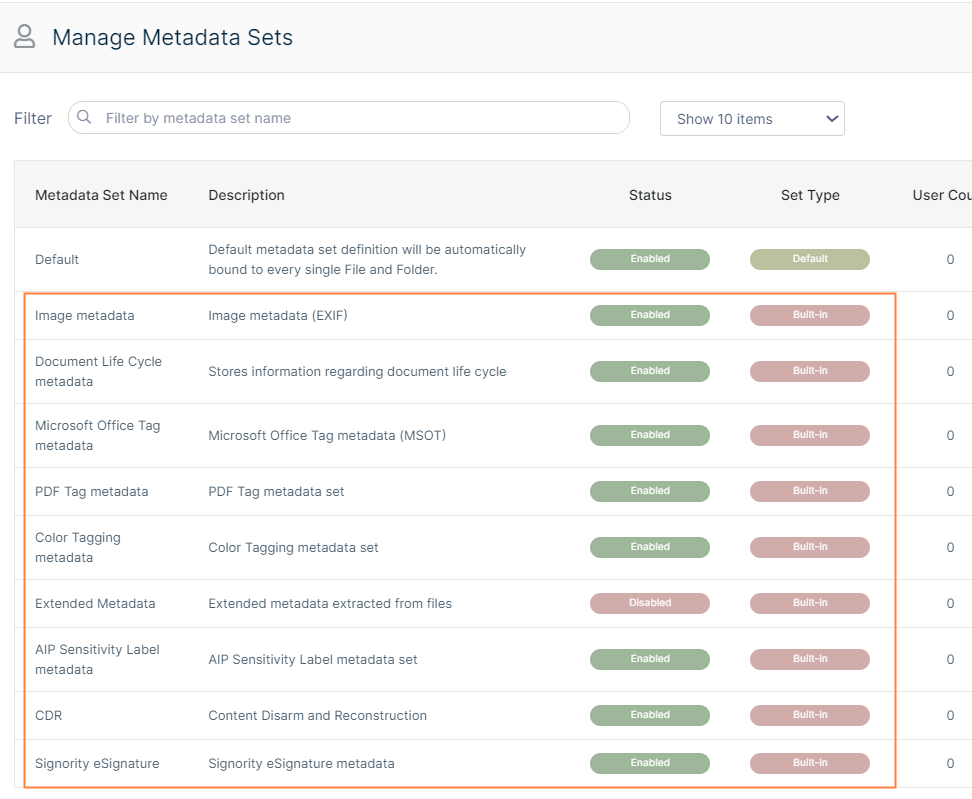

Unlike the Default metadata set:
-
Built-In sets cannot be renamed
-
Built-In sets are not limited to paths
The versions of FileCloud in which each built-in metadata set and its attributes became available are listed in the following table:
|
Built-in Metadata Set |
FileCloud Version |
|---|---|
|
Image |
18.1 |
|
Document Life Cycles |
18.1 |
|
Microsoft Office Tag |
20.1 |
|
Color Tagging |
20.3 |
|
PDF Tag |
21.2 |
|
AIP Sensitivity Label |
21.2 |
|
CDR |
23.241.4 |
|
Signority eSignature |
23.241.4 |
|
ITAR |
23.252 |
|
CUI |
23.252 |
|
Extended |
23.262 |
The Color Tagging metadata set differs from the other built-in metadata sets because its Tag attribute can be edited (but not deleted).
The attributes of all other built-in metadata sets cannot be edited or deleted.
The sets that have been created for you include:
Image Metadata
The Image metadata set is based on the Exchangeable Image File Format (Exif) and is a standard that records the important data on image files such as shutter speed, aperture, ISO Speed, lens type etc.
-
The Exif data provides valuable information to organize photographs, perform searches and provide vital information to photos stored in FileCloud.
-
This set is provided to you so that you can allow users to store and search image attributes using metadata.
-
FileCloud does not apply Image metadata for Azure/S3 Network Folders.
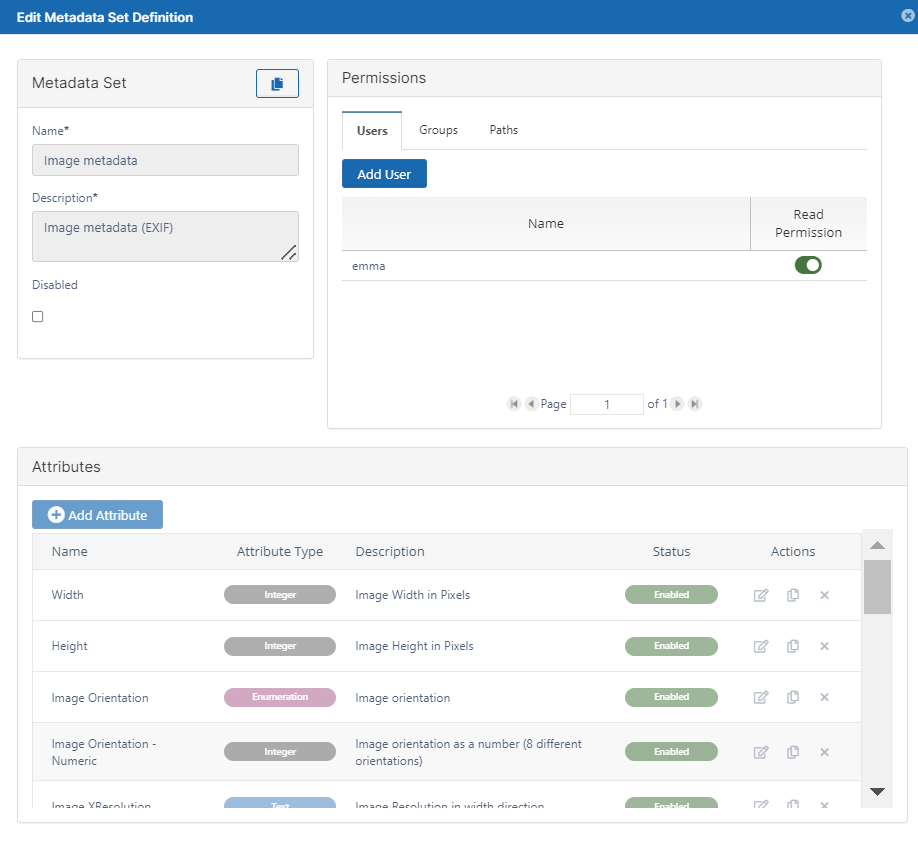
The following attributes exist in the Image built-in metadata set:
|
|
Description |
Options |
|---|---|---|
|
Name |
Title for the metadata set: Image metadata |
|
|
Description |
By default, says: Image metadata (Exif) |
|
|
Disabled |
Stops the metadata set from being automatically bound to every new file and folder. |
|
|
User Permissions |
Grant access to specific users to:
For more information, read Managing Metadata Permissions |
|
|
Group Permissions |
Grant access to specific groups to:
For more information, read Managing Metadata Permissions |
|
|
Path Permissions |
File Objects in this location will have the metadata set applied |
|
|
Attributes |
A number of tags that are built-in for image files |
|
Document Life Cycle Metadata
This set stores information about a document's life cycle.
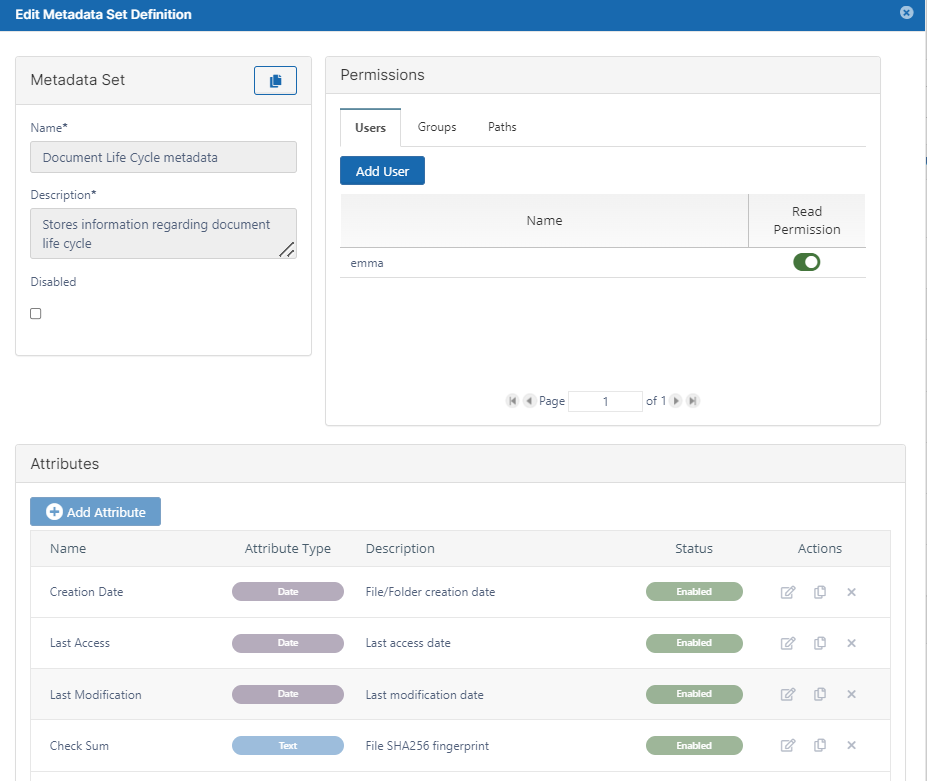
The following attributes are included in the Document Lifecycle metadata set:
|
|
Description |
Options |
|---|---|---|
|
Name |
Title for the metadata set: Document Life Cycle Metadata |
|
|
Description |
By default, says: Stores information regarding document life cycle |
|
|
Disabled |
Stops the metadata set from being automatically bound to every new file and folder. |
|
|
User Permissions |
Grant access to specific users to:
For more information, read Managing Metadata Permissions |
|
|
Group Permissions |
Grant access to specific groups to:
For more information, read Managing Metadata Permissions |
|
|
Path Permissions |
File Objects in this location will have the metadata set applied |
|
|
Attributes |
A number of custom values (tags) extracted from the file. One of these attributes is a SHA256 Fingerprint (file checksum).
|
|
Microsoft Ofiice Tag metadata
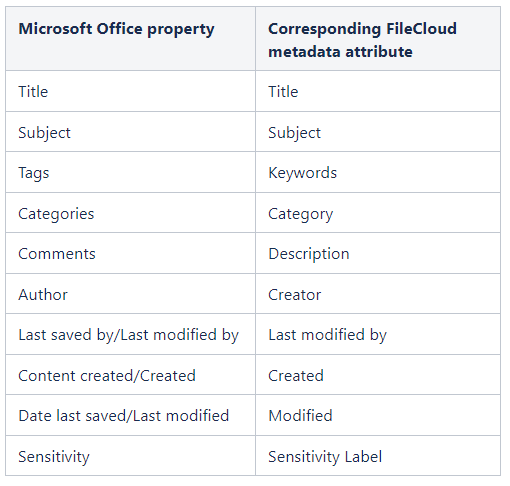
Microsoft Office Tag metadata enables the system to apply FileCloud tags that match existing tags in MS Office documents (.docx, .xlsx and .pptx files) when they were uploaded to FileCloud.
Note: FileCloud does not apply Microsoft Office Tag metadata for Azure/S3 Network Folders.
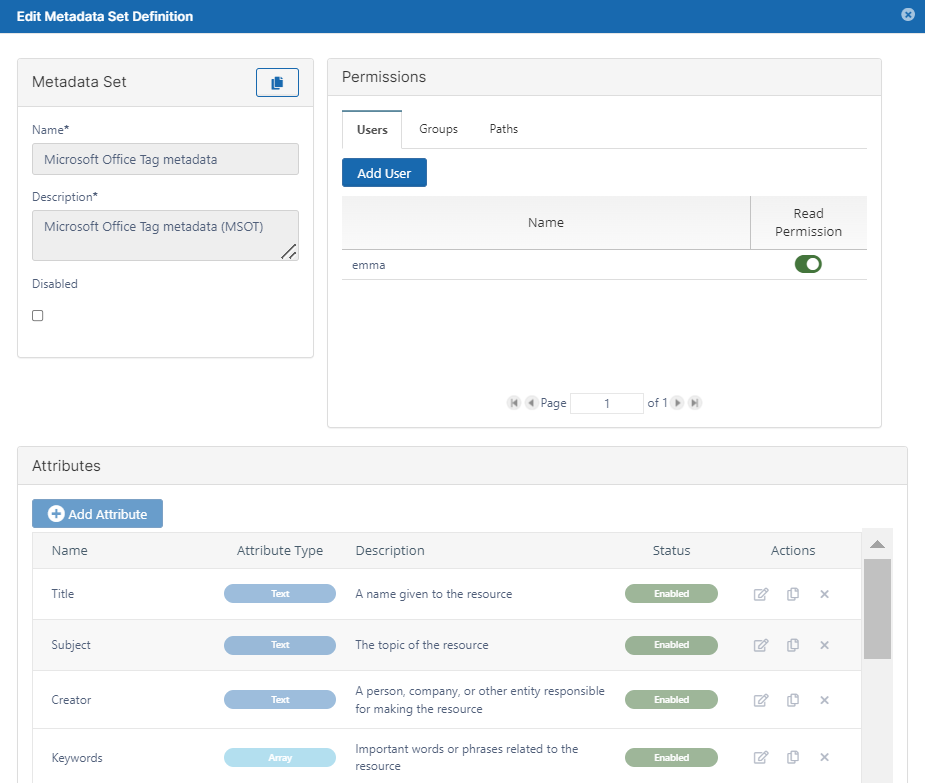
The following attributes are included in FileCloud's Microsoft Office Tag metadata set:
|
|
Description |
Options |
|---|---|---|
|
Title |
Name of file. |
|
|
Subject |
Topic of file. |
|
|
Creator |
User who created file. |
|
|
Keywords |
Keyword tags assigned to file. |
|
|
Description |
Description of file. |
|
|
Last Modified By |
Last user who modified file. |
|
|
Created |
Date file was created. |
|
|
Modified |
Date file was last modified. |
|
|
Category |
Category of file. |
|
|
Sensitivity Labels |
Sensitivity level of data in file, such as Public or Confidential. |
Note: You can only view and capture sensitivity labels if you have enabled them in Office. They are disabled by default. Please see the following note regarding them. |
MSOT Sensitivity Labels
By default, FileCloud does not capture MSOT sensitivity label data even if sensitivity labels are enabled in Office.
Prior to FileCloud 21.2, enabling the Sensitivity Label field was the only way to extract sensitivity label data. In FileCloud 21.2, AIP Sensitivity Label metadata, which captures more details and applies to more file types was added to replace this method; however, the MSOT sensitivity label is still available for backwards compatibility.

To enable FileCloud to capture MSOT sensitivity label data and to display the Sensitivity Label field in the Metadata panel, add the following setting to the config file.
-
Open cloudconfig.php:
Windows Location: XAMPP DIRECTORY/htdocs/config/cloudconfig.php
Linux Location: /var/www/config/cloudconfig.php -
Add the following :
define('TONIDO_DISABLE_MSOT_SENSITIVITY_LABELS', 0);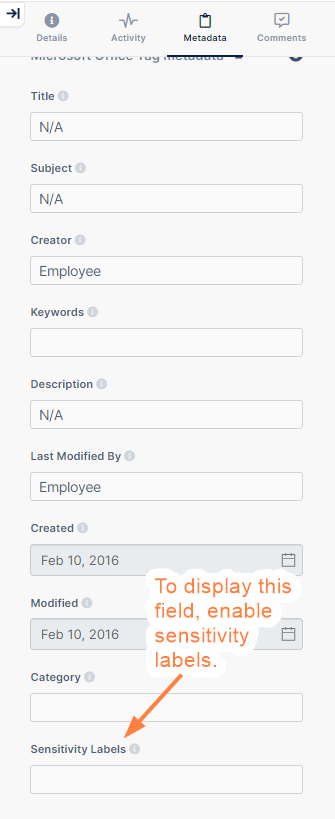
There are several ways in MS Office that you can view, add, and modify the properties:
|
From within an Office document by clicking Properties in the toolbar: 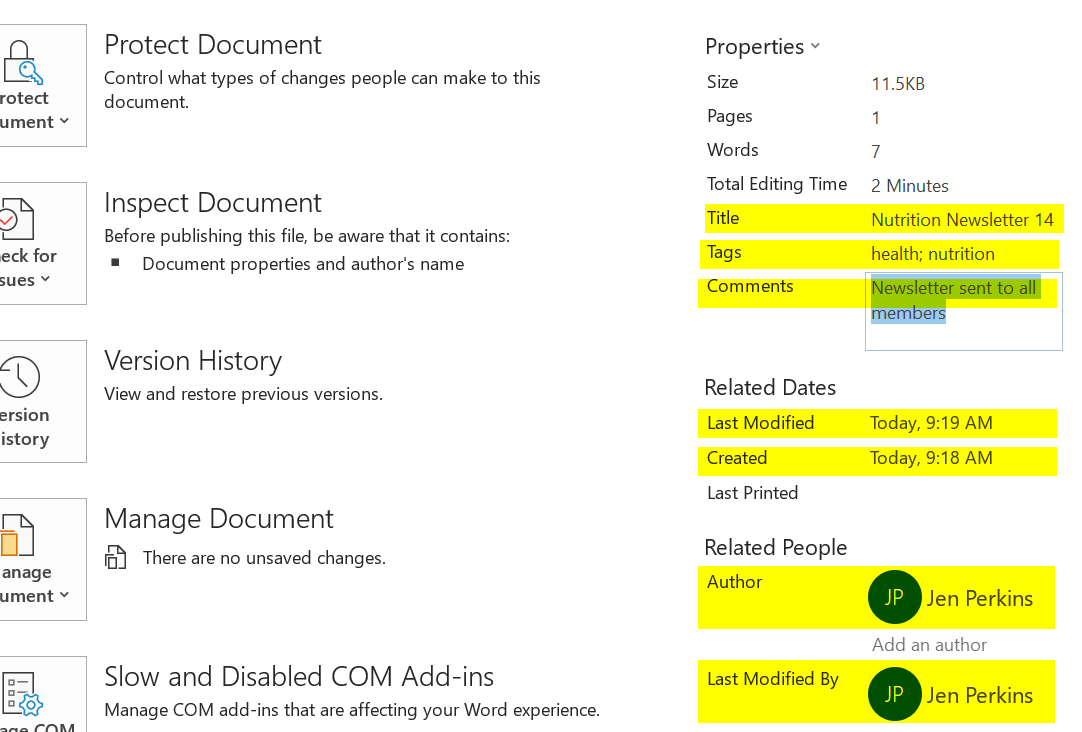
When you right-click an Office document in file explorer and select Properties > Details tab:
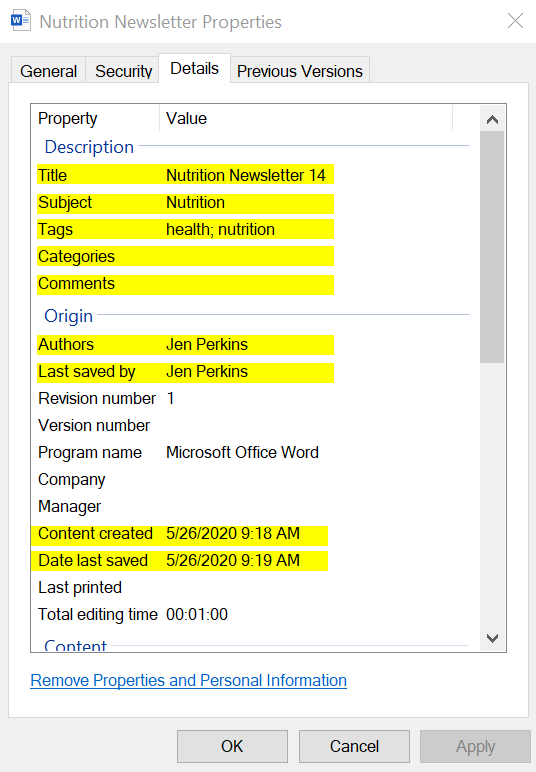
Or when you save an Office document: 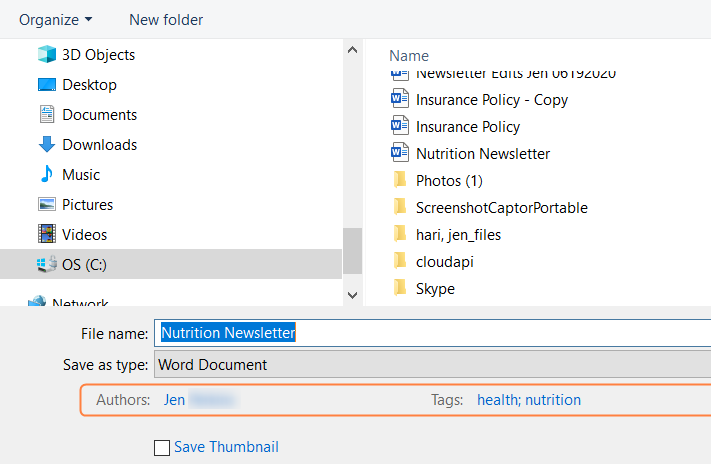
|
|
Color Tagging Metadata
The Color Tagging metadata set enables you to apply color tags to files and folders. It includes a single Color attribute that has six default values: Red, Yellow, Green, Aqua, Blue, and Purple. Admins can add other color values to the attribute.
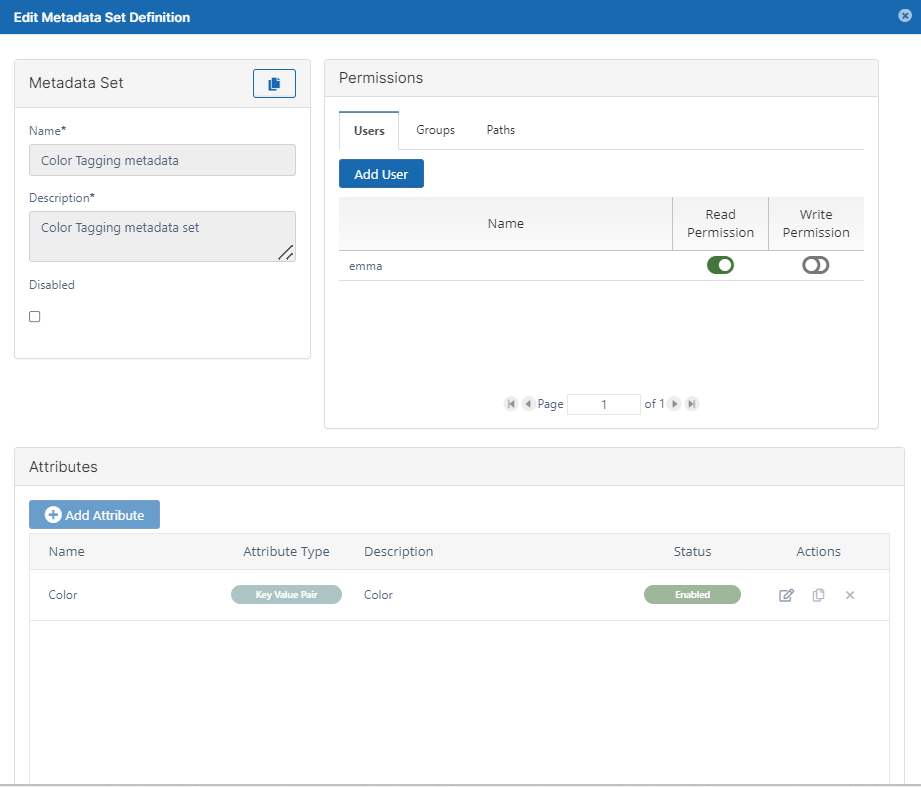
Color is the only attribute included in the Color Tagging metadata set.
|
Name |
Description |
Options |
|---|---|---|
|
Color |
An array of color tags in the format Color:Hexadecimal value |
|
Color values are added to the Color attribute with the name of the color and its hexadecimal value.
To find hexadecimal codes for colors, see https://html-color-codes.info/.
To add values to the Color attribute:
-
To open the Edit Metadata Set Definition dialog box, click the Edit button for Color Tagging metadata.
-
Under Attributes, click the Edit button for Color.
The Edit Attribute dialog box opens. -
Click in the Predefined Values box, and type the name of a color followed by :# and then the hexadecimal color code.
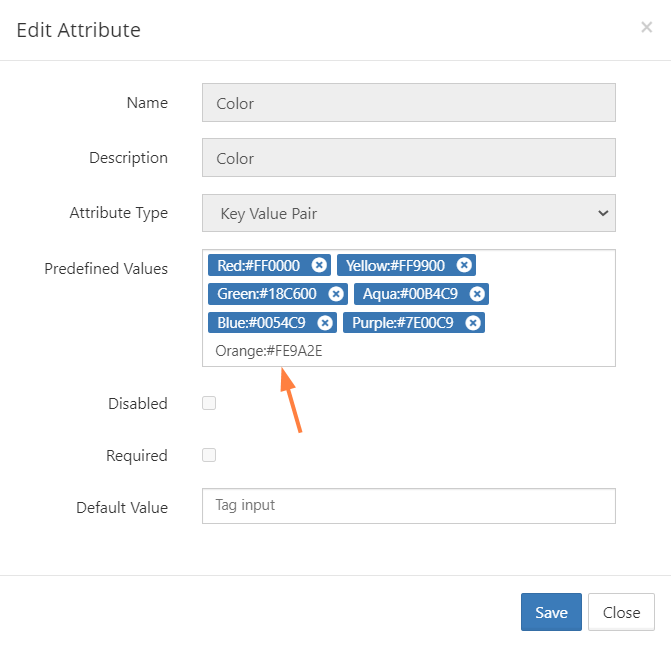
-
Click Enter.
The color is saved and formatted with white letters on a blue background. -
Add any number of custom colors and click Save.
The colors now appear as options to users when they apply color tags to files or folders.
For information on applying color tags to files, see Color Tag Metadata.
Beginning with FileCloud 21.1, the Smart Classification can apply color tag values to files.
Note: Although users can search on color metadata in both the new and classic user interfaces, they can only apply color tags to files and folders in the new interface.
PDF Tag metadata
The PDF Tag metadata set enables FileCloud to apply FileCloud tags that match default and custom tags in PDF files when they are uploaded.
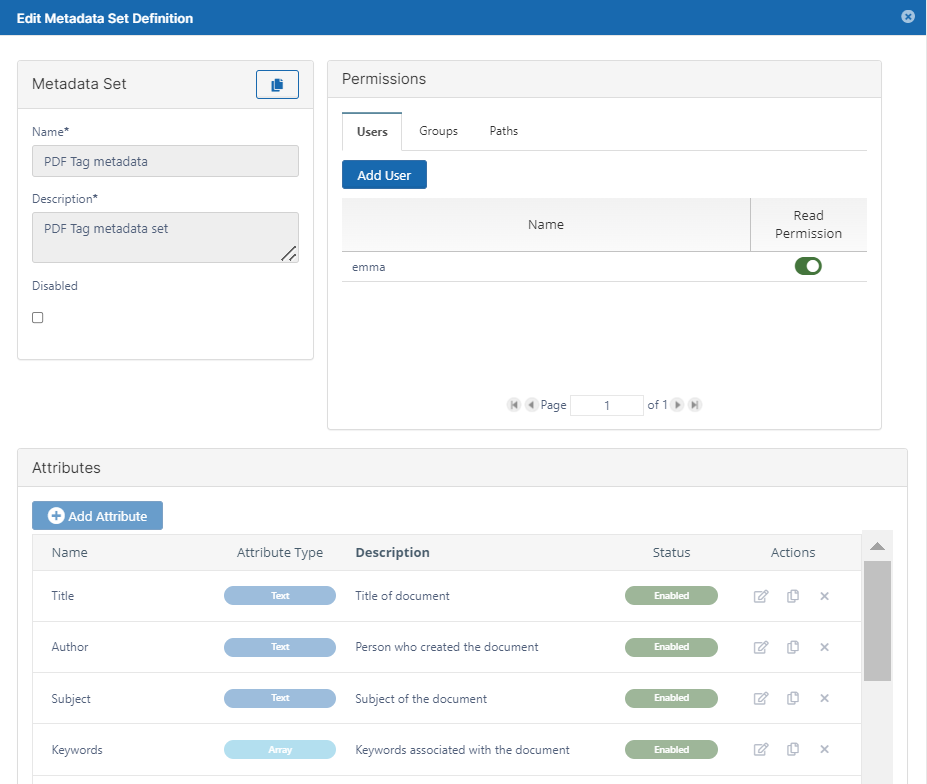
The following attributes are included by default in FileCloud's PDF Tag metadata set:
|
|
Description |
Options |
|
Title |
Title of document. |
Read only |
|
Author |
Author of document |
Read only |
|
Subject |
Subject of document. |
Read only |
|
Keywords |
Keywords associated with document. |
Read only |
|
Creator |
Application used to create file before it was converted to PDF. |
Read only |
|
Producer |
Application used to convert this file to PDF. |
Read only |
|
Created |
Date created. |
Read only |
|
Modified |
Date last modified. |
Read only |
AIP Sensitivity Label metadata
Note: AIP Sensitivity Label metadata was added in FileCloud Version 21.2 and currently applies only to Microsoft Office Word, Excel, and PowerPoint files. In the future, it will be applied to additional file types.
AIP Sensitivity Label metadata stores sensitivity label information applied to files using Azure Information Protection when the files are uploaded to FileCloud.
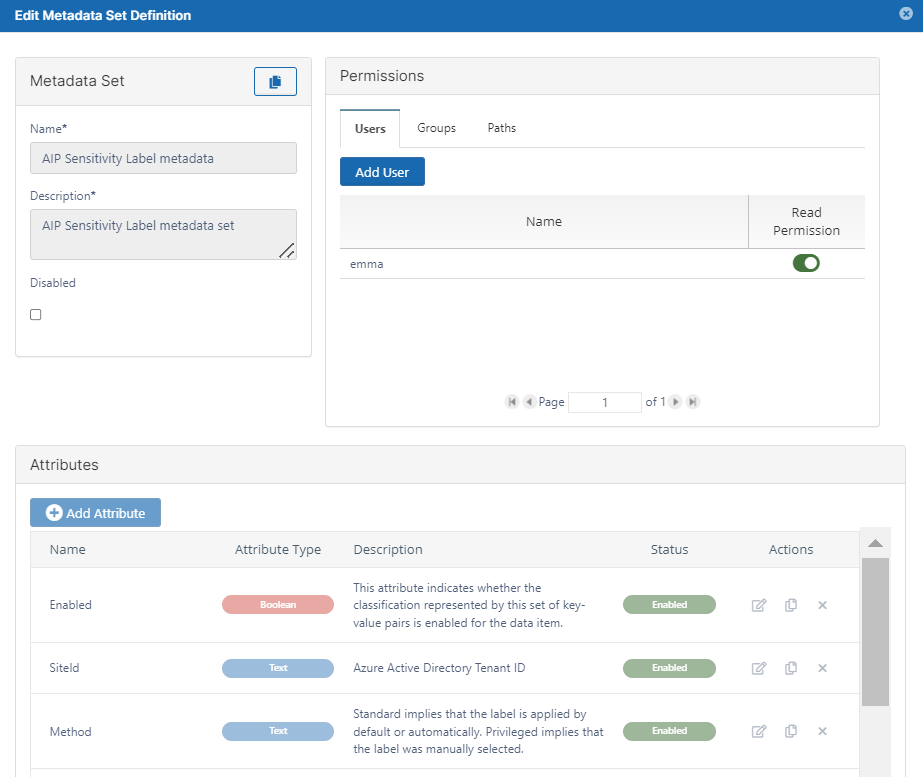
The following attributes are included in FileCloud's AIP Sensitivity Label metadata set:
|
|
Description |
Options |
|---|---|---|
|
Enabled |
Whether the sensitivity label is enabled for this item. |
Read only |
|
SiteID |
Azure Active Directory tenant ID. |
Read only |
|
Method |
Indicates whether label was applied by default/automatically or if the label was applied manually.
|
Read only |
|
SetDate |
Timestamp when label was set. |
Read only |
|
Name |
Unique label name (may differ from display name). |
Read only |
|
ContentBits |
Bitmask that describes the types of visual marking that should be applied to the file to identify the sensitivity category.
|
Read only |
CDR metadata
Note: CDR metadata was added in FileCloud Version 23.241.4
CDR metadata stores a Boolean attribute that indicates whether or not CDR was successful.
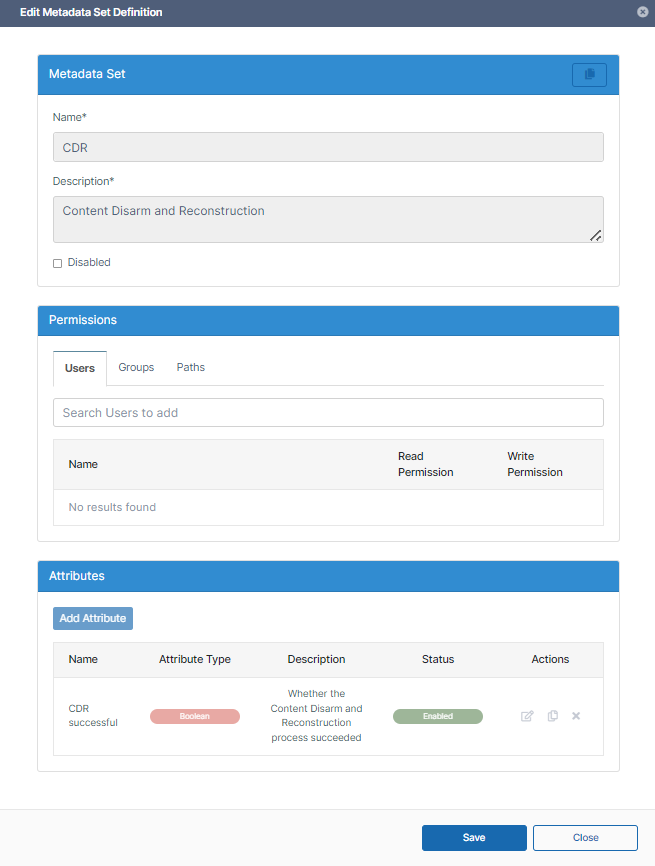
The following attribute is included in FileCloud's CDR metadata set:
|
|
Description |
Options |
|---|---|---|
|
CDR successful |
Whether content disarm and reconstruction was successful for this file. |
Read only |
Signority eSignature metadata
Note: Signority eSignature metadata was added in FileCloud Version 23.241.4.
Signority eSignature metadata stores information about eSignatures applied to the file.
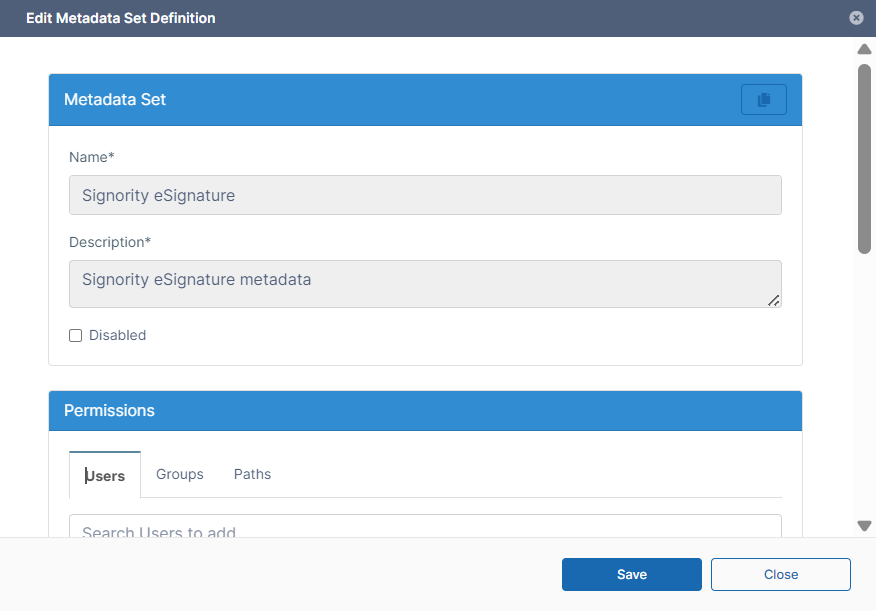
The following attributes are included in FileCloud's AIP Sensitivity Label metadata set:
|
|
Description |
Options |
|---|---|---|
|
Completion Date |
Date signing was completed. |
Read only |
|
Total Signers |
Total number of people who received signing requests. |
Read only |
|
Total Rejections |
Total number of signers who rejected the document. |
Read only |
|
Digital Signature |
Whether the signature is a digital signature. |
Read only |
|
Signing Request ID |
ID of the request to begin the eSignature process. |
Read only |
ITAR metadata
Note: ITAR metadata was added in FileCloud Version 23.252
ITAR (International Traffic in Arms Regulations) metadata enables you to identify the presence of phrases indicating that a file contains ITAR information. This enables you to apply an appropriate rule or workflow to the file.
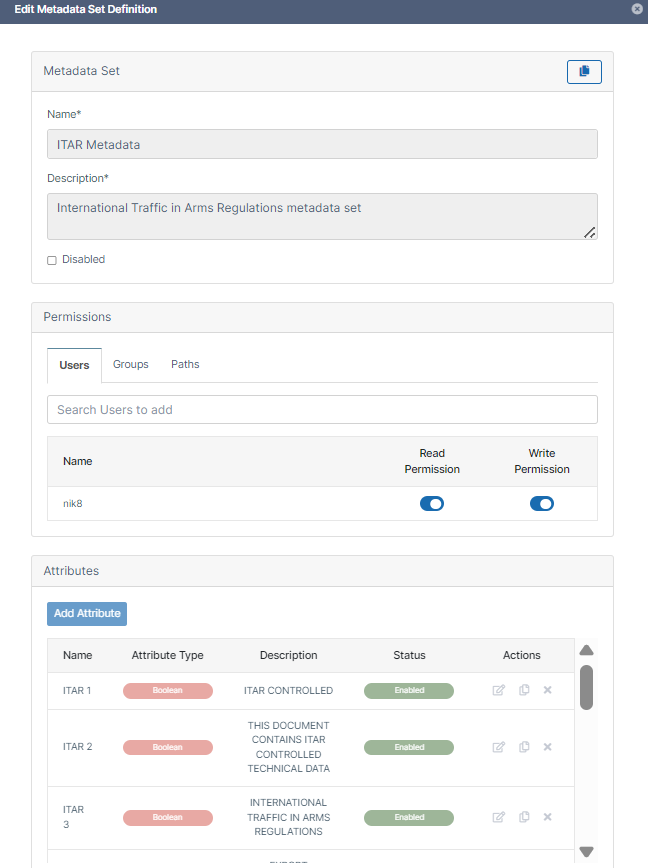
The following attributes are included in FileCloud's ITAR metadata set.
Note that the descriptions are phrases that commonly appear in ITAR documents. If other phrases are used in your ITAR documents, search for those phrases.
|
|
Description |
Options |
|---|---|---|
|
ITAR 1 |
ITAR CONTROLLED |
Read only |
|
ITAR 2 |
THIS DOCUMENT CONTAINS ITAR CONTROLLED TECHNICAL DATA |
Read only |
|
ITAR 3 |
INTERNATIONAL TRAFFIC IN ARMS REGULATIONS |
Read only |
|
ITAR 4 |
EXPORT CONTROLLED INFORMATION |
Read only |
|
ITAR 5 |
EXPORT CONTROLLED |
Read only |
|
ITAR 6 |
SUBJECT TO ITAR |
Read only |
|
ITAR 7 |
SUBJECT TO THE INTERNATIONAL TRAFFIC IN ARMS REGULATIONS |
Read only |
|
ITAR 8 |
U.S. MUNITIONS LIST |
Read only |
|
ITAR 9 |
TECHNICAL DATA AS DEFINED IN ITAR |
Read only |
|
ITAR 10 |
DEFENSE ARTICLE |
Read only |
|
ITAR 11 |
DDTC EXPORT AUTHORIZATION |
Read only |
|
ITAR 12 |
AUTHORIZED EXPORT ONLY |
Read only |
|
ITAR 13 |
NOT FOR PUBLIC RELEASE |
Read only |
|
ITAR 14 |
NO FOREIGN NATIONALS |
Read only |
|
ITAR 15 |
DISTRIBUTION STATEMENT |
Read only |
CUI metadata
Note: CUI metadata was added in FileCloud Version 23.252
CUI (controlled unclassified information) metadata enables you to identify the presence of phrases indicating that a file contains CUI information. This enables you to apply an appropriate rule or workflow to the file.
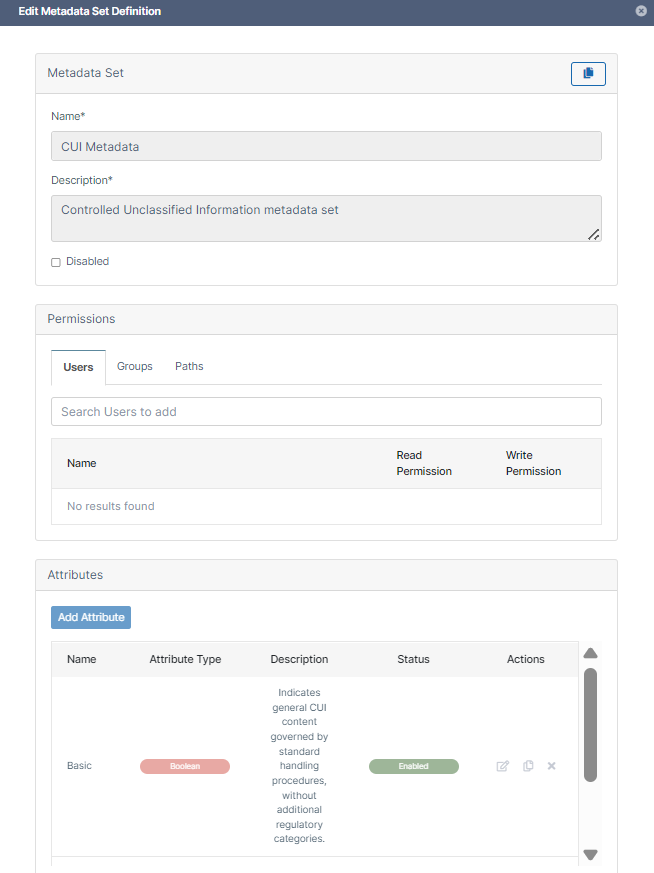
The following attributes are included in FileCloud's CUI metadata set:
|
|
Description |
Options |
|---|---|---|
|
Basic |
Indicates general CUI content governed by standard handling procedures, without additional regulatory categories. |
Read only |
|
Specified |
Identifies CUI content tied to specific legal or regulatory requirements, marked with SP- designations. |
Read only |
Extended metadata
Extended metadata enables you to work with custom tags have been applied to PDF or Microsoft Office files by a third-party application that is exporting them, such as Forcepoint CDR.
How metadata attributes are added
Extended metadata contains custom metadata attributes that can be added in two ways:
-
Manually created by admins in the Extended metadata set.
-
Automatically extracted from uploaded PDF and Microsoft Office files when automatic extraction is enabled.
Metadata attributes are extracted and added to the Extended metadata set if they match regex filters that you have supplied.
Manually created attributes are always available in the Extended metadata set, and if a manually created attribute matches a tag in the file, it is applied to the uploaded file.
Setting an auto extraction limit
You set a limit that determines how much metadata can be automatically extracted. The limit depends on the amount of metadata already manually created, as explained in the procedure below. The limit prevents an excessive number of metadata attributes matching the regex filter and being added unintentionally.
Why full set of attributes are not added to every file
Note that when other FileCloud metadata is applied to files, all of its metadata attributes are added to each file whether or not each attribute is given a value. Extended metadata differs in that the full set of attributes may not be added to every file. Only those attributes that already exist in the uploaded files are applied. This prevents extraneous attributes and excessive numbers of attributes being applied to files.
Example
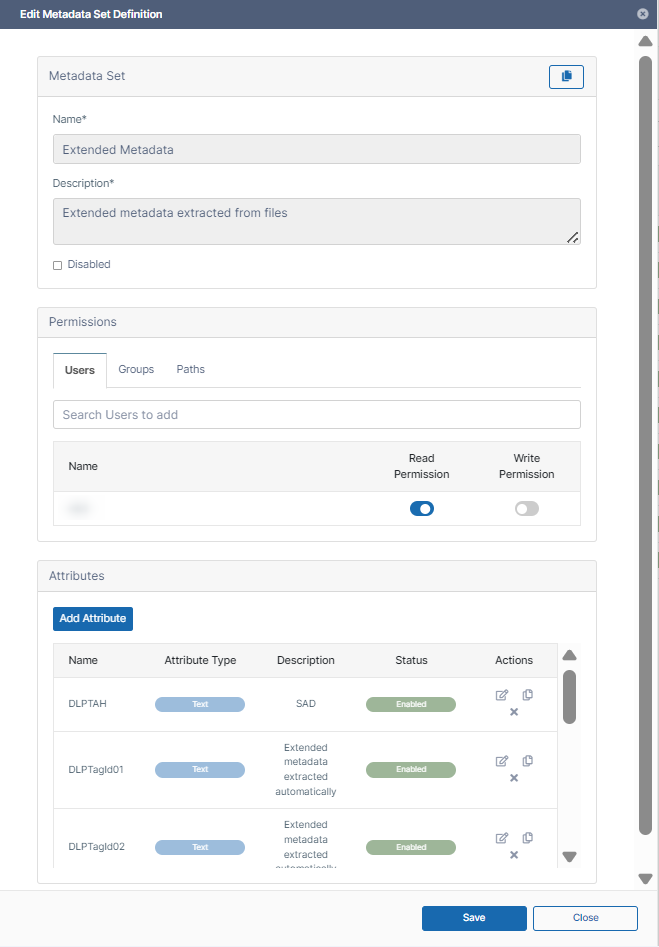
In the following example, the attribute DLPTAH was added manually, and the DLPTagId01 and DLPTagId02 attributes were extracted automatically from uploaded files. When each file is uploaded the Extended metadata attributes it contains already are added to it from the Extended set. These attributes are given the values that exist for them on the uploaded file.
Files that were uploaded before Extended metadata was configured do not have it applied to them after it is created.
After upload, files that are modified to include tags matching the Extended metadata attributes do not have those attributes applied to them.
To configure the Extended metadata set:
-
In the admin portal, in the navigation pane, click Metadata to go to the Manage Metadata Sets page.
The Extended metadata set is disabled by default and must be opened for edit to manually enable it. -
Enable Extended metadata:
-
In the Extended Metadata row, click the Edit icon.
The Edit Metadata Set Definition dialog box opens. -
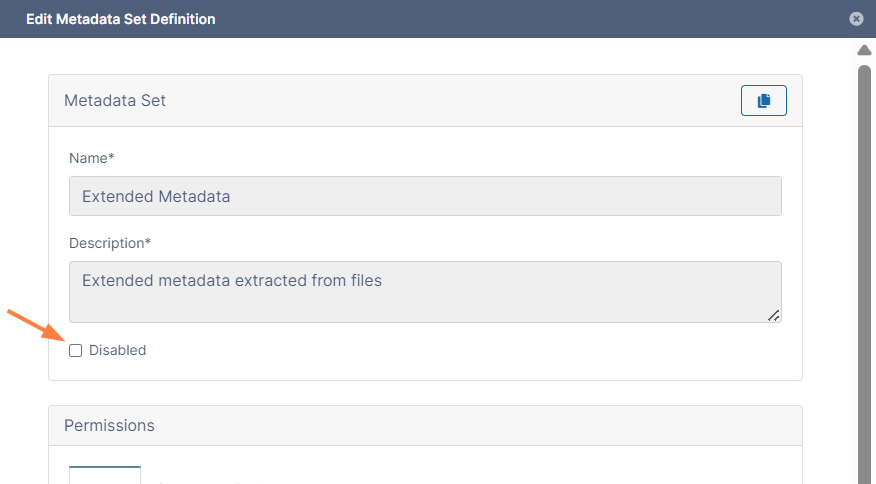
Uncheck Disabled.
-
-
Manually add any attributes to the Extended metadata set. If they match any tags in uploaded PDF and Office files, they are added to the files.
-
Add the two required settings to the cloudconfig.php file:
-
Open cloudconfig.php:
Windows Location: XAMPP DIRECTORY/htdocs/config/cloudconfig.php
Linux Location: /var/www/config/cloudconfig.php -
To enable automatic extraction and add the regular expression filter, set TONIDOCLOUD_METADATA_AUTO_TAG_REGEX to a regular expression matching the attributes you want to extract.
For example, to extract the attributes Sensitive and Restricted from the first uploaded files containing them, add:define('TONIDOCLOUD_METADATA_AUTO_TAG_REGEX', 'Sensitive|Restricted');
Or to extract attributes that begin with the word Custom followed by an uppercase letter, add:define('TONIDOCLOUD_METADATA_AUTO_TAG_REGEX', '/^Custom[A-Z]/'); -
To add the per file extraction limit for automatically extracted tags, set TONIDOCLOUD_METADATA_AUTO_TAG_LIMIT to the limit value.
About the limit:-
It applies to the number of automatically extracted attributes, but manually added attributes are added to the extraction limit.
-
It does not apply to manually added attributes. In other words, once the limit is reached, additional automatically extracted attributes are not added, but manually added attributes can continue to be added.
-
Example: If this limit is 10 and 3 attributes have been created manually, only 7 more can be auto-created. However, additional attributes can be added manually.
-
By default, its value is 10.
To limit the number of attributes (automatically extracted + manually added) to 15, add the following to the cloudconfig.php file:
define('TONIDOCLOUD_METADATA_AUTO_TAG_LIMIT', 15);
-
-
Note: The Extended metadata set only accepts attributes of type text.
Now your Extended metadata is configured, and as PDF and Office files are uploaded they will be checked for the matching regex strings. If there is a matching string, it is extracted and an Extended metadata attribute is created. In addition, the metadata attribute is assigned to the file with the value it contained in the file.
Once the number of attributes in the limit is reached:
-
If an uploaded file has a matching string that does not have a corresponding Extended metadata attribute, an attribute is not automatically created and is not added to the file.
-
If an uploaded file has a matching string that has a corresponding Extended metadata attribute, the attribute is added to the file and given the value originally contained in the file.