.svg)
As an administrator, you can integrate FileCloud Server to store user data in Azure Blob Storage.
-
Azure Blob Storage is a massively scalable object storage service for unstructured data.
-
You can use Blob Storage to store and retrieve any amount of data at any time, from anywhere on the web.
-
You can perform these tasks using the Azure portal.
Getting Started with Azure Blob Storage
WARNINGS:
-
Only change the FileCloud storage type to Blob for new installations.
-
Do not change the FileCloud storage type to Blob if FileCloud has been in use and data is already stored.
-
Be very careful when changing the storage path. If done improperly, it could lead to data loss.
-
When changing the storage type from local to Azure Blob, the files and folders that have already been saved to local storage will not be moved automatically to Blob storage.
-
For existing files and folders, the administrator must manually export them from local storage before changing the storage type.
-
After changing the storage type to Blob, the administrator must manually import pre-existing files and folders.
-
-
The Azure Storage Container should NEVER be modified outside of the FileCloud subsystem.
-
Do not add/edit/modify files directly using Azure Storage tools. Doing so will destabilize your FileCloud installation.
Integrate Azure Blob Storage
1. Change the Storage Type to Azure Blob Storage
NOTE:
For this step you will need to access WWWROOT. It is typically located at:
|
Windows |
Linux |
|---|---|
|
c:\xampp\htdocs |
/var/www/html |
To enable Azure Blob storage as the backend:
-
To make sure that your server does not have any time variations, set up the time on your server to be synchronized.
-
Open the following file for editing:
WWWROOT/config/cloudconfig.php
-
Find the following line:
define("TONIDOCLOUD_STORAGE_IMPLEMENTATION", "local");
-
Change it to:
define("TONIDOCLOUD_STORAGE_IMPLEMENTATION", "azureblob");
-
Save and close the file.
-
Find the following file:
WWWROOT/config/azureblobstorageconfig-sample.php
-
Rename it to:
WWWROOT/config/azureblobstorageconfig.php
You do not need to modify azureblobstorageconfig.php
2. Configure Credentials
After you have set up the storage implementation key in step 1, you can configure the credentials:
To configure Azure Blob Storage credentials:
-
In the FileCloud admin portal's left navigation bar, scroll down and click Settings. Then, on the Settings navigation page, click Storage

The Managed Storage settings page opens by default. -
Type in or select the Azure Blob settings for your environment (the settings that appear above the Save Settings button).
Definitions of the settings appear in the table below.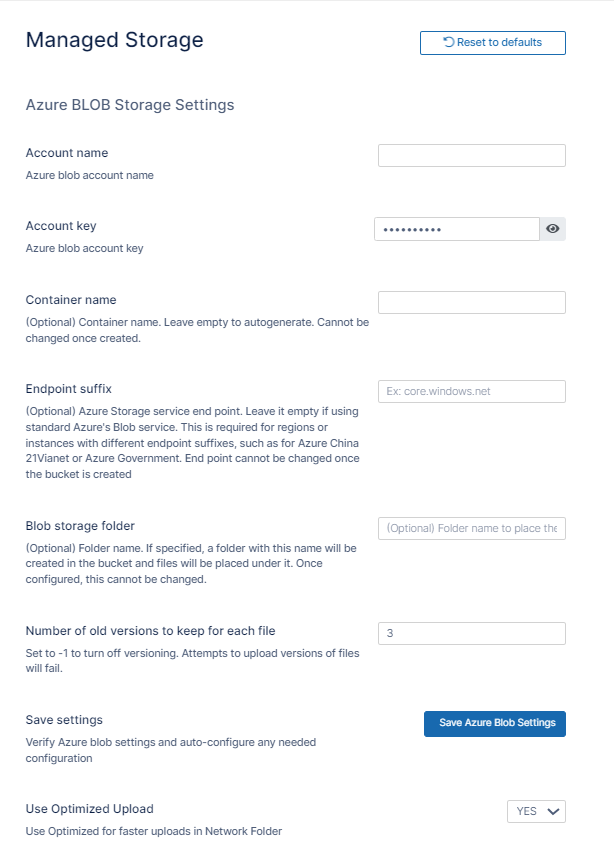
-
Click Save Settings.
-
Enter values for the settings below it or leave the default settings.
Definitions of the settings appear in the table on the page Setting up FileCloud Managed S3 Storage. -
Click Save.
|
Field |
Description |
|---|---|
|
Account Name
|
This is your Azure storage account name. For an RBAC user, it requires at least the following permissions.
|
|
Account Key
|
This is your Azure storage account key (visit the https://azure.microsoft.com/en-us/get-started/azure-portal to obtain your account key). For an RBAC user, it requires at least the following permissions.
|
|
Container Name
|
Provide a storage container name. Use a new storage container whenever possible. (in some circumstances, containers previously used in FileCloud could be used). It is very important that the Azure storage container is never modified outside of the FileCloud subsystem. Container name rules
|
|
Endpoint Suffix |
Optional: This is the Azure Blob storage endpoint.
To use an Azure endpoint, it must be one of the values published here.
|
|
Blob Storage Folder
|
Optional: All files will be stored inside this root storage folder.
|
|
Number of old versions to keep for each file |
If a file with the same path and name is uploaded, FileCloud versions the file. This setting determines number of recent versions that FileCloud should retain. To disable versioning completely, set the number of versions to -1; attempts to upload versions of a file will fail.
|
Troubleshooting
How to Correct Issues with Image Previews
If you are having problems previewing images, add the following domain to the .htaccess file.
To add the domain to the .htaccess file:
-
Open the following file:
Windows: C:\xampp\htdocs\.htaccess
Linux: /var/www/html/.htaccess -
Locate the following line and add the domain *.core.windows.net to the locations shown in the example below. The first instance may already be included.
