.svg)
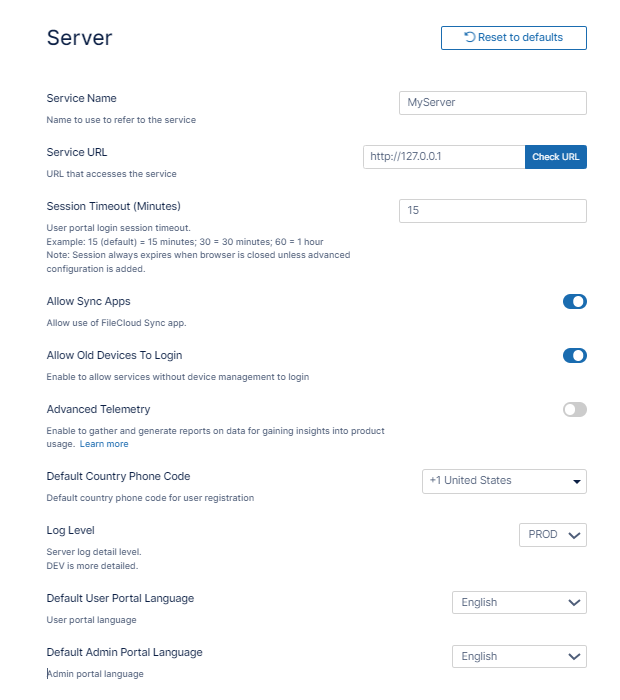
Server settings include the Service Name and Service URL, which you must set before using FileCloud, as well as other server-related settings such as the session timeout period and the languages of the user portal and admin portal.
To set the Server settings:
-
In the FileCloud admin portal's left navigation bar, scroll down and click Settings. Then, on the Settings navigation page, click Server

The Server settings page opens. -
Fill in the settings as shown in the following screenshot, using the table below as a guide.
|
Settings Name |
Description |
||||||
|---|---|---|---|---|---|---|---|
|
Service Name |
The name used when referring to your FileCloud service. This is used in email messages, in the zip filename for multiple downloads, and anywhere else your service is referred to by its name. |
||||||
|
Service URL |
The URL used to access your FileCloud site. Enter the protocol and domain name, for example, https://xyz.company.com, and click Check URL to confirm that it is accessible.
Notes:
|
||||||
|
Session Timeout |
The number of minutes of inactivity that the browser session times out.
By default:
To apply Session Timeout to other clients or to disable session logout when the browser is closed, see User Session Expiration |
||||||
|
Allow Sync Apps |
Toggled on by default. Toggle off to block all Sync apps from connecting to this server and performing sync operations. |
||||||
|
Allow Old Devices to Login |
FileCloud supports clients that are Remote Client Management (RMC) compliant. However, you can allow access using older FileCloud (non RMC compliant) clients by toggling on this setting. For more information about using RMC in FileCloud, see Remote Client Management. |
||||||
|
Advanced Telemetry |
Toggle on to allow FileCloud to gather diagnostic and usage data. |
||||||
|
Default Country Phone Code |
The default country code that appears in the user portal when share creators invite users to a share and when users add/modify their phone numbers in settings. |
||||||
|
Log Level |
How many activities are recorded in the system log. The default is PROD (production), a regular level of logging.
|
||||||
|
Default User Portal Language |
The language that is used when a user logs in to the user portal. |
||||||
|
Default Admin Portal Language |
The language that is used when an administrator logs in to the admin portal.
|
FileCloud needs a cron job to perform certain ongoing maintenance tasks.
These tasks include:
-
Sending email notifications
-
Sending admin summary emails
-
Performing recycle bin cleanup
-
Deleting expired shares
-
Archiving old audit records
Configure System-Generated Emails
To reset server settings:
-
Click Reset to defaults to reset the settings on this page only.