.svg)
Server Version 23.241.0.27140
The August 2024 release of FileCloud (version 23.241) is now available.
|
New installation: Installing FileCloud Server
|
Upgrade to access new and enhanced features.
Latest SHA256 release checksums
-
filecloudupdate.zip 44d3cdd1fbb0a7821b53d44de0e9ab1dca069b841353fbaac5b8b7ee2182efc6
-
FileCloudSetup.exe 212acd64546b3f4205029b826f6dfe234c5289dcfc666641086d8ede70b61679
-
Minor FileCloud Desktop for macOS Release 23.241.22 -
Minor FileCloud Desktop for macOS Release 23.232.12 -
Minor FileCloud Desktop for macOS Release 23.232.11 -
Minor FileCloud Release 23.241.1 -
Minor FileCloud Release 23.241.2 -
Minor FileCloud Release 23.241.3 -
Minor FileCloud Release 23.241.4 -
FileCloud Patch Release 23.241.5 -
Minor FileCloud Release 23.241.6
Security Advisories
Highlights of the release:
|
Folder permissions information updated and easy to understand
With Version 23.241, FileCloud has added functionality to clarify the effective permissions on folders in the admin portal for Team Folders and in the user portal for My Folders. Now, effective permissions for these folders show folder-level permissions and share permissions separately, and below them show effective permissions, which reflect how their permissions combined work together. In addition, the effective permissions listed here take into account permissions for groups that users belong to.
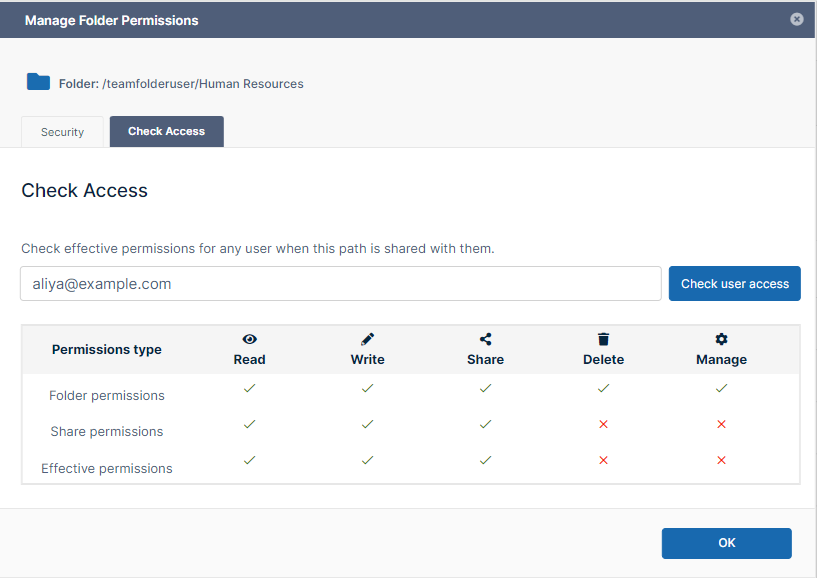
Effective permissions for Team Folders
Automated Workflow Feature for Copying Folder Structures
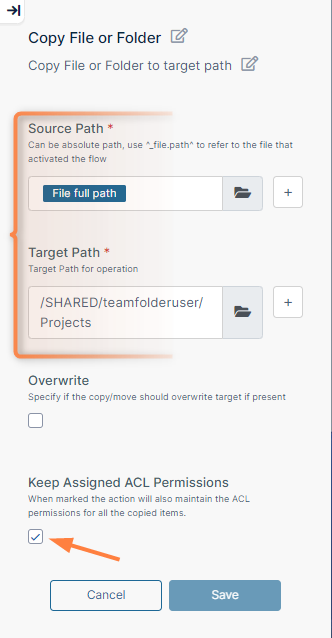
FileCloud has changed the automated workflow step Copy File to Copy File or Folder, so that when a user chooses to copy a folder, the entire folder structure is copied from one location to another. In addition, the folder-level permissions can be copied. This enables users to copy folder structures with their permissions within different locations in Team Folders and My Files.
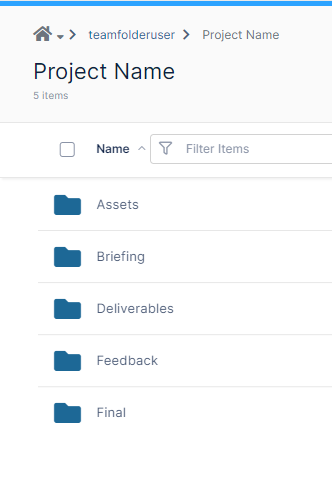
Below, the user wants to use the Project Name folder structure giving the same users access to the same subfolders each time a new project is created. In the workflow to the right, the step Copy File or Folder is used to copy the folder structure in Source Path to the folder structure in Target Path. Keep Assigned ACL Permissions is checked, so folder-level permissions assigned to users are copied into the new set of folders.
|
|
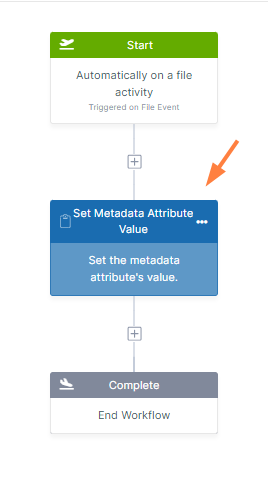
Use of metadata in automated workflows
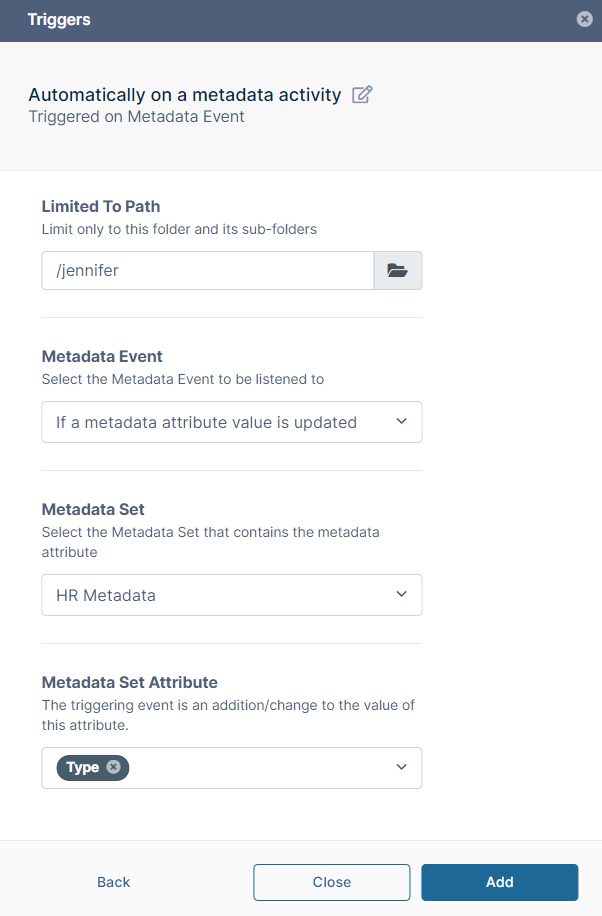
Use of metadata in automated workflows enables users to:
-
Trigger a workflow when a metadata set is attached to a file or folder or when a metadata attribute on a file or folder is updated.
-
Assign a value to a metadata attribute as a step in a workflow.
-
Trigger a workflow when a metadata set is attached to a file or folder or when a metadata attribute on a file or folder is updated.
-
Assign a value to a metadata attribute as a step in a workflow.
|
|
Optimized S3 Uploads
If your system uses S3 storage, a number of new settings enable you to significantly increase the speed and efficiency of uploads. When you go to Settings > Storage > My Files, there are now settings that enable you to upload chunks in parallel, use the accelerated feature in the S3 bucket, and change the number of minutes the pre-signed URL is valid.
The same settings appear in Settings > Storage > My Files if you are using local storage, but in this case they only apply to S3 Network Folders. If you do not use Network Folders or your Network Folders do not use S3 storage, these settings appear, but do not apply.
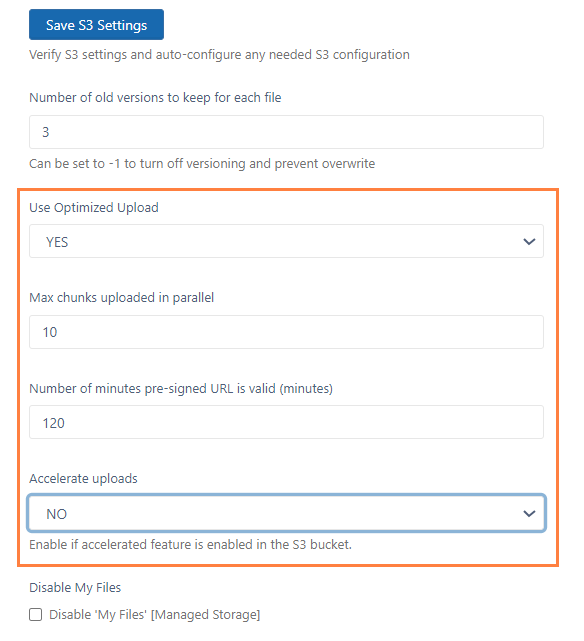
The new settings for S3 upload optimization in the storage settings screen for systems that use S3 for managed storage.
UI Changes in FileCloud 23.241
User Portal
-
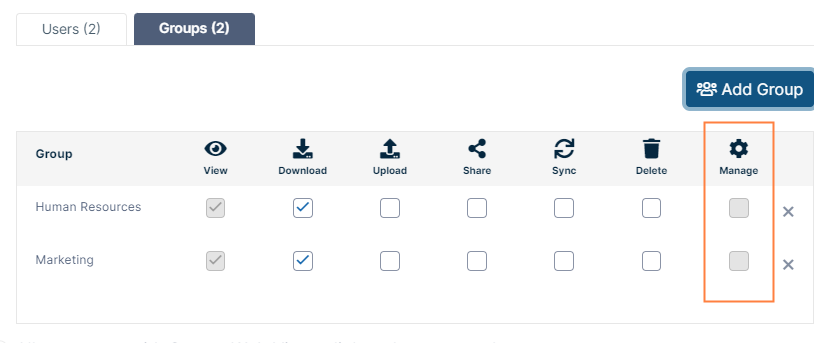
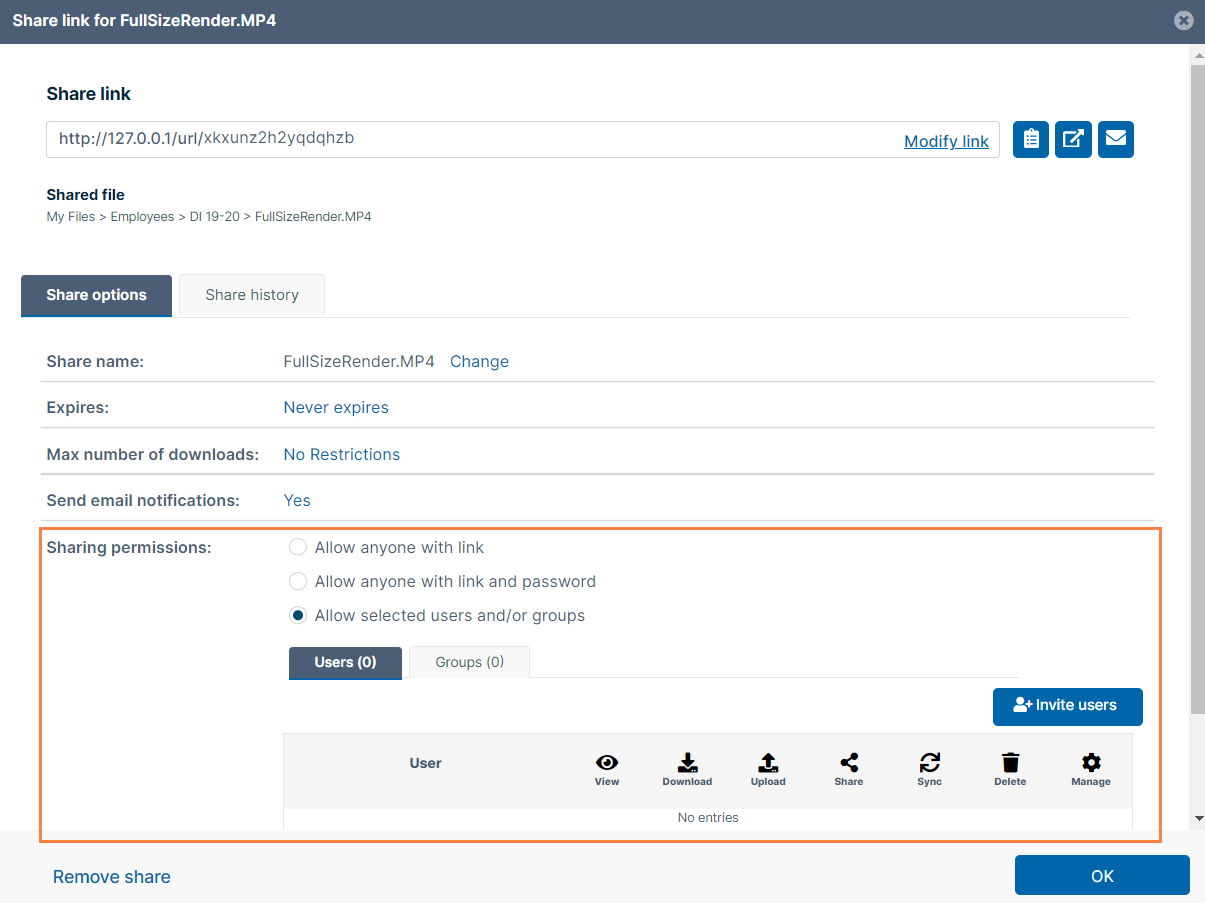
Group sharing permissions for private shares now show Manage permissions grayed out, to indicate they cannot be assigned to groups.
-
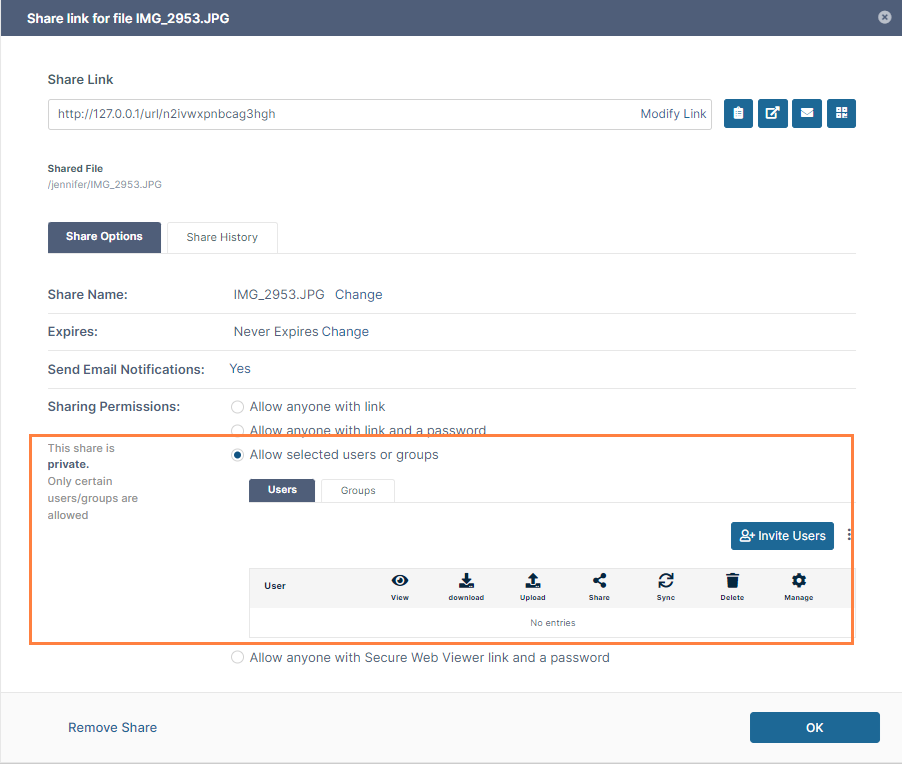
By default, share dialog boxes now display a private share without users added instead of a public share. Users attached to the share are not saved and emails notifying them about the share are not sent until OK is clicked.
-
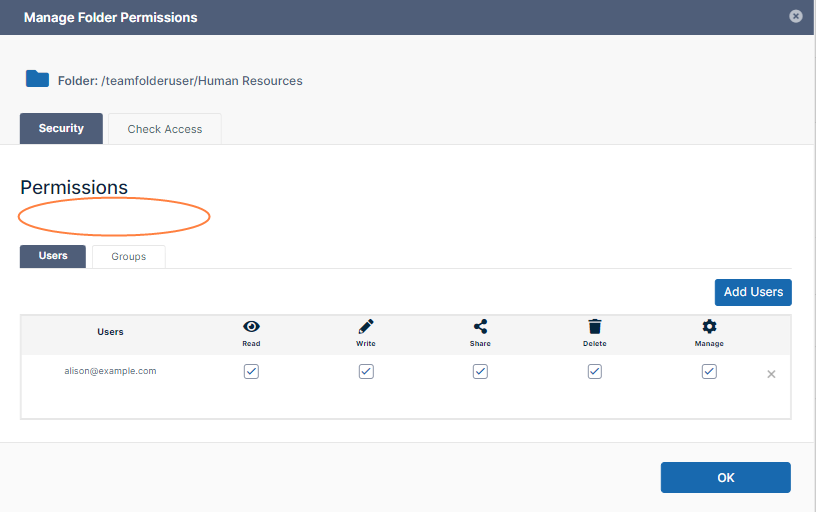
In the user portal, the Manage Folder Level Permissions dialog box no longer shows a checkbox for Inherit Folder Level Security for top-level Team Folders since it does not apply.
-
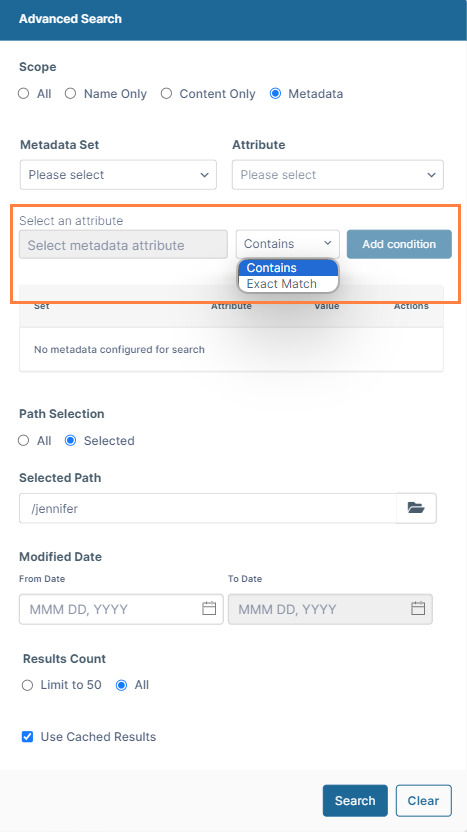
The metadata search now has a drop-down list for selecting whether the value of the metadata attribute must be an exact match with the search term or may contain the search term. The default value is Contains.
-
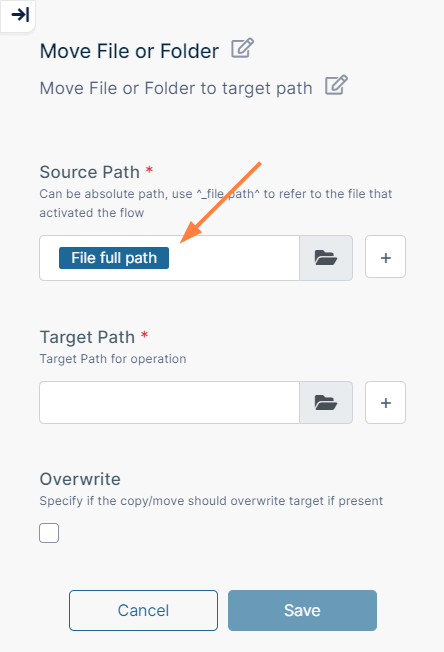
When a workflow with the trigger Automatically on a file activity is created and a Copy or Move step is added to the workflow, the Source Path parameter is now automatically filled with the File full path variable.
Admin Portal
-
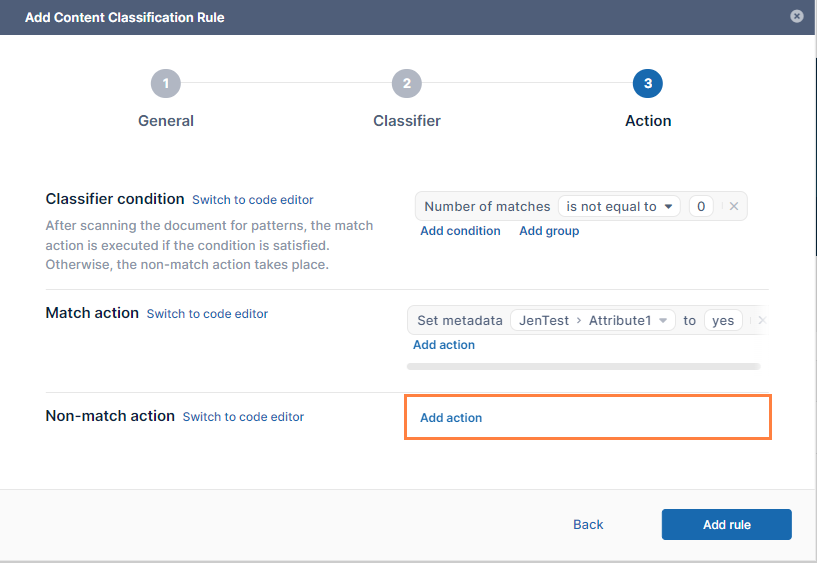
The Add Content Classification Rule wizard now allows admins to leave the value of Non-match action blank.
-
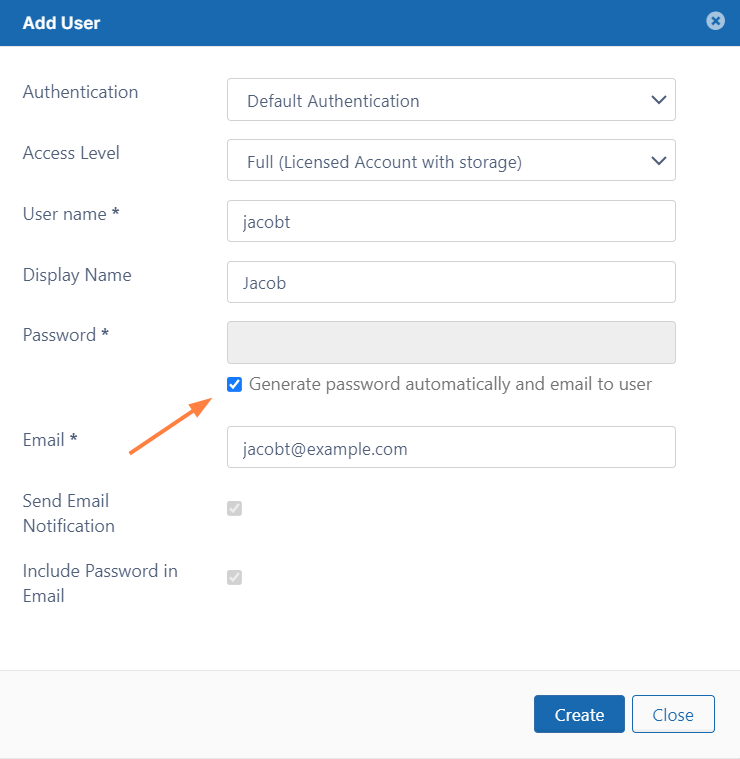
There is now a checkbox in the Add User dialog box that enables admins to have the password for a new user automatically generated and emailed to the user.
-
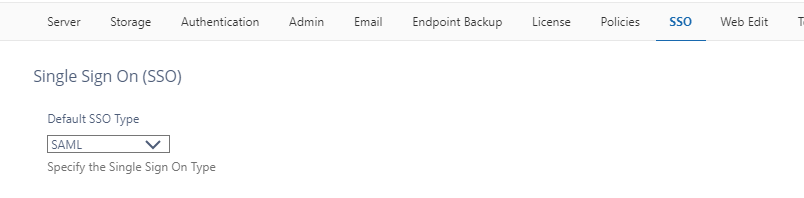
The SSO tab is now available for systems in FIPS mode.
Client and Mobile apps
-
By default, share dialog boxes in all FileCloud client and mobile apps now display a private share without users added instead of a public share. Users attached to the share are not saved and emails notifying them about the share are not sent until OK is clicked.
Information for Admins
|
Enhancements
|
Reference Number |
Area |
Feature |
|
Server |
|
|
|
CL-14451 |
Downloads |
An issue preventing opening of some download zip files has been fixed. |
|
CL-13176 |
File approval |
Email sent to users requesting that they approve files now include links for approving and rejecting the file embedded in the email. |
|
CL-14550 |
Search |
The metadata search in the user portal now defaults to a search for words that contain the search term instead of an exact match. Users may also choose to search on an exact match. |
|
CL-14306 |
Shares |
Share notification emails are now sent after the share creator confirms all settings by clicking OK. By default, newly created shares are now private shares without share recipients instead of public shares. |
|
CL-14365 |
Smart classification |
The new smart classification user interface introduced in FileCloud 23.232 now allows Non-match action to be left blank. |
|
CL-13751 |
Sort order |
Previously, by default, file, folder, and user lists were sorted in ASCII sort order (numerals, uppercase letters, then lowercase letters). Now, by default, they are sorted in natural sort order (numerals, letters with no case sensitivity). |
|
CL-14315 |
Team Folders |
Admins can now share Team Folders with external users from the admin portal. |
|
CL-14313 |
Users |
When admins manually create users from the user portal, they now have the option of having the password automatically generated and sent to the user. |
|
CL-13829 |
Workflows (admin) |
To enable the system to send custom emails to users or groups at defined intervals the following changes have been made:
|
|
CL-11092 |
Workflows (automated) |
The condition step in automated workflows now supports custom variables. |
|
CL-12179 |
Workflows (automated) |
When a workflow with the trigger Automatically on a file activity is created and a Copy or Move step is added to the workflow, the Source Path parameter is now automatically filled with the File full path variable since that will always be the source path. |
|
CL-13292 |
Workflows (automated |
Now when a user triggers a workflow manually on a file or folder, they can check a box to send toast notifications to inform the user who started the workflow whether the workflow has succeeded or failed. If the workflow includes an approval, the user also receives toast notifications when the file/folder begins waiting for approval and when the workflow is complete. |
Server-only Enhancements
|
Reference Number |
Area |
Feature |
|
Server |
|
|
|
CL-14741 |
Customization |
Settings have been added for adding links that go directly to the Google and Apple stores instead of going to a web page that includes links to the stores. |
|
CL-14254 |
Database |
MongoDB Enterprise is now supported for FileCloud in Windows and Linux. |
|
CL-14658 |
FIPS |
Previously, SSO features were not available for systems in FIPS mode. They are now available, and the SSO tab in settings is visible and can be selected. |
|
CL-13902 |
Network Folders, Sync |
The Sync sharing permission for private shares of Network Folders was previously disabled, but is now available. |
|
CL-14360 |
Rsync backups |
If an Rsync backup had an incomplete status, the next backup was a full backup instead of an incremental one, which could potentially have caused too many files to be stored on the system. This has been fixed so that the next backup is incremental even if the previous one was incomplete. |
|
CL-13922 |
Thumbnails |
A new tool has been created to delete thumbnail files that are taking up excessive amounts of a user's storage quota. |
|
CL-10465 |
Username |
A new setting supports prioritizing the entered email over the entered username when creating a new user through SSO login, AD login or import, and share invite if Allow Account Creation using the email as username is also enabled. |
Security Fixes
|
Reference Number |
Description |
|---|---|
|
CL-14774 |
Apache has been upgraded to version 2.4.59, which includes Apache security updates. |
|
CL-14882 |
NodeJS has been upgraded to version 18.20.3, which includes NodeJS security updates. |
|
CL-14838 |
PHP has been upgraded to version 8.2.20, which includes PHP security updates. |
Bug Fixes
|
Reference Number |
Area |
Description |
|
Server |
|
|
|
CL-14171 |
AD |
A problem causing user loading from AD or LDAP to time out when there were a large number of users or groups has been fixed. |
|
CL-14467 |
AD |
If the AD domain server was not reachable and an AD group sync was performed, FileCloud deleted the users from the group. This has been fixed. |
|
CL-13639 |
AD |
If use of duplicate names was allowed, if an AD prefix was used, user import failed. This has been fixed. |
|
CL-13488 |
Audit |
If a a folder with view-only permission was shared, when its files were previewed, the audit log showed them as downloaded. This has been fixed. |
|
CL-13837 |
Backup |
When FileCloud backup was completed for multiple files, the notification showed "Backed files: 0". This has been fixed. |
|
CL-14736 |
Date |
An issue causing the modification date of a file to be different on the system, after upload to My Files, and in a share recipient's Shared with Me folder has been fixed. |
|
CL-13350 |
Delete |
The delete action for a share was shown as enabled on the More menu although the user did not have folder (ACL) permission to delete the folder. This has been fixed. |
|
CL-13048 |
Delete |
A problem causing deletion of files or folders in long paths to fail has been fixed. |
|
CL-14406 |
Deleted files |
In the user portal, if My Files was disabled, when a user went to Team Folders, the Deleted Files link in the navigation panel was no longer visible. This has been fixed. |
|
CL-14369 |
Download |
When multiple files/folders were downloaded in Safari on macOS, a log file was downloaded instead of a zip file containing the downloaded items. This has been fixed. |
|
CL-14468 |
|
An issue causing a <style> tag in a custom email template to be removed has been fixed. |
|
CL-14856 |
Encryption |
When encryption was enabled without encrypting existing files, when a file was uploaded (and encrypted) the unencrypted existing files were lost. This has been fixed. |
|
CL-14409 |
Images |
A decrease in resolution of previewed images has been fixed. |
|
CL-12901 |
Notifications |
An issue causing user-overrides of policy notification settings to fail has been fixed. |
|
CL-14284 |
Notifications |
An issue causing delivery of notifications to be delayed has been fixed. |
|
CL-14829 |
Outlook Add-in |
Users could not drag and drop emails or email attachments from the classic version of Outlook to the FileCloud web browser in Windows. This has been fixed. |
|
CL-14445 |
Preview |
An issue causing LibreOffice preview to fail has been fixed. Now, clicking Shift + Preview icon in the row for a file or folder initiates a LibreOffice preview. |
|
CL-14078 |
Reports |
Issues causing some reports to return the message "Report generation took too long to respond. Please try again later," has been fixed. |
|
CL-14376 |
S3 storage |
An issue causing large tmp files to be created but not removed in S3 storage has been fixed. |
|
CL-14350 |
Search |
When a long value was entered as a search term in a metadata search, the "x" for deleting the search term no longer appeared. This has been fixed. |
|
CL-13245 |
Shares |
An error causing the side panel in Team Folders to display "Share not permitted" when it should have displayed 'Not shared" has been fixed. |
|
CL-10987 |
Shares |
An issue preventing users from accessing a share when clicking the share link in an email has been fixed. |
|
CL-13228 |
Shares |
When an external user uploaded a file to a shared file, the share recipient was sent the wrong link. This has been fixed. |
|
CL-14490 |
Sorting |
Sorting numerically named files and folders was not working properly. This has been fixed. |
|
CL-14471 |
SSO, Azure AD |
When SSO was integrated with Azure AD, and a new user was created on login, the users' Password Expires On date was set to a date in the past (instead of no date). This has been fixed. |
|
CL-14395 |
Superadmin UI |
Certain settings were causing the superadmin user interface to display a navigation panel. This has been fixed. |
|
CL-13238 |
Team Folders |
A problem causing an upload limit placed on a Team Folder to fail to be applied to reshares of the Team Folder has been fixed. |
|
CL-14314 |
Team Folders |
Admins were able to give users folder permissions on Team Folders even if the Team Folders had not been shared with them. This has been fixed. |
|
CL-14276 |
Team Folders |
In the user portal, the Manage Folder Level Permissions dialog box no longer shows a checkbox for Inherit Folder Level Security for top-level Team Folders since it does not apply. |
|
CL-14605 |
Team Folders |
When a Team Folder with a name that ended in a dot was shared with a user, the folder was not listed in the user portal. This has been fixed. |
|
CL-14436 |
Translations |
Errors in Chinese translations have been fixed. |
|
CL-14485 |
Translations |
Errors in French translations have been fixed. |
|
CL-14787 |
Translations |
An issue causing Arabic characters to appear incorrectly when downloaded in report csv files has been fixed. |
|
CL-14954 |
Translations |
A problem with files being uploaded into folders with Arabic characters in their names has been fixed. |
|
CL-14495 |
Upload |
Upload time appeared differently in a public share in the path the share was created on and in a "Shared with Me" folder. This has been fixed. |
|
CL-15075 |
User interface |
Right-click options were not available when multiple files were selected. This has been fixed. |
|
CL-14823 |
User quota |
Files that were uploaded on a share were not blocked after the user's quota was met. This has been fixed. |
|
CL-14010 |
Workflows (admin) |
An issue that prevented the workflow If file has not been modified for specified days, move the file(s) to some location from moving the files to the specified location has been fixed. |
|
CL-14140 |
Workflows (automated) |
When a variable was inserted into the body of a Send Email node, the variable appeared in the email at the bottom of the body text instead of where it was placed. This has been fixed. |
Client Bug Fixes
|
Reference Number |
Area |
Description |
|
Drive and
|
|
|
|
CL-14013 |
Audit, lock |
Incorrect audit messages for failed lock and failed get lock info requests implied there were data leaks. The audit messages have been corrected to indicate that there were invalid paths. |
|
CL-14536 |
UI |
The Versions tab would not scroll down to show all versions. This has been fixed. |
|
Sync |
|
|
|
CL-14836 |
ACL |
After syncing, Sync did not add or remove folders for users whose folder permissions had changed. This has been fixed. |
|
CL-14428 |
Proxy settings, folders |
When users logged in with proxy settings, folders could not be selected for syncing. This has been fixed. |
|
CL-14233 |
Share |
Attempts by users who logged into Sync with their emails to create shares returned an "Invalid Path for Share" error. This has been fixed. |
|
CL-14416 |
SSO with DUO |
When users logged in to Sync using SSO with DUO Security, the DUO Security screen appeared blank. This has been fixed. |
Server-only Bug Fixes
|
Reference Number |
Area |
Description |
|---|---|---|
|
Server |
|
|
|
CL-15038 |
Actions |
Users were getting logged out on actions including upload and download if the HTTPONLY cookie setting was not set to 1. This has been fixed. |
|
CL-14535 |
Critical Section Cleanup tool |
When the parameter -d 0 was used with the Critical Section Cleanup tool, it didn't locate and list the records to be deleted. This has been fixed. |
|
CL-14444 |
Network Folders, file recovery |
When a user attempted to recover a deleted file in Network Folders, FileCloud prompted the user to overwrite the (non-existing) deleted file instead of restoring the file. This has been fixed. |
|
CL-14373 |
NTFS permissions |
If permission inheritance was disabled in Network Folders, NTFS permissions failed to be imported for them. This has been fixed. |
|
CL-14288 |
Preview |
When a user tried to preview a shared Excel file with WOPI, the preview was unsuccessful. This has been fixed. |
|
CL-14503 |
Preview |
WOPI created the same lock for different files, which sometimes caused editing problems. This has been fixed. |
|
CL-12774 |
Preview |
An issue causing some previews of files in Network Folders to fail has been fixed. |
|
CL-14730 |
S3, Download |
When a a folder share resulted in a file being downloaded from an S3 bucket, the system showed that the file was downloaded from the FileCloud site instead of from the S3 bucket. This has been fixed. |
|
CL-14159 |
S3 Network Folders |
An issue causing files shared from S3 Network Folders to appear in the recipients' Shared with Me folder with a modified date of Jan 1, 1970 has been fixed. |
|
CL-14515 |
S3 Network Folders |
When a share recipient of a file shared on an S3 Network Folder tried to open the Shared with Me page, a HTTP 500 internal server error was returned. This has been fixed |
|
CL-14382 |
S3 Network Folders |
If a Network Folder created outside the FileCloud environment was shared, an error occurred. This has been fixed. |
|
CL-14243 |
S3 Network Folders |
When files were deleted from an S3 Network Folder, when the user tried to clear the files from the recycle bin, an error occurred. This has been fixed. |
|
CL-11116 |
ServerLink |
An issue causing ServerLink to send notifications from primary and secondary servers where ServerLink was not running has been fixed. |
|
CL-13681 |
Thumbnails |
A problem preventing thumbnails for files to be shown in Network Folders has been fixed. |