.svg)
Major Release
FileCloud server version 23.262.0.33902
GA release date: July 6, 2026
Installation and upgrade information
Installing FileCloud Server Upgrade Notes
SHA256 release checksums
-
filecloudupdate.zip 229e1ac217570064ff6326167f536e6028d03116821c2b91495b5986a3de8ea5
-
FileCloudSetup.exe cf8c1d7df73e684d8aab45f081cb0dc5fc4b3c8fe4d822cd410351872cb03eef
Minor/Patch Releases
Major new features
Application of Watermarks to Downloaded Files
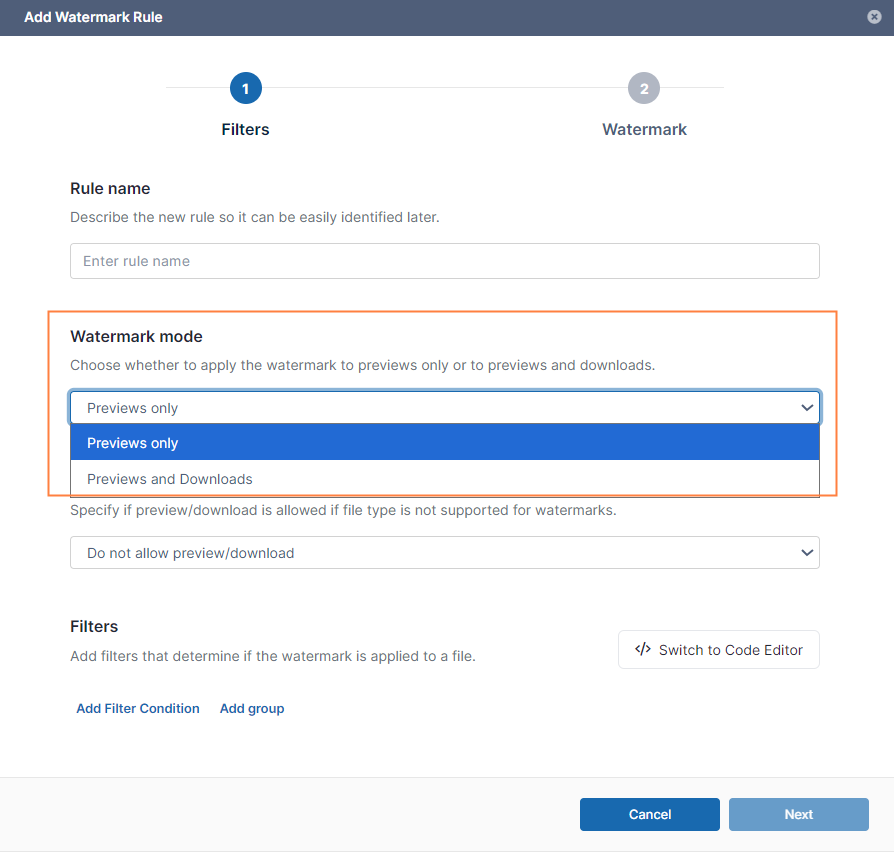
Watermarks can now be applied to downloaded files as well as previewed files.
The Add Watermark Rule wizard has the new setting Watermark mode, which you can set to Previews only or Previews and Downloads.
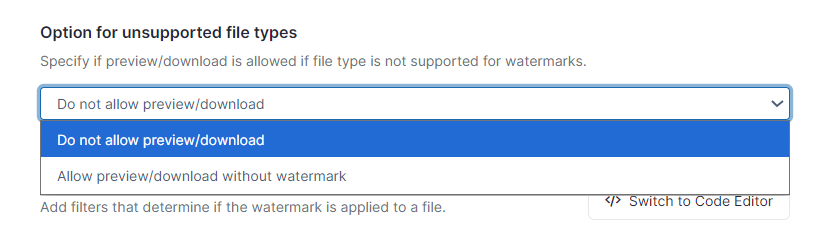
In addition, the field Option for unsupported file types has been added to allow you to choose whether or not file types that are not supported for watermarks can be previewed or downloaded if they match a watermark rule.
For more information, see Watermark Settings.
Integration of FileCloud with the Signit eSignature Platform
Signing documents through the Signit eSignature platform is now possible through FileCloud.
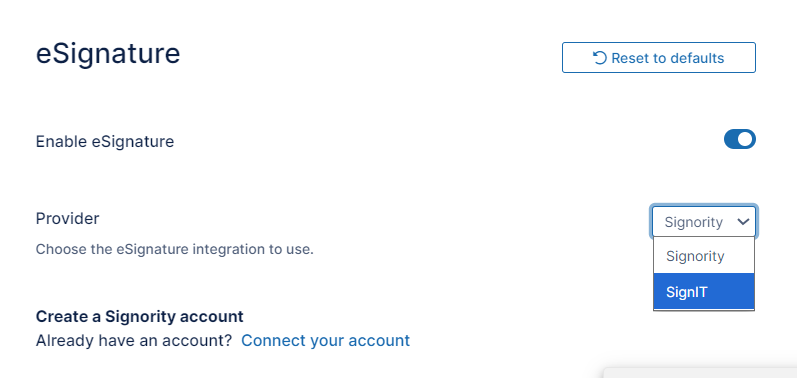
The admin portal’s eSignature settings screen now enables you to choose eSignature integration with Signit. Once you select Signit, you are presented with fields for entering the information necessary for accessing its capabilities through FileCloud.
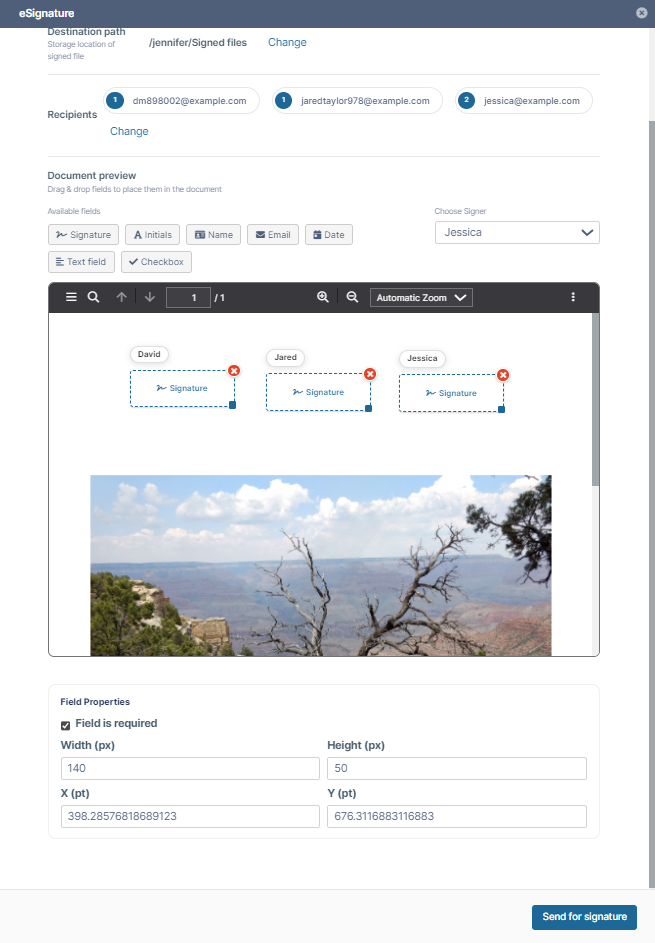
An interface for setting up a Signit eSignature document appears within FileCloud. You are not required to log in to Signit. The interface enables you to add various fields to the document for each recipient, and then send it to the recipients for eSignature.
For more information, see eSignature Integration.
UI Changes in FileCloud 23.262
Admin Portal
-
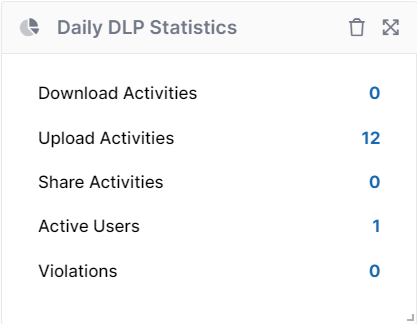
The DLP statistics widget on the Admin Dashboard has been renamed from Realtime DLP Statistics to Daily DLP Statistics as it now shows DLP statistics from the last 24 hours. In addition, the labels have been modified to more accurately describe the information conveyed by each statistic. The widget now appears as:
-
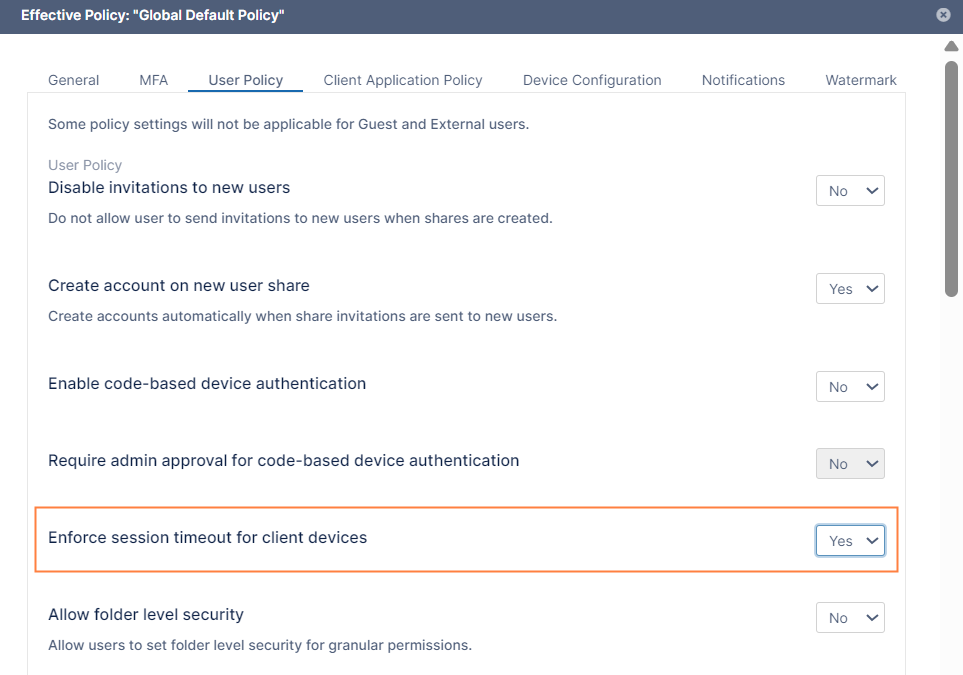
In policies, on the User Policy tab, the setting Enforce session timeout for devices using code-based device authentication has been changed to Enforce session timeout for client devices to accurately reflect its function. In addition, enabling the setting no longer requires the Enable code-based device authentication setting to be set to Yes.
See Policies.
-
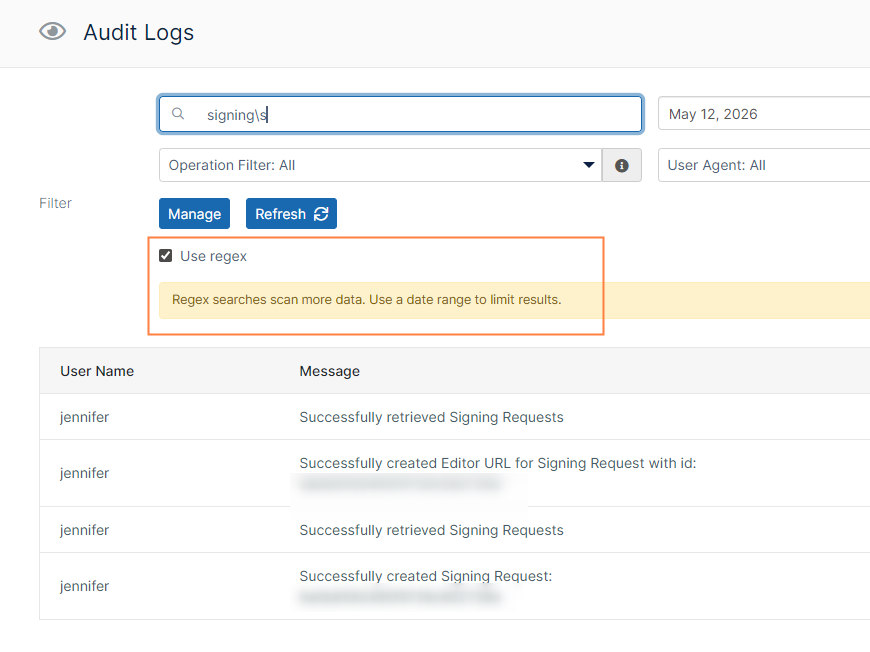
The Audit Logs page of the admin portal now has a Use regex checkbox for enabling entry of a regular expression in the search field. When you check the field, you are prompted to enter a date range in the search parameters.
-
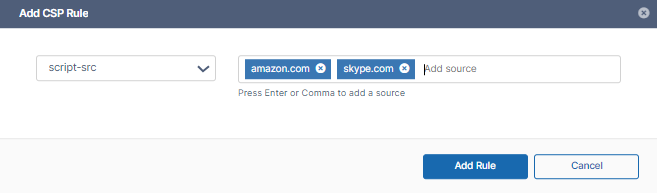
A new CSP Rules page has been added to Settings > Misc to enable admins to either disable dynamic CSP or customize it through the admin portal user interface instead of configuring it in the FileCloud configuration files.
By default, dynamic CSP is enabled and must be toggled off to disable it.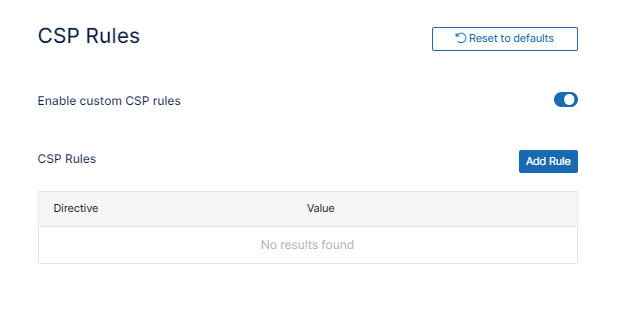
To add dynamic CSP custom rules, click Add Rule, and enter a directive and sources for each rule:
For more information, see Dynamic CSP in FileCloud .
-
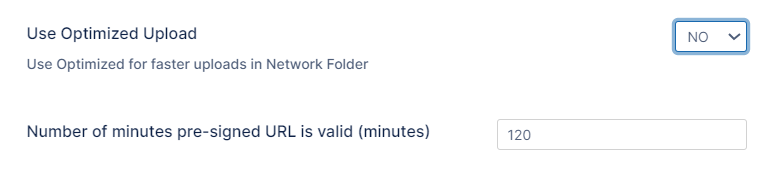
To enable admins to increase the expiry time for S3 network storage downloads, the Number of minutes pre-signed URL is valid (minutes) is now displayed in storage settings whether or not Use Optimized Upload is activated. Note that these settings are displayed on the Managed Storage settings page.
For more information, see Setting up Managed Storage or Setting up FileCloud Managed S3 Storage.
User Portal
-
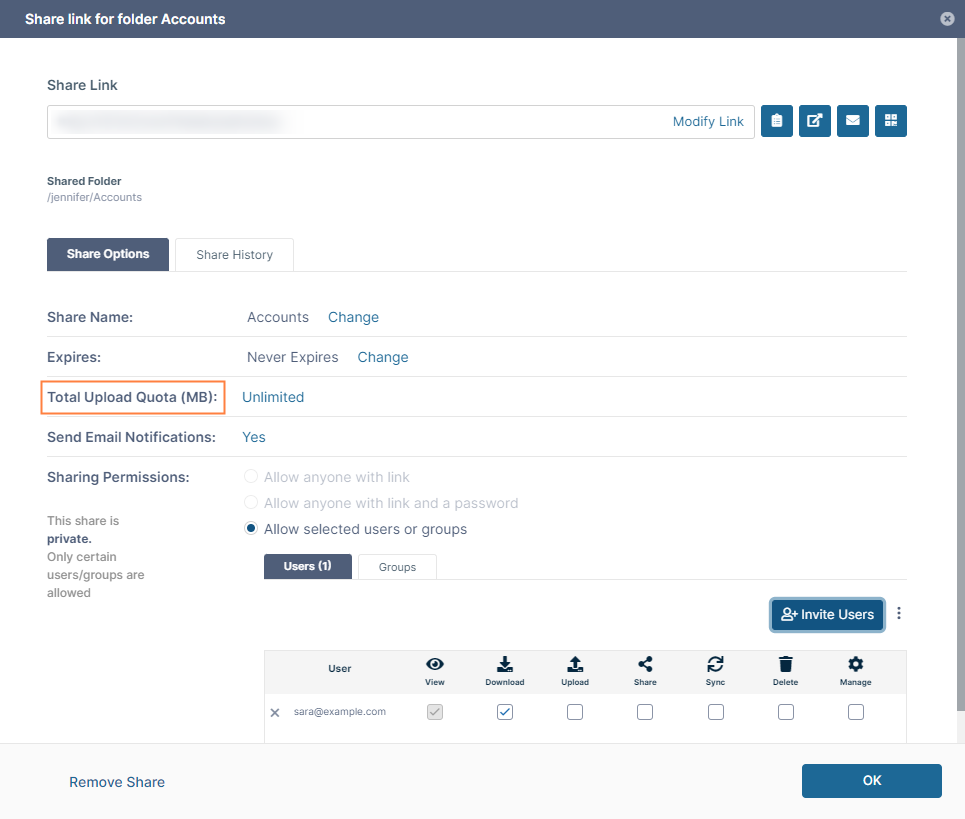
In the Share link for folder dialog box for private folder shares, the label Upload Size Limit (MB) has been changed to Total Upload Quota (MB) to clarify that the value entered represents the total upload allowance of the share, not the maximum size of an individual file uploaded.
-
In the user portal 2FA login screen, the Resend text button now appears as Resend code and displays a 60-second timer. Each time the code is sent, the timer begins and the Resend code text button appears grayed out. When the 60-second countdown completes, the Resend code text button becomes active again.
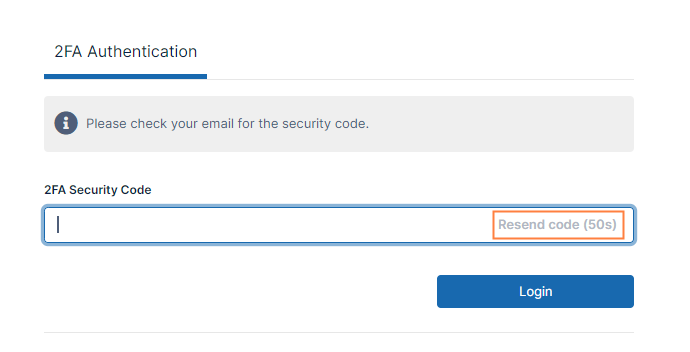
Grayed out Resend code text button with timer
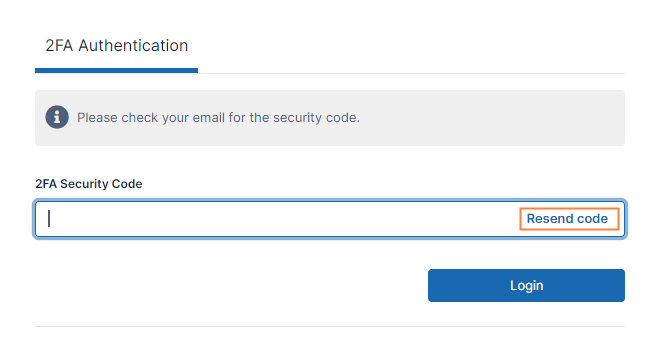
Active Resend code text button
Information for Admins
-
This version of FileCloud requires an OnlyOffice secret key of 256 characters minimum. If you are using OnlyOffice and have a secret key that is less than 256 characters, regenerate it so that it is the required length, and replace the value in the Web edit settings. See Web Editing with OnlyOffice for help.
-
To enhance security, FileCloud has disabled CBC cipher suites for TLS/SSL connections. Both RSA and ECDSA certificates remain fully supported, and the most secure compatible encryption method is selected automatically when a connection is established.
This change may affect very old browsers, operating systems, and legacy applications that rely on outdated encryption methods. If any of these software clients can no longer connect after you upgrade FileCloud, update them to a current version to restore compatibility.
-
In this release, FileCloud has added indexing for previously unindexed content. This may cause lengthier installation or upgrade times for customers with large databases.
-
After FileCloud is upgraded, the folder ../scratch/tmp is not recreated in FileCloud, causing the system to fail to save necessary short-term data. If you are upgrading FileCloud, follow the upgrade notes for your operating system to recreate the ../scratch/tmp file.
Upgrade Notes -
With this release, FileCloud has enabled OCSP stapling by default; however, this setting may prevent FileCloud from loading on airgapped systems. If you are using an airgapped system, comment out the setting in the httpd-ssl.conf file:
-
Open the httpd-ssl.conf file:
Windows location:
C:\xampp\apache\conf\extra\httpd-ssl.conf
Ubuntu location:
/etc/apache2/sites-enabled/default-ssl.conf
RHEL location:
/etc/httpd/conf.d/ssl.conf -
Locate the line SSLUseStapling On.
-
Comment it out by placing a # in front of it:
#SSLUseStapling On
-
Enhancements
|
Reference Number |
Area |
Feature |
|
Server |
|
|
|
FCL-8091 |
Audit log |
The audit log page now includes a regex search functionality for more granular searching of the audit logs. See Filter Audit Log Views. |
|
FCL-5086 |
DLP statistics |
The DLP statistics widget on the Admin Dashboard has been improved to show statistics from the last 24 hours. The widget has been renamed to Daily DLP Statistics (see UI Changes in FileCloud 23.262, above). |
|
FCL-7755 |
Login |
When a user with promoted admin privileges is logged into the FileCloud user portal and clicks Switch to Admin Portal in the navigation pane, the user is automatically authenticated and logged in to the admin portal. See Switch to Admin Portal. |
|
FCL-8090 |
MFA |
The Resend Code text button now appears grayed out until a 60-second timer completes its countdown. This prevents users from accidentally triggering code resends (see UI Changes in FileCloud 23.262, above). |
|
FCL-8345 |
Move file/folder |
Files and folders could not be moved to a location if the resulting path exceeded 255 characters. This has been fixed by requiring only the file name or folder name to be 255 characters or less. |
|
FCL-6247 |
Session timeout |
The policy setting Enforce session timeout for devices using code-based device authentication was inaccurately named because it did not only apply to devices using code-based device authentication. This has been fixed by changing the setting name to Enforce session timeout for client devices; in addition, enabling the setting no longer requires the Enable code-based device authentication setting to be set to yes. See Policies.
|
|
FCL-8855 |
Watermarks |
The ^EMAIL^ parameter is now available for the watermark text in the Add Watermark Rule wizard. See Watermark Settings. |
Server-only Enhancements
|
Reference Number |
Area |
Description |
|---|---|---|
|
Server |
|
|
|
FCL-8567 |
Apache |
The default Apache web server configuration was enhanced to further align with CIS security benchmarks. Improvements include updated log retention, OCSP Stapling enabled by default, stricter request and file access controls, restricted HTTP methods, and enhanced resource locking configuration.
|
|
FCL-4993 |
Dynamic CSP |
A new settings screen has been added to the admin portal for disabling or customizing dynamic CSP. Previously, these settings could only be configured in the FileCloud configuration files. See Dynamic CSP in FileCloud. |
|
FCL-10604 |
LibreOffice |
LibreOffice has been upgraded to version 26.2 to replace the previous version, which is approaching EOL. |
|
FCL-5060 |
S3 storage |
The Number of minutes pre-signed URL is valid (minutes), which applies to S3 network storage, was only displayed in storage settings when Use Optimized Upload was activated. Now it is also shown when Use Optimized Upload is not activated, enabling admins to increase the expiry time for downloads.
|
|
FCL-7583 |
Storage usage report |
The file for running the storage usage report was available on request from FileCloud Support; now it is included in the paths C:\xampp\htdocs\resources\backup in Windows and /var/www/html/resources/backup/ in Linux. See Export Storage Usage Report | FileCloud Help for more information. |
Security Fixes
|
Reference Number |
Description |
|---|---|
|
FCL-7393 |
The system was vulnerable to stored cross-site scripting (XSS) attacks. This has been fixed. |
|
FCL-7540 |
The DICOM viewer was upgraded from the legacy Cornerstone v2 stack to the current Cornerstone architecture to fix security issues. |
|
FCL-8018 |
MongoDB has been upgraded to version 8.0.23 to fix a security issue. |
|
FCL-8245, FCL-8246, FCL-7384 |
Various areas of the internal code in FileCloud were updated to fix security issues. |
|
FCL-10350 |
Apache has been upgraded to version 2.4.68 to fix security issues. |
Bug Fixes
|
Reference Number |
Area |
Description |
|
Server |
|
|
|
FCL-7907 |
2FA admin login, DLP |
When an admin logged in with 2FA, and a DLP rule allowed the login, the login was prevented and an invalid username or password error was returned. This has been fixed. |
|
FCL-7853 |
AD import |
When Automatic account approval was set to automatically approve new accounts to external user, on AD import they were created as full users. This has been fixed. |
|
FCL-10003 |
AD import |
Customers were unable to list or import users from Active Directory groups in the Admin portal. This has been fixed. |
|
FCL-10048 |
Admin portal UI |
The Client Device Distribution By OS widget labelled statistics with numbers instead of operating systems. This has been fixed. |
|
FCL-6577 |
Admin portal UI |
The system displayed incorrect text referring to the AD component when the DLP component was unavailable for Online Basic plans. This has been fixed. |
|
FCL-7168 |
Admin portal UI |
The Checks page in the admin portal contained a misspelling in the table headings. This has been fixed. |
|
FCL-5691 |
Audit |
Duplicate audit log entries were created for user and admin actions. This has been fixed. |
|
FCL-8491 |
Automated (user) workflows |
In the approval page in the user portal, the counter showed [number approvals]/[total approvers] instead of [number approvals]/[total approvals required]. This has been fixed. |
|
FCL-8851 |
Automated (user) workflows |
A workflow was marked as rejected when fewer than the number of required users rejected it. This has been fixed. |
|
FCL-8849 |
Automated (user) workflows |
If the number of users was equal to the number of required approvals or rejections, when the approval or rejection number was reached, the workflow did not proceed to the next step. This has been fixed. |
|
FCL-8852 |
Automated (user) workflows |
When a user shared a workflow with another user, the share recipient’s Completed and Currently Running counts for the workflow appeared as 0 even if they had values for the original user. This has been fixed. |
|
FCL-6993 |
Comments |
When a user entered a comment for a file in the user portal, if the user clicked the Add button or pressed the Enter key multiple times, multiple comments were created and multiple notifications were sent. This has been fixed. |
|
FCL-7001 |
Comments |
When a user @mentioned a group name with spaces in a comment for a file, the group name was treated as normal text. This has been fixed. |
|
FCL-9620 |
Cron |
The daily S3 cleanup Cron job encountered errors. This has been fixed. |
|
FCL-8446 |
Customization |
Upload of logo images was not working in Customization. This has been fixed. |
|
FCL-8535 |
Customization |
In Customization, after an admin chose a custom theme, and then entered a custom label, the theme reverted back to its original value. This has been fixed. |
|
FCL-9093 |
Customization |
In Customization, a logo image was not uploaded to the system although the UI showed that the upload was successful. This has been fixed. |
|
FCL-9021 |
Customization |
When certain fields in the Label settings and General settings tabs were enabled or disabled, they affected settings on the other tab. This has been fixed. |
|
FCL-7149 |
DLP |
The contains value label in the Rule Expression Builder was inconsistent with other labels and has been changed to Exists and contains value. |
|
FCL-8493 |
DLP |
Login DLP rules using email domain and IP range parameters failed to work correctly for new SSO users. This has been fixed. |
|
FCL-7907 |
DLP, MFA |
A DLP rule that allows admin login only did not work when admin MFA was enabled. This has been fixed. |
|
FCL-8544 |
Email template |
The subject was blank on some email templates. This has been fixed. |
|
FCL-7770 |
Folders |
All of a user’s Team Folder’s were not listed because the system erroneously included folders the user didn’t have permissions to view when determining if the listing limit was exceeded. This has been fixed. |
|
FCL-7816 |
Folders |
If a new folder was created with a “+” in its name, and a new file was created immediately in the folder, when the user went back to the folder, an error was returned. This has been fixed. |
|
FCL-7962 |
Governance dashboard |
In the Retention Alerts users could not sort by the Full Path and Date columns. This has been fixed. |
|
FCL-6658 |
Metadata |
Admins were able to toggle on write permissions on metadata sets for users and groups that did not have the permission available to them. This has been fixed. |
|
FCL-9754 |
MFA |
If the setting that forced promoted admins to use the admin MFA method for admin portal login was enabled, promoted admins were also required to use that method when they logged into the user portal. This has been fixed. |
|
FCL-8086 |
MFA |
The message noting that MFA had been enabled but a method had not been chosen was incorrect for non-default policies. This has been fixed. |
|
FCL-9285 |
MFA with SMS |
An error message appeared if admins did not enable MFA in the Global policy before testing Twilio integration with FileCloud. This has been fixed by no longer requiring enabling of MFA in the Global policy to perform the test. |
|
FCL-8171 |
MFA with SMS |
After MFA was disabled in the Global Default policy, in Settings > Misc > MFA, when the SMS gateway configuration was tested, it incorrectly returned that the test was successful. This has been fixed. |
|
FCL-8444 |
MFA with SMS |
In some parts of the UI, user phone numbers could be entered without validation, enabling invalid numbers to be entered, which resulted in undelivered SMS codes. This has been fixed. |
|
FCL-6869 |
Passwords |
When the password for a password-protected share began with < users received an error when attempting to access the share after sanitization. This has been fixed; now any strings cleaned by sanitization are rejected as share passwords. |
|
FCL-7071 |
Performance |
Slow queries connected to retention caused high CPU usage. This has been fixed. |
|
FCL-6274 |
Policies |
In the admin portal, when a change was made to a policy and the admin clicked Save, the dialog box remained open. This has been fixed. |
|
FCL-9634 |
Policies |
When the Require share approval workflow setting was enabled in a policy, the Select workflow drop-down list only showed the first 10 policies. This has been fixed so that it shows all policies. |
|
FCL-7739 |
Policies, Groups |
The Group Count in policies was not always correct because the EVERYONE and EXTERNAL groups were not assigned to the default policy by default. This has been fixed. |
|
FCL-6471 |
Preview |
When previewed, files in German displayed symbols in some text. This has been fixed. |
|
FCL-7795 |
Preview |
When a PowerPoint file was previewed, the icons for performing actions were not functional. This has been fixed. |
|
FCL-8577 |
Reports |
Some reports failed to run or send the report email to the admin because it assumed the admin name was ADMIN instead of checking the value set in Admin login name. This has been fixed. |
|
FCL-8174 |
SAML |
Sample certificate files from SimpleSAML were marked as a security concern. These files have been removed from the system. |
|
FCL-9046 |
Scan tool |
Running the Scan tool resulted in errors. This has been fixed. |
|
FCL-8221 |
Secure Web Viewer |
When users accessed shares in the Secure Web Viewer in Firefox, it did not show previews of the files. This has been fixed. |
|
FCL-6237 |
Shares |
Public share URLs did not display dates in the format set by the user. This has been fixed. |
|
FCL-8226 |
Shares |
When an admin created a share through a user profile, Allow selected users or groups was not selected by default in the Share dialog box. This has been fixed. |
|
FCL-8118 |
Shares |
When a share approval was sent, the Share Expires and Send Email Notifications fields showed the wrong values. This has been fixed. |
|
FCL-7071 |
Shares |
Share queries were causing performance issues. This has been fixed. |
|
FCL-8774 |
SMS |
When users initially logged in and were prompted to enter a phone number for SMS, the country code was not saved. Therefore, the SMS messages were not successfully sent. This has been fixed. |
|
FCL-12183 |
SSO |
When the SSO setting "Show the IdP Login Screen" was enabled, if users clicked direct links, they were incorrectly redirected to the IdP login screen. In the case of direct links, they should have been sent to the local FileCloud login screen. This has been fixed. |
|
FCL-9667 |
SSO API |
The setting to prioritize email as username was not working for SSO API integration, so even when users had different domains, duplicate users with just the username portion of the email were created. This has been fixed. |
|
FCL-8722 |
SSO group import |
Group import from SSO providers was timing out, and errors such as users being disabled or removed from the group were occurring. This has been fixed. |
|
FCL-7995 |
Translation |
Some settings labels were not translated to the language selected for the admin portal. This has been fixed. |
|
FCL-7427 |
Trial sites, previews |
Trial sites allowed users to navigate links within docx file previews. This has been fixed. |
|
FCL-8808 |
User portal UI, admin portal ui |
When users enabled the setting to show the Created column in their file listings, it became disabled after logging out, and had to be reset. In addition, the bolding and dot for new or changed files in both portal listings was sometimes inaccurate. These issues have been fixed. |
|
FCL-6749, FCL-7027 |
User portal UI |
Activity notifications on the user panel were missing space characters in a few places. This has been fixed. |
|
FCL-9040 |
Watermark |
When Share is Public was chosen as the filter in the first screen of the Watermark Rule wizard the error message Expression return type must be ‘boolean’ was returned. This has been fixed. |
|
FCL-8724 |
WebDRM |
WebDRM was creating duplicate keys. This has been fixed. |
|
FCL-8482 |
Workflows |
The admin workflow action “notify users” always sent a notification to the admin even if the admin was not one of the users listed to receive a notification. This has been fixed. |
|
FCL-7593 |
Workflows |
The workflow If a user’s account is older than then Disable user account disabled the Team Folder account. This has been fixed. |
|
FCL-8577 |
Workflows |
A Perform an action periodically workflow was not performing the action due to an uninitialized variable. This has been fixed. |
|
FCL-6512 |
Zip files |
When the contents of a Zip file were viewed through the user portal, some files and folders were omitted from the listing. This has been fixed. |
|
FCL-7470 |
Zip files, preview |
Users were unable to preview image files within a publicly shared zip file. This has been fixed. |
Server-only Bug Fixes
|
Reference Number |
Area |
Description |
|---|---|---|
|
Server |
|
|
|
FCL-9922 |
DocConverter |
An upgrade of LibreOffice caused FCDocConverter to crash due to incompatibility with customers' Java versions. This has been fixed by bundling a custom JRE with FileCloud. |
|
FCL-9970 |
Efficiency |
Navigation in the admin and user portals was slow in an environment using space intensive Network Folders and FileCloud Desktop. This has been fixed. |
|
FCL-7071 |
Efficiency, High availability |
A query to calculate storage was run in every Cron cycle, causing a performance issue in high availability environments. This has been fixed. |
|
FCL-7422 |
Network Folders |
After modifying the log level and other settings, a user received an error when trying to create a Network Folder. This has been fixed. |
|
FCL-8269 |
OnlyOffice, Multitenant |
Regardless of the default language set for the user portal in the admin portal server settings, if no language was set by the user in the user portal settings, the user interface defaulted to English. This has been fixed. |
|
FCL-7553 |
Seed tool |
The seed tool was not successfully migrating all files and folders from local storage to blob storage. This has been fixed. |
|
FCL-6395 |
ServerLink |
Improvements were made to reduce the possibility of parallel processing of remote files download in ServerLink. |