.svg)
Major Release
FileCloud server version 23.263.0.35023
GA release date: October 6, 2026
Installation and upgrade information
Installing FileCloud Server Upgrade Notes
SHA256 release checksums
-
filecloudupdate.zip c5982678e6eb44ce89b5aa60ba8ab5e9d51f4fe44239cd52c8c1f0e3c574d6de
-
FileCloudSetup.exe f7e852721b6ab9a17a8f576feee1e35dd7375ee8d449978d0730de6a202695f5
Security Advisories
UI Changes in FileCloud 23.263
Admin Portal
-
Behavior Change: In Notification settings, the File change email frequency setting’s description now indicates that the value is measured in minutes. Previously, it erroneously stated that the value was measured in seconds.

-
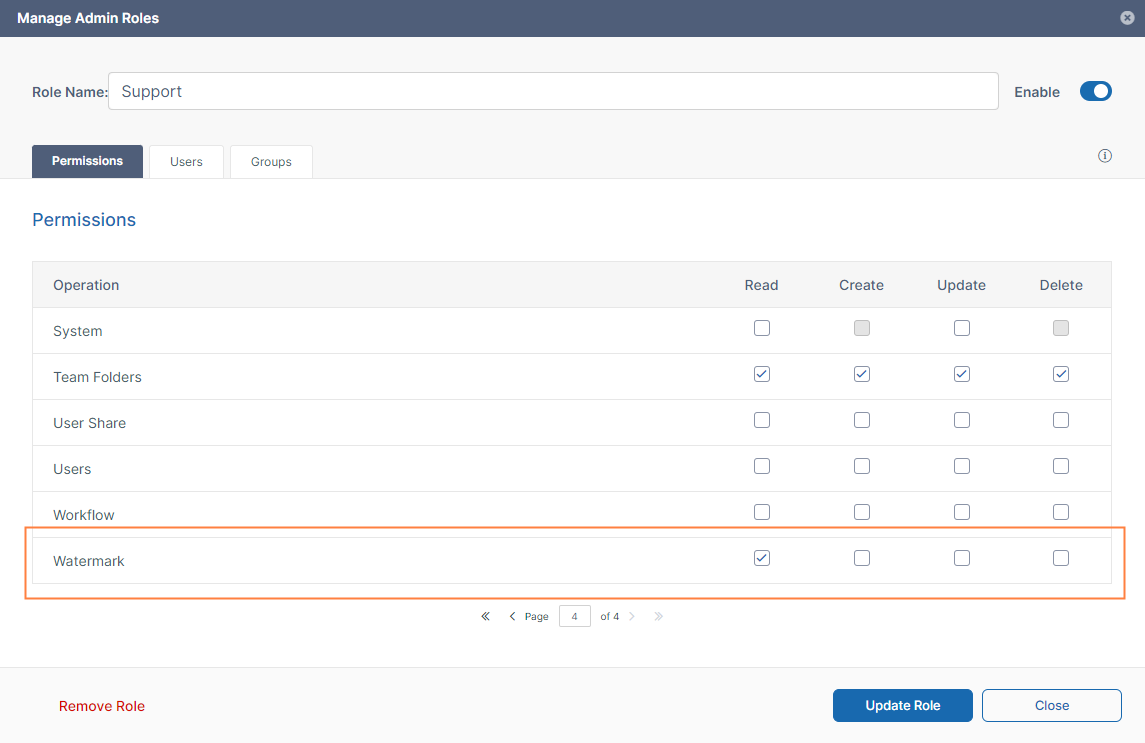
Permissions available for the roles listed on the Admins (Manage Admin Roles) page, now include Watermark permissions. These permissions now control promoted admins' ability to view, create, edit, and delete watermarks.
Information for Admins
-
In prior versions, when a parent folder was renamed or moved, notifications were sent for the folder action and all of the items contained in the folder. To reduce notifications, beginning in FileCloud 23.263, a notification will only be sent for the parent folder.
-
Previously, promoted admins required roles with System/update permission to change an Email Template’s subject. Now, they require roles with Customization/update permission. See Admin User and Role Settings for information about roles and permissions.
-
As a security enhancement, FileCloud will remove certain deprecated cryptographic algorithms from its codebase.
What you can do to prepare:-
On-Prem customers with a license issued before April 2024: Request a reissued license.
-
Online customers: No action needed to update your license; it will be updated automatically.
-
-
If you are using Signit as your eSignature application, please do not update or delete the API app you have created in Signit, as this will change the webhook secret which will prevent connection between FileCloud and Signit.
If you inadvertently update or delete the API app:-
Delete the webhook in Signit.
-
Go to the eSignature settings page in FileCloud and click Reset to defaults.
Reset is required to trigger FileCloud to generate a new webhook in the next step. -
Re-enter your FileCloud Client ID and Client Secret (from the Signit API application).
Now FileCloud generates a new webhook in Signit, and your connection between FileCloud and Signit is enabled again.
-
-
In this release, FileCloud has made improvements to the way folders are stored to prevent data redundancy and orphaned files. If you are upgrading FileCloud, storage will be restructured during the upgrade process. Please see the Upgrade Notes to prepare for the restructuring process and understand how it will affect your upgrade.
Enhancements
|
Reference Number |
Area |
Feature |
|
Server |
|
|
|
FCL-11052 |
Notifications |
In prior versions, when a parent folder was renamed or moved, notifications were sent for the folder action and all of the items contained in the folder. To reduce notifications, beginning in FileCloud 23.263, a notification will only be sent for the parent folder. |
|
FCL-9881 |
SCIM |
FileCloud's SCIM integrations with identity providers (IdPs) such as Azure AD, Okta, and OneLogin now follow the SCIM 2.0 standard more closely to avoid provisioning errors. |
|
FCL-8807 |
Shares |
In the share screen, the Share History showed a relative time (such as 3 days ago) for each action. Now it shows the exact date and time of each action. |
|
FCL-10661 |
Solr |
To perform Solr indexing more quickly, instead of creating a queue of all files and then seeing which files are already indexed by Solr, FileCloud now only selects files for the queue if they have not been indexed by Solr. |
|
FCL-10370 |
Solr |
Instead of creating a separate indexing job each time a file is changed, FileCloud now keeps a pending indexing job per file and updates the pending job each time the file is changed before the job is run. This enables Solr indexing to be quicker and more efficient. |
|
FCL-11112 |
SSO |
Admins are now able to configure SSO login with Google, Okta, and Entra ID IdPs to sync a user’s group memberships on login. |
|
FCL-8580 |
SSO group import |
The dialog box for choosing groups to import from SSO providers now has a search bar. |
|
FCL-9879 |
Usernames |
A setting that allows FileCloud to automatically resolve duplicate username conflicts during automated user provisioning now applies to SAML SSO and SCIM provisioning. Previously, this only applied to AD/LDAP and SSO API imports. Instead of rejecting the import when the requested username is already taken, FileCloud creates the new account with the modified username |
Security Fixes
|
Reference Number |
Description |
|---|---|
|
FCL-6153 |
The GWT-based UI has been removed from the product to improve security. |
|
FCL-8243 |
A path traversal vulnerability in FileCloud has been fixed. |
|
FCL-10983 |
PHP has been updated to version 8.4.24 to fix a security issue. |
|
FCL-12316 |
MongoDB has been update to version 8.0.29 to fix security issues. |
Bug Fixes
|
Reference Number |
Area |
Description |
|
Server |
|
|
|
FCL-10356 |
AD |
The reset password option for users in the admin portal was available for AD users although their passwords cannot be changed from FileCloud. The option is no longer clickable. |
|
FCL-13022 |
AD, groups |
AD groups and corresponding FileCloud groups were not properly syncing. This has been fixed. |
|
FCL-10429 |
Admin portal UI |
In the admin portal, when the admin clicked the Deleted Files/Folders option, the breadcrumbs for the page showed Deleted Files. The breadcrumb has been fixed to show Deleted Files/Folders. |
|
FCL-9632 |
Admin portal UI |
In the admin portal, when the last user shown a paginated page was deleted, the refreshed screen showed no users. This has been fixed. |
|
FCL-9955 |
Admin portal UI |
On the OnlyOffice Web edit screen, the secret key did not appear when the eye icon was clicked. This has been fixed. |
|
FCL-8871 |
Admin portal UI |
In the Manage Admin Roles screen, when a role was opened for edit and the name was changed, no update button appeared and the name was not changed. This has been fixed. |
|
FCL-6186 |
Admin portal UI |
In the MFA Settings page, the SMS admin token field did not clear when it was first clicked on to enter a value. When a value was saved and the admin clicked the eye icon, the value was not shown. These issues have been fixed. |
|
FCL-10428 |
Admin portal UI |
The Version Information widget appeared with slight differences in the Admin portal dashboard and the Upgrade screen. They now appear the same. |
|
FCL-10213 |
Admin portal UI |
In the Server settings page, the Service URL field sometimes lost focus, making it difficult to complete the entry. This has been fixed. |
|
FCL-9553 |
Admin portal UI |
The File change email frequency setting’s description indicated that the value was measured in seconds instead of minutes. This has been fixed. |
|
FCL-8135 |
Admin portal UI |
When a network share was edited in the admin portal, the Manage Users and Manage Groups screens sometimes appeared blank. This has been fixed. |
|
FCL-12684 |
Admin portal UI |
The control for choosing the start and end dates for audit records did not show dates past January 2026. This has been fixed. |
|
FCL-12741 |
Audit logs |
Audit logs could not be searched by date or exported. These issues have been fixed. |
|
FCL-11891 |
Admin workflows |
The user_account_type parameters were not effective in user workflows, so instead of an action being performed for the specified user, it was performed for all users. This has been fixed. |
|
FCL-11492 |
Automated (user) Workflows |
Misalignment issues in the Arabic user interface have been fixed. |
|
FCL-10427 |
Automated (user) Workflows |
An edit icon that did not have a function appeared beside the Trigger name in the second window of the workflow wizard. The icon has been removed. |
|
FCL-8998 |
Automated (user) Workflows |
When users viewed long workflows, they could not see the right panel on the screen. This has been fixed. |
|
FCL-4728 |
Automated (user) Workflows |
When users zoomed a page in their browsers, the connector lines in workflows sometimes broke. This has been fixed. |
|
FCL-10891 |
Automated (user) Workflows |
When a user added a Set Metadata Attribute Value step to a workflow and chose an enumeration metadata attribute, the Update to drop-down list was empty. This has been fixed. |
|
FCL-2399 |
Comments |
When external users were enabled to add comments to shares, they were unable to save a comment with an email address in it. This has been fixed. |
|
FCL-8925 |
Daily DLP Statistics |
The Daily DLP Statistics widget did not show all records when the links for the Download, Upload, and Share Activities were clicked. This has been fixed. |
|
FCL-1722 |
Date format, shares |
When the date format was changed in the admin portal settings or the user settings, the new format was not reflected in the share windows for user shares and Team Folders. This has been fixed. |
|
FCL-11590 |
Downloads, watermarks |
When watermarks were enabled, downloads of ZIPs of Office files larger than the 20 MB or the set limit failed. Now these files are skipped, and skipped appears beside them in the opened ZIP file. |
|
FCL-10615 |
Email templates |
When a QRCODE placeholder was inserted into an Email Template, the email did not display the code. This has been fixed. |
|
FCL-9638 |
Email templates |
When the contents of the Notification Email Template were deleted and new content was entered, the new content could not be saved. This has been fixed. |
|
FCL-12507 |
eSignature |
On the eSignature dialog box for changing the destination path, the Change link was too far to the right. This has been fixed. |
|
FCL-12508 |
eSignature |
On the eSignature dialog box for adding recipients, the recipients were added in white text on a white background and were invisible. This has been fixed. They are now added in black text on a white background. |
|
FCL-8707 |
Move |
When users attempted to move more than 100 files from one folder to another, only 100 files were moved. This has been fixed. |
|
FCL-10500 |
Password, share |
Public password-protected share passwords were rejected during validation if they included the character < or >. This has been fixed. |
|
FCL-10977 |
Preview |
An issue causing previews of PSD files to fail has been fixed. |
|
FCL-11172 |
SCIM |
When SCIM calls were used to sync user attribute updates in Okta with FileCloud, the user Access Level in FileCloud was changed to External although that attribute was not changed. This has been fixed. |
|
FCL-6965 |
Settings |
Some UI settings were saved with trailing spaces, which caused errors. This has been fixed by removing trailing spaces when UI settings are saved. |
|
FCL-8571 |
Shares |
An issue preventing modification of a share link from the admin portal has been fixed. |
|
FCL-10688 |
Shares |
Admins no longer had the ability to change a share owner when managing a user’s shares. This has been fixed. |
|
FCL-12040 |
Shares |
When a share owner who was not logged in to FileCloud tried to access the share link, after login, the user interface showed an error. This has been fixed. |
|
FCL-13288 |
Signit |
When users clicked the test connection on the Signit configuration page, the message Signit webhook is not configured was returned. This has been fixed. |
|
FCL-12520 |
Signority |
When the audit trail setting was configured to combine the audit trail with the signed document they were created as separate files. This has been fixed. |
|
FCL-12496 |
Signority |
On the admin portal screen for connecting to Signority, the API Key field should appear only after an admin created a fresh account or connected to their existing account, but it appeared at all times. This has been fixed. |
|
FCL-7606 |
SSO |
The value of Initial User Web Portal Path entered in Customization > URL Configuration was not effective for SSO users. This has been fixed. |
|
FCL-11477 |
SSO |
When Default SSO type was set to None Enabled and Show the Idp login screen was enabled, the user was incorrectly redirected to the IdP screen for login. This has been fixed. |
|
FCL-11679 |
SSO |
Promoted admins were unable to authenticate using SSO when they switched from the user portal to the admin portal using the Switch to Admin Portal button. This has been fixed. |
|
FCL-10324 |
Superadmin portal UI |
The superadmin portal had a User Website link in the user drop-down list. This has been removed. |
|
FCL-10349 |
Team Folders |
Removing the Upload permission from a Team Folder automatically caused the Delete permission to be checked. This has been fixed. |
|
FCL-7277 |
Team Folders, Admin portal UI |
In the admin portal, the option in the drop-down list for deleting multiple files and folders in Team Folders did not appear. This has been fixed. |
|
FCL-8869 |
User portal UI |
There was no delete confirmation shown when a user right-clicked on a file and deleted it. This has been fixed. |
|
FCL-10221 |
User portal UI |
If admin MFA was set to SMS and the logged in user was a promoted admin without a phone number entered and the user clicked Switch to Admin Portal, the user was not prompted to set up a phone number for SMS and could not receive the code. This has been fixed. |
|
FCL-2244 |
User portal UI, Locks |
When the Locked Files and Folder screen in the user portal had more than one page of locks (more than 10 locks) it did not display the total count of locked items. This has been fixed. |
|
FCL-10360 |
User portal UI, Network shares |
When a user selected an item in Network Shares and viewed the Activity tab, the EXTERNAL path did not have a leading /. This has been fixed. |
|
FCL-6862 |
User workflows |
The following improvements have been made to the workflow interface:
|
|
FCL-2711 |
User Workflows |
User workflows using the trigger Automatically on a metadata activity were unable to resolve Started by user variables in emails. This has been fixed. |
|
FCL-12650 |
Watermarks |
Promoted admins (Admin users) were unable to view the files listed on the Watermarks tab in user policies. This has been fixed by adding watermark permissions for roles, and enabling promoted admins to view the watermarks listed if the View permission for Watermarks is checked.
|
Server-only Bug Fixes
|
Reference Number |
Area |
Description |
|---|---|---|
|
Server |
|
|
|
FCL-8177 |
Encryption |
Encryption could not be enabled on FileCloud after it was installed on a FIPS-enabled Ubuntu machine. This has been fixed. |
|
FCL-9780 |
Network Share Scanner |
An issue preventing files from appearing in the search index after adding network shares to a system that's already running has been fixed. |
|
FCL-9775 |
Network Share Scanner |
Restarting a node caused network shares to be managed by two nodes at once, leading to duplicate indexing. This has been fixed. |
|
FCL-10722 |
Network Share Scanner |
Some network share changes that occurred while the Network Share Scanner was down were not captured when it restarted. This has been fixed. |
|
FCL-9781 |
Network Share Scanner |
The Network Share Scanner was exiting after detecting a share whose ownership changed, leaving the share unmonitored until the Network Share Scanner was automatically restarted by the system. This has been fixed. |
|
FCL-10564 |
Solr |
Solr OCR failed to clean up thousands of files in the /tmp folder. This has been fixed. |
|
FCL-12043 |
Solr |
Clicking Reindex or Sync multiple times in the Content Search screen caused duplicated events to be produced in the message queue. This has been fixed. |