.svg)
As an administrator, you can read log files as an important part of maintaining proper operation and ensuring system security of your FileCloud site.
-
Log files can be extremely useful in troubleshooting issues
-
Only an Administrator can read FileCloud log files
To view the audit log, in the navigation panel, click Audit.
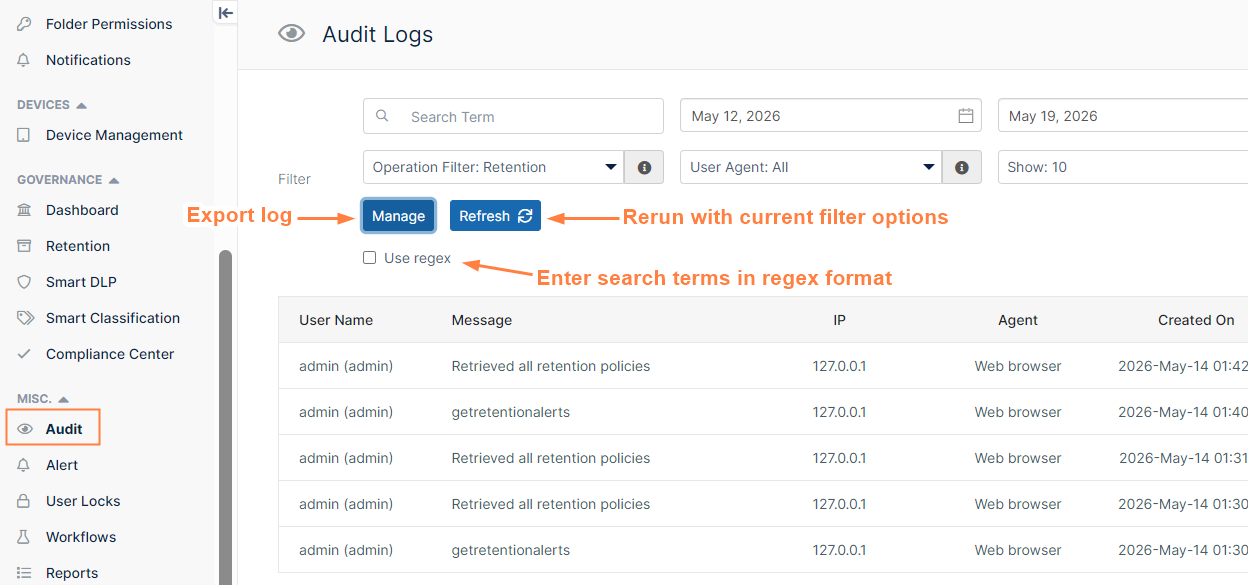
At the top of the Audit Logs screen are fields that enable you to filter log results. Below them, a Manage button opens a dialog box for exporting the log to a csv file and downloading it. A Refresh button regenerates the log with the current filter settings. When checked, Use regex enables you to enter search terms in regex format.
The main portion of the Audit Log screen lists the audit log entries. Each entry includes the following information:.
|
User Name |
Name of the user account |
|---|---|
|
Message |
The descriptive message for the audit record For example, USER1 logged in FAIL |
|
IP |
The IP address from which the event occurred |
|
Agent |
Indicates how FileCloud was accessed. For example:
|
|
Created On |
The date and time when the event was logged |