.svg)
Problem
In the following scenarios, FileCloud Drive users may see a blank error message when connecting:
Attempted Retry without Admin Intervention
-
A new device using FileCloud Drive tries to login to the FileCloud Server site.
-
An error notification appears without providing any text.
-
The FileCloud user clicks OK in the error message dialog box and then exits FileCloud Drive.
-
The user tries to open FileCloud Drive again.
-
An error notification appears without providing any text.
Attempted Retry with Admin Intervention
-
A new device using FileCloud Drive tries to login to the FileCloud Server site.
-
An error notification appears without providing any text.
-
The FileCloud user clicks OK in the error message dialog box and then exits FileCloud Drive.
-
The administrator logs on to the Admin Portal and deletes the device.
-
The user tries to open FileCloud Drive again.
-
An error notification appears without providing any text.
Cause
This is a known issue when all of the following conditions are set:
|
Condition |
For more information |
|---|---|
|
The Administrator enables and configures two-factor authentication |
|
|
The Administrator creates and configures a workflow to block client access |
|
|
You are running FileCloud Server version 18.1 or earlier |

Resolution
This issue is fixed in FileCloud Server 18.2.
When the following conditions occur:
-
The Administrator enables and configures two-factor authentication
-
The Administrator creates and configures a workflow to block client access
-
You are running FileCloud Server version 18.2 or later
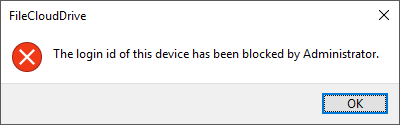
The FileCloud Drive user now sees the error message with text: