.svg)
Client Device configuration settings can be configured remotely by specifying the configuration XML using policies.
For most clients, if the user changes the configuration locally, then the remote settings configured by the Administrator will override those settings the next time the client refreshes its settings.
To set FileCloud Drive for mac device configuration in a policy:
-
In the FileCloud admin portal's left navigation bar, scroll down and click Settings. Then, on the Settings navigation page, click Policies

The Policies settings page opens.
.png?cb=f11a08db8bd48fc3b7c4186cbd5a4c98)
-
Edit the policy of the users whose client device settings you want to modify.
-
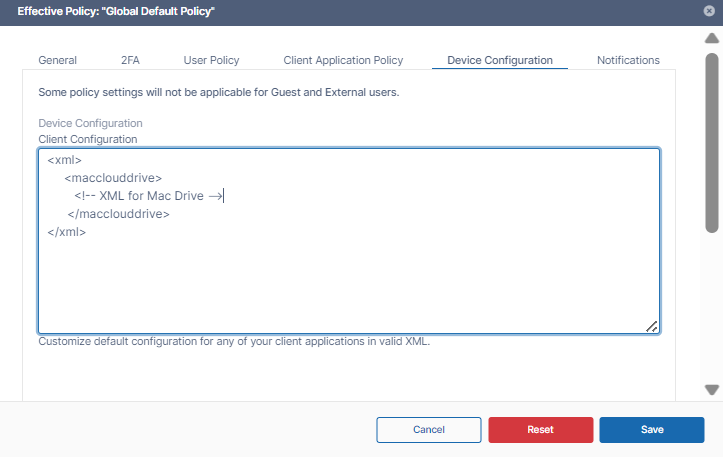
Click the Device Configuration tab.
-
Paste or type in the following remote device configuration XML in Device Configuration replacing <!-- XML for Mac Drive --> with any parameters from the table below.
<xml>
     <macclouddrive>
        <!-- XML for Mac Drive -->
      </macclouddrive>
</xml>
Supported parameters for FileCloud Drive for Mac. All parameters are optional. Add one of more of these parameters (as XML tags) in the <macclouddrive> tags in the XML.
|
Parameter (XML Tag) |
Value |
Example |
|---|---|---|
|
maxdownloadsizeinmb |
Assigns the maximum single file download limit to the supplied value. The download limit does not apply to the following file types: .txt, .rtf, .doc, .docx, .xls, .xlsx, .ppt, .pptx, and .indd. |
<maxdownloadsizeinmb>100</maxdownloadsizeinmb> |
|
driveloginmode |
Setting this to "0" will cause filecloud drive to use username/password to log into the Filecloud server. Setting this value to "1" will cause drive to use device code authentication mode |
<driveloginmode>1</driveloginmode> |
|
drivelockonupdate |
Setting this value to 1 will enable automatic lock on edit function in FileCloud Drive. Setting this to 0 will disable the drive's lock on edit function |
<drivelockonupdate>1</drivelockonupdate> |
|
drivemutemessages |
Setting this value to 1 will disable system tray notifications being shown to the user. |
<drivemutemessages>1</drivemutemessages> |
|
driveopenexploreronstartup |
Setting this value to 1 will automatically open finder when drive starts up and 0 will disable it. |
<driveopenexploreronstartup>1</driveopenexploreronstartup> |
|
checkupdates |
Setting this value to 1 will enable automatic checking for new versions of FileCloud Drive for Mac and setting this value to 0 will disable it. |
<checkupdates>1</checkupdates> |
|
disableprecaching |
Setting this value to 1 disables precaching.
|
<disableprecaching>1</disableprecaching> |
|
disableautologin |
By default, once a drive is mounted, the authentication will be reused on every FileCloud Drive for Mac start ups. Setting this key to 1 will require authentication from user on every start up. |
<disableautologin>1</disableautologin> |
|
currentlanguage |
Currently available languages. |
<currentlanguage>english</currentlanguage> |