.svg)
The current version of FileCloud runs FIPS mode using FIPS 140-3, which does not support encrypted managed storage on RHEL9. If you are planning to use FileCloud on RHEL9 in FIPS mode, please Contact FileCloud Support .
If you are running FileCloud in a high availability environment, to upgrade to the latest version, please Contact FileCloud Support.
FileCloud Support can help you upgrade or can provide a PDF with instructions if you would like to perform the upgrade without assistance.
Pre-upgrade
-
As always, make a full backup of your existing installation before upgrading.
Backup on Linux -
If you are using native LDAP for authentication and using non-TLS connections set the LDAP Host value to ldap://hostname. Older FileCloud versions supported host value without the protocol definition ldap://
-
Beginning in FileCloud 23.253, by default, a more granular dynamic content security policy replaces the existing content security policy in the .htaccess file. If you are upgrading, to make this change effective, you must make a small change to the Content-Security-Policy header in the .htaccess file:
-
Open the .htaccess file.
in Windows:
C:\xampp\htdocs\.htaccessin Linux:
/var/www/html/.htaccess -
Find the line that begins:
Header set Content-Security-Policy: -
Change set to setifempty:
Header setifempty Content-Security-Policy: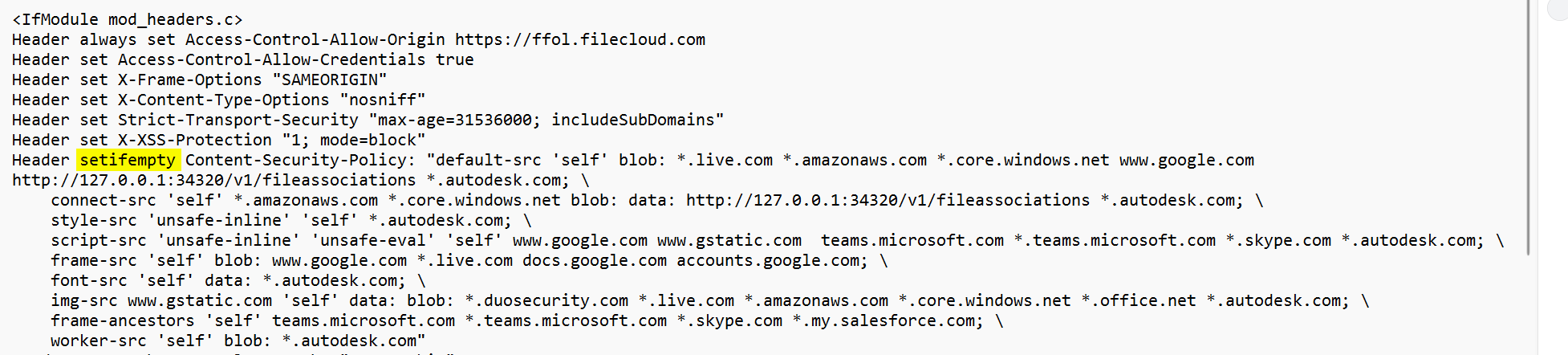
-
-
If you have added custom rules to the .htaccess file, they will be overridden by the dynamic CSP feature. To solve this:
Either:
Disable the dynamic CSP feature with the setting TONIDOCLOUD_DYNAMIC_CSP_ENABLED. See Dynamic CSP in FileCloud.Or:
Add the custom rules to the setting TONIDOCLOUD_DYNAMIC_CSP_EXTEND.To add the custom rules:
-
On the FileCloud Server, open the cloudconfig file:
In Windows:
C:\xampp\htdocs\config\cloudconfig.phpIn Linux:
/var/www/html/config/cloudconfig.php
-
Add the setting in the format:
define("TONIDOCLOUD_DYNAMIC_CSP_EXTEND",directive:source,source;[directive:source,source;]);
for example:
define("TONIDOCLOUD_DYNAMIC_CSP_EXTEND", "script-src:amazon.com;worker-src:amazon.com,google.com;");
-
-
If your system uses ServerLink, follow these steps:
-
Before upgrade, ensure all ServerLink nodes are fully synced and are at the same state.
-
Make backups of all nodes as needed.
-
Stop the FileCloud ServerLink client service in secondary nodes.
-
Upgrade the primary node first.
-
Upgrade each secondary node after upgrading the primary node.
-
Start the FileCloud ServerLink client service in secondary nodes. (In HA setups, client service must run only in one of the servers from each secondary node.)
-
Note: All connected ServerLink nodes, both primary and secondary, must be upgraded to the same ServerLink version before enabling access to the site again.
-
If you have installed the Network Share Scanner in a previous version, you are required to make some changes to the associated configuration files:
-
In /opt/fceventapi/config.yaml
-
If you see the line data_path: data, delete it.
-
If the field orchestrator is not set to etcd, change it to etcd:
orchestrator: etcd
-
-
In /opt/fcnetworksharescanner/maestro-config.yaml
-
If you did not make changes to maestro-config.yaml previously:
Replace the content of maestro-config.yaml with the content of maestro-config.dist.yaml. -
If you made changes to maestro-config.yaml previously:
Add the changes to maestro-config.dist.yaml, then remove maestro-config.yaml.
Rename maestro-config.dist.yaml to maestro-config.yaml.
-
-
In /opt/fcnetworker/networker-config.yaml
-
If you did not make changes to networker-config.yaml previously:
Replace the content of networker-config.yaml with the content of networker-config.dist.yaml. -
If you made changes to networker-config.yaml previously:
Add the changes to networker-config.dist.yaml, then remove networker-config.yaml.
Rename networker-config.dist.yaml to networker-config.yaml.
-
-
Upgrade instructions
-
Upgrade using the steps at Upgrade FileCloud on Linux .
Post-upgrade
FileCloud iOS mobile users
After you upgrade to FileCloud 23.261, to use FileCloud, iOS mobile users must upgrade to iOS 16+ and FileCloud 23.261.