.svg)
You can use system tray icons to quickly access menu options for opening the FileCloud Drive dashboard, navigating to drive in file explorer, searching for files and exiting FileCloud Drive.
To open the right-click menu:
-
In the lower right corner of your Windows desktop, open the system tray.
-
Right-click on the FileCloud Drive icon.
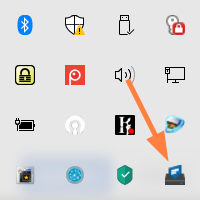
The menu of options opens:
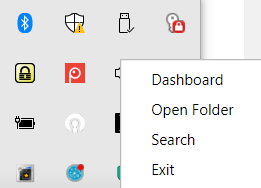
Option
Description
Dashboard
Opens a window of FileCloud Drive activity and settings.
Open Folder
Launches an explorer window that displays the contents of the mounted drive volume. If the remote server is not available or configured then nothing is launched.
Search
Opens a FileCloud Drive Search window where you can type in a keyword, browse to a specific folder, and set Advanced Search options. For more information, read Searching in Drive.
Exit
Unmount and exit FileCloud Drive application.