.svg)
Major Release
FileCloud server version 23.242.0.29412 FileCloud client version 23.242.0.9064
GA release date: March 31, 2025
Installation and upgrade information
SHA256 release checksums
-
filecloudupdate.zip 8d6ccd6d3ea0ffd3d27c456171fb7ad0f96461f8a385e12c36882346578e850c
-
FileCloudSetup.exe 947a4d29f153598713d893198cb6a635990c18843abc19f6883f97d1977b7884
Major new features
New User Interface for Settings
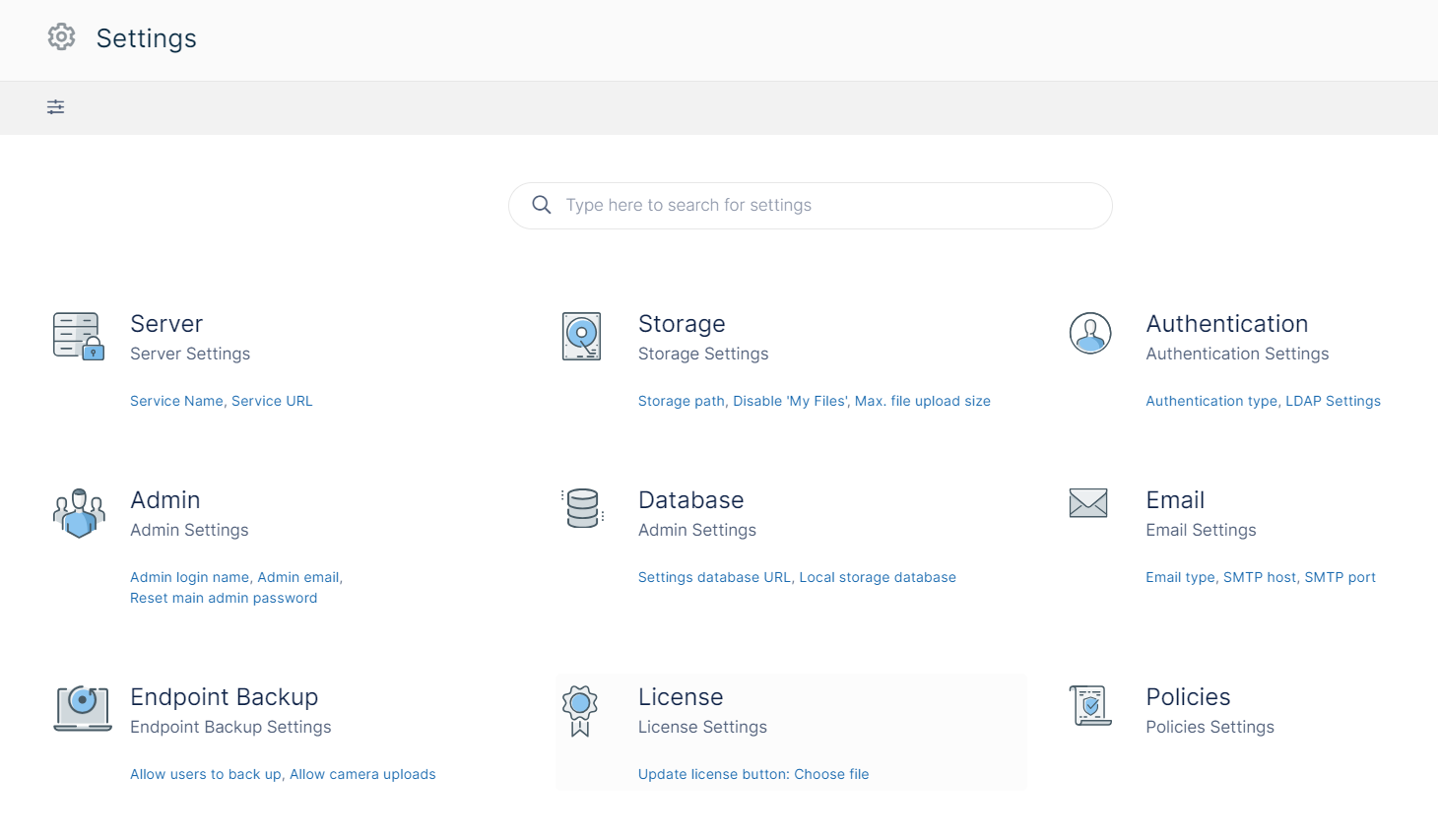
With Version 23.242, FileCloud has added a new admin portal interface for settings, which includes a search function. The search function enables you to configure settings without having to know which page they appear on.
The new Settings home page shows the top-level settings in a tabular format.
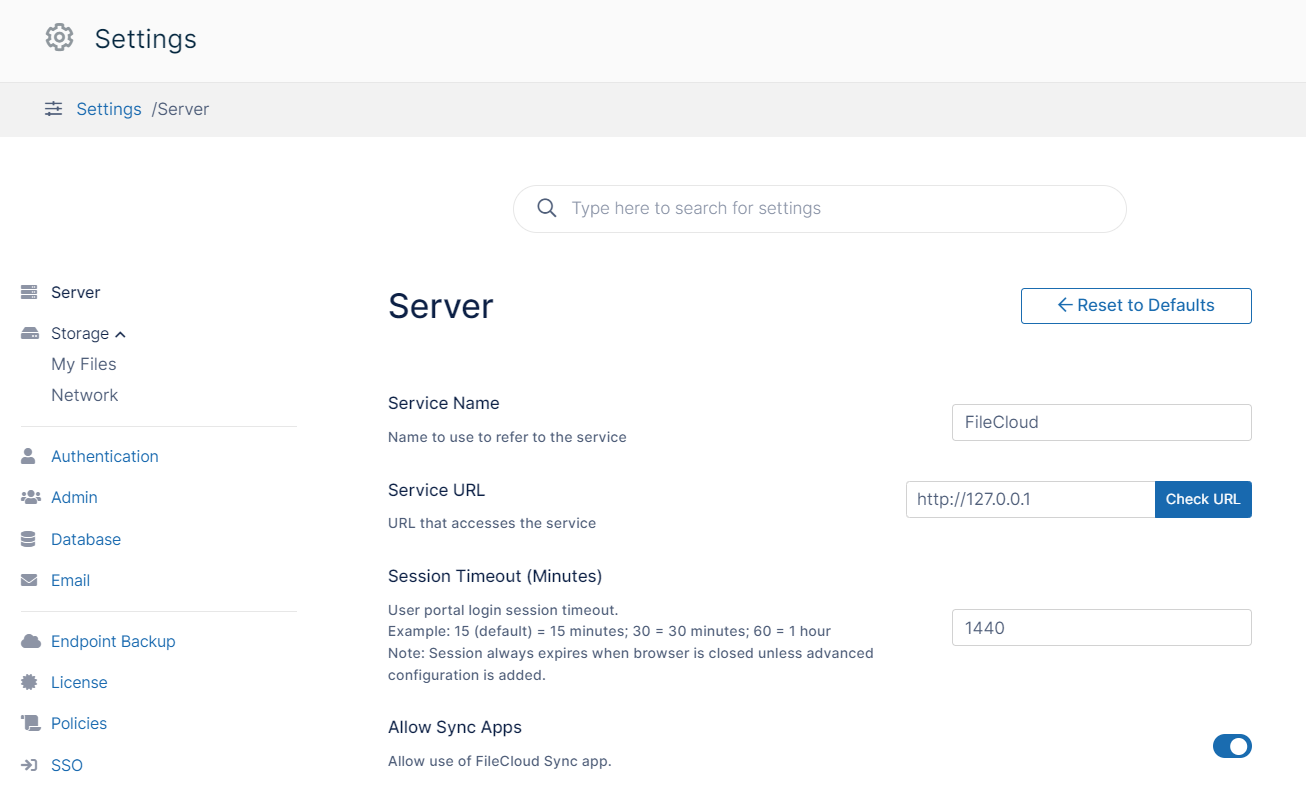
When you click a setting category, you are taken to a page that is similar to those of previous versions but places the additional settings in a navigation panel instead of page tabs.
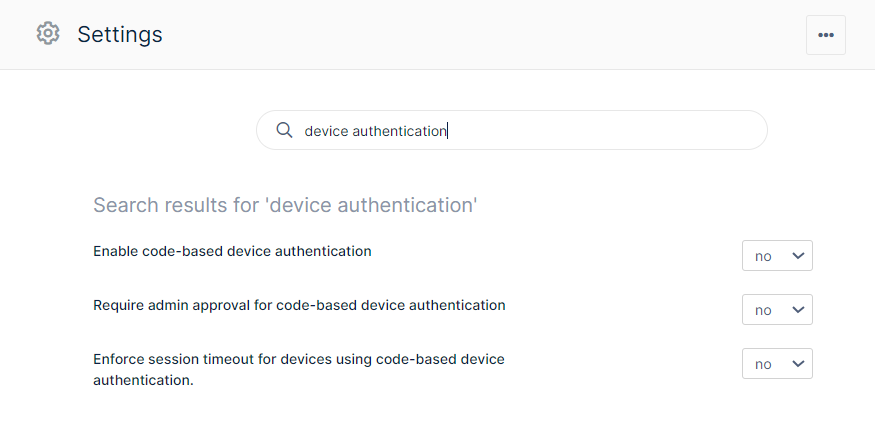
When you enter a setting in the search bar, you are shown matching settings, and you are given the ability to change the value of a setting from there.
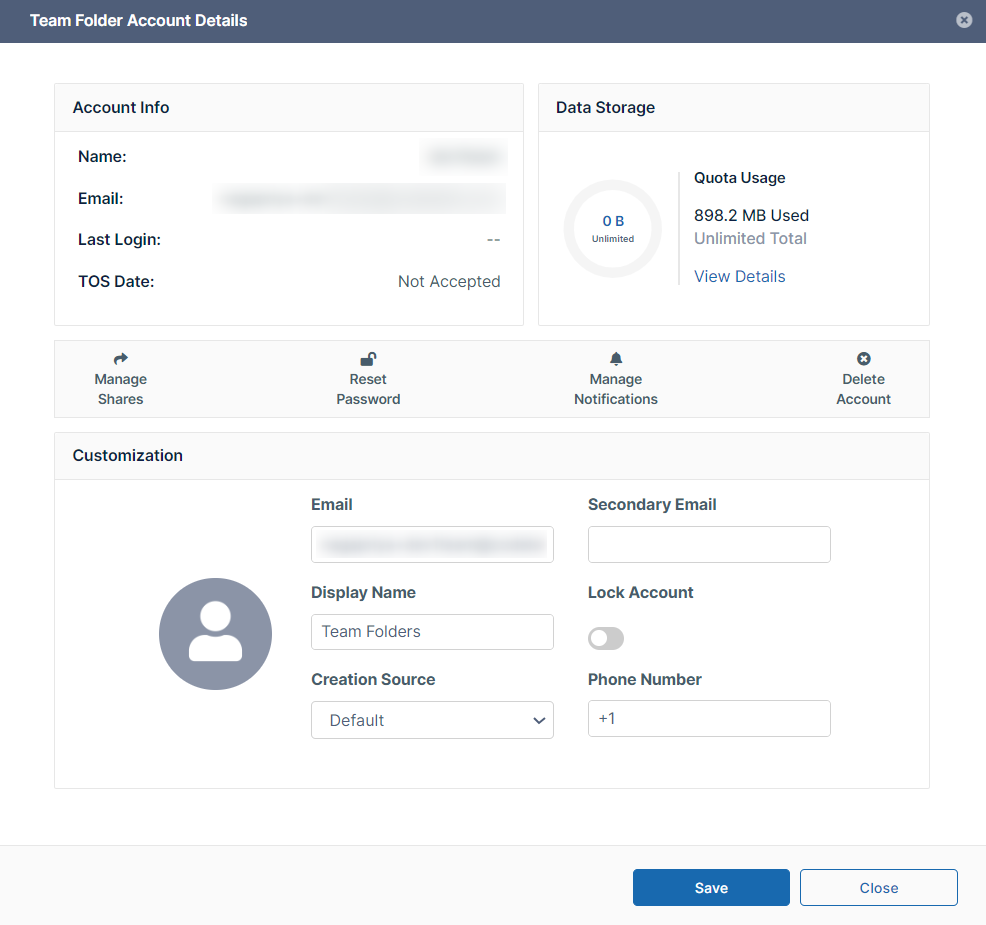
Team Folder Account Details
The new Team Folders settings page gives you access to a Team Folders Account Details dialog box that shows you information about your Team Folder account and enables you to change its settings.
For help using the new settings user interface, see Navigating and Searching for Settings - FileCloud Docs - Server.
Updated FileCloud Outlook Add-in
The FileCloud Outlook add-in, which is available in the Microsoft Apps Store, has been redesigned to make it simpler to save Outlook attachments to FileCloud and include FileCloud files as attachments or links in Outlook email. The new add-in can be used:
-
in both Windows and macOS
-
on Outlook desktop and Outlook Web
-
in the classic and the new Outlook apps.
Note that previously, we used a native Outlook add-in that was available for download from the FileCloud website, but now the new web-based Outlook add-in must be downloaded from the Microsoft Store. This change was necessary because the native Outlook add-in is not supported in the new Outlook for Windows; in addition, it was outdated and only worked with Windows.
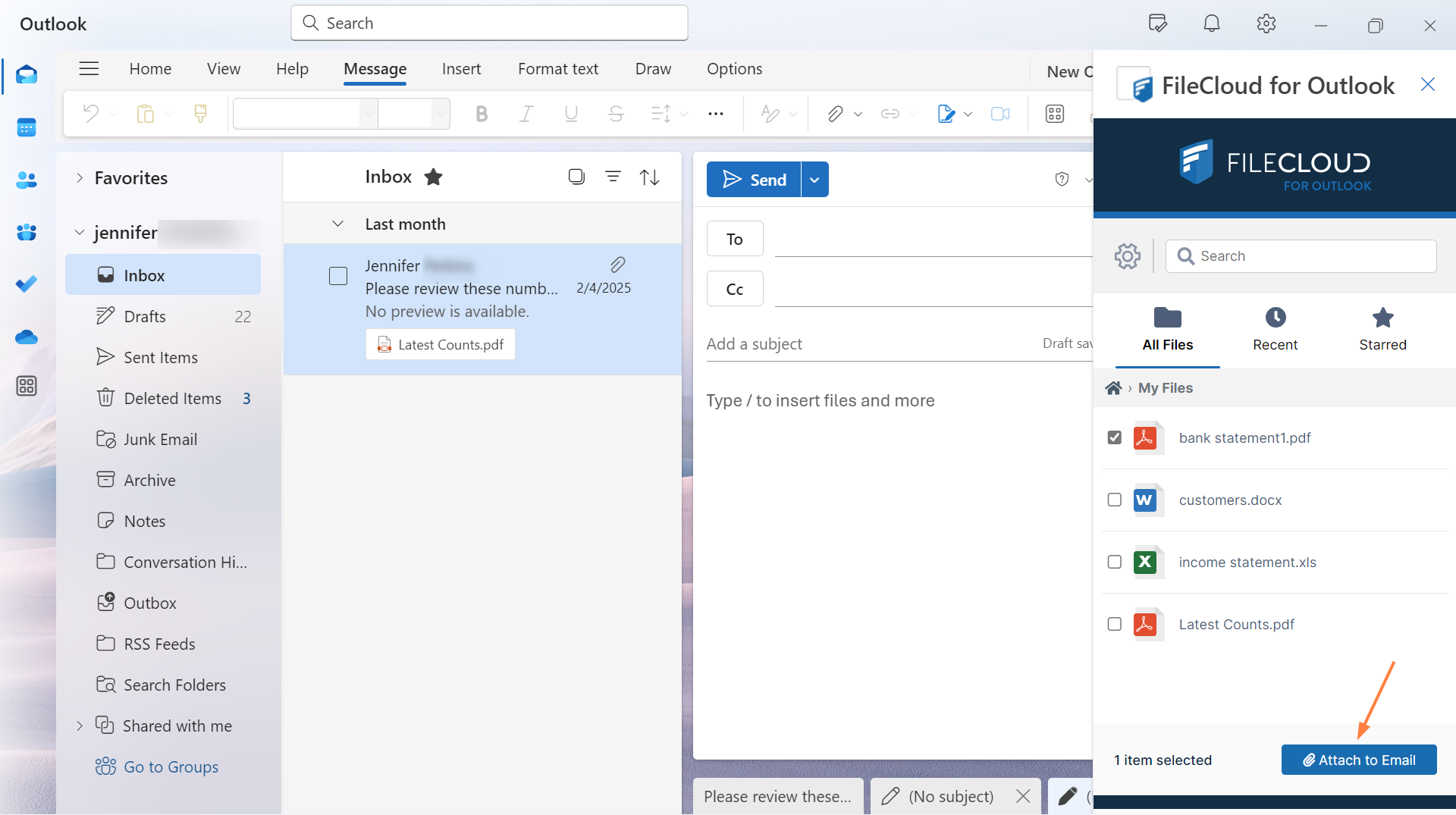
The add-in opens as a FileCloud dashboard beside new and existing emails. In the dashboard, you can navigate to a file and click an Attach to Email button to attach it to an email as a file or a FileCloud share link.
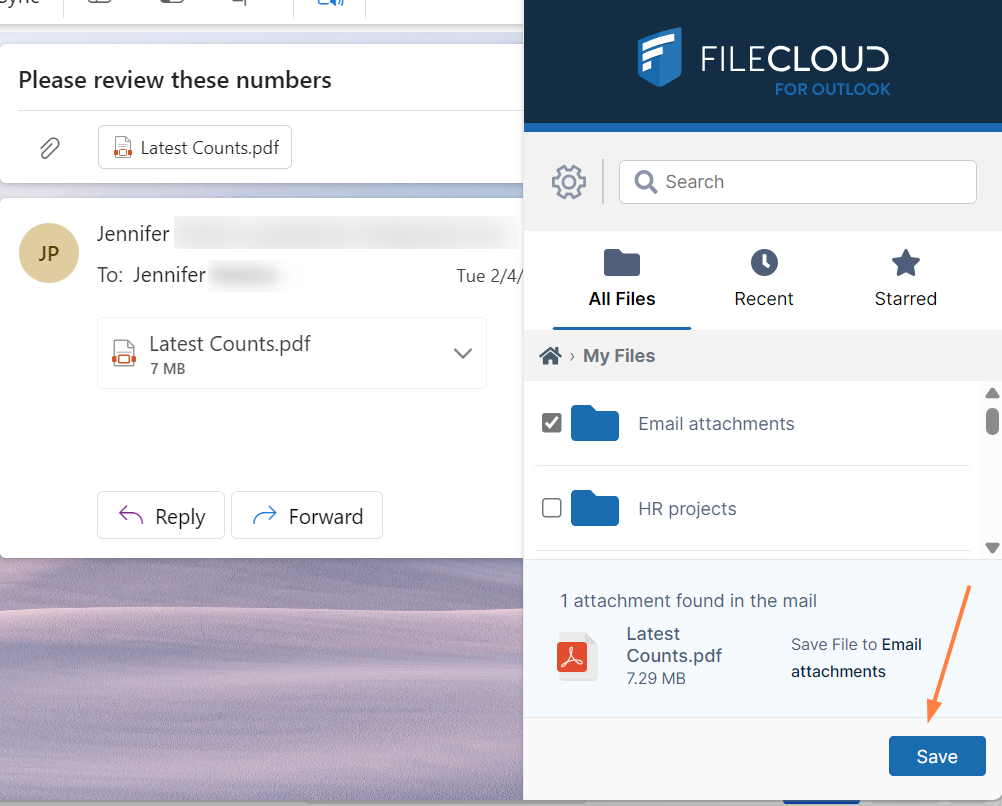
You can also upload email attachments into a FileCloud folder from an Outlook email using the add-in.
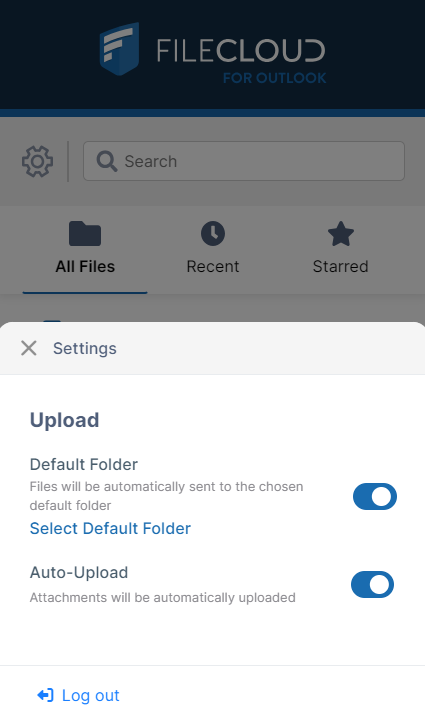
To streamline the process, you can set up the add-in to automatically upload email attachments to a specified folder:
For more information, see FileCloud for Outlook Add-In.
TOTP Option for 2FA Delivery Method for Admin Portal
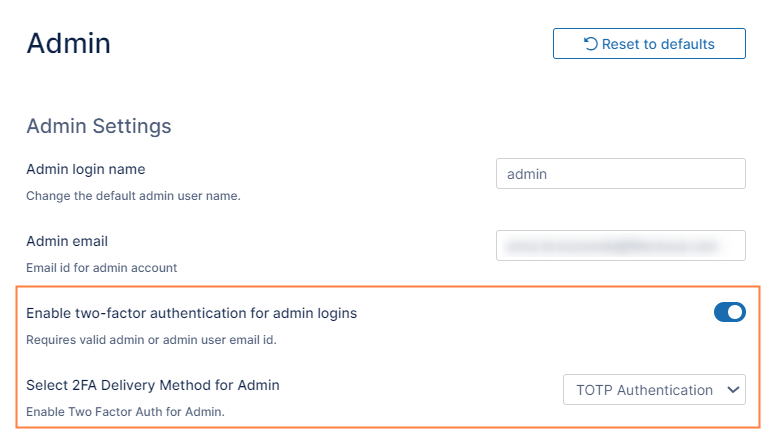
TOTP login is now available as a 2FA delivery method for the admin portal. An admin sets up TOTP login by enabling 2FA for admin login and then choosing TOTP Authentication as the delivery method.
TOTP login to FileCloud has been tested successfully with the apps Google Authenticator, TOTP Authenticator, Duo Mobile, Microsoft Authenticator, Authy, Okta Verify, and 2FA Authenticator (2FAS). However, it should function properly with any authenticator app.
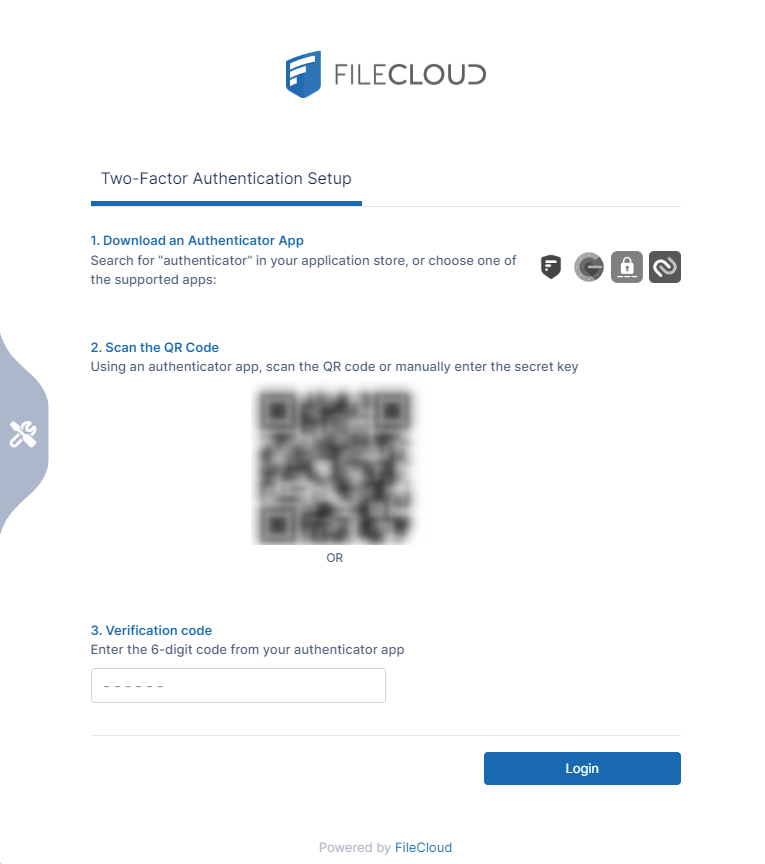
For more information, see Two-Factor Authentication for Admin Portal - FileCloud Docs - Server
UI Changes in FileCloud 23.242
Admin Portal
-
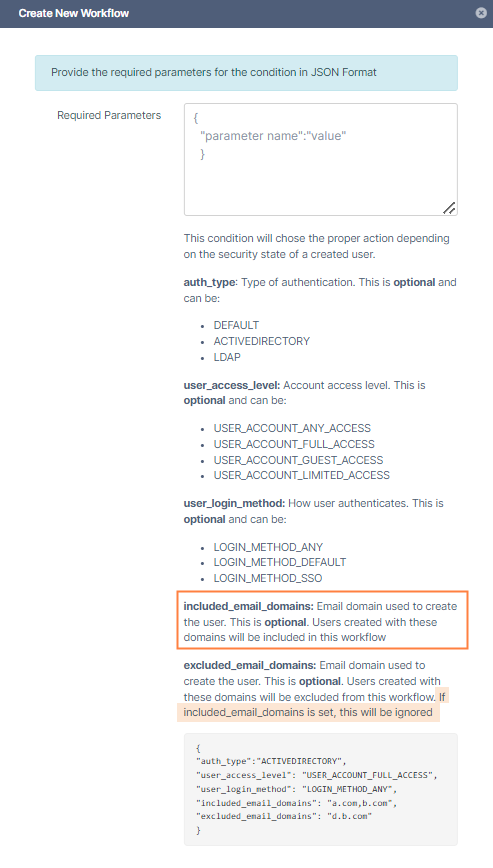
The "If a new user is created" workflow now includes a parameter for only including users in certain email domains.
-
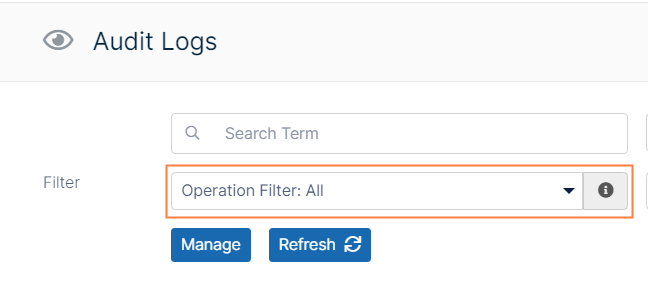
The Audit Logs page now displays All records by default instead of Common records. All displays all audit records, while Common displays create new account, login, create file or folder, upload, download and share audit records.
-
The Customization > Email Templates page, which enables admins to customize system emails, now includes the email sent when a workflow disables an account.

-
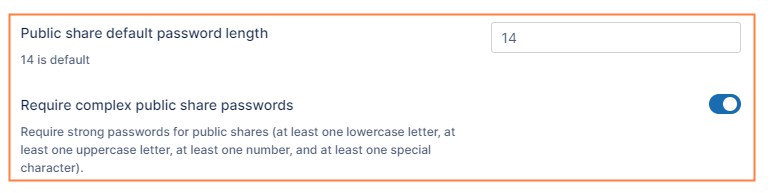
The Misc > Share settings page now includes the fields Public share default password length, which is set to 14 by default and Require complex public share passwords, which is enabled by default. Shares created with passwords prior to 23.242 maintain the passwords they were created with and are not required to comply with the new settings.
-
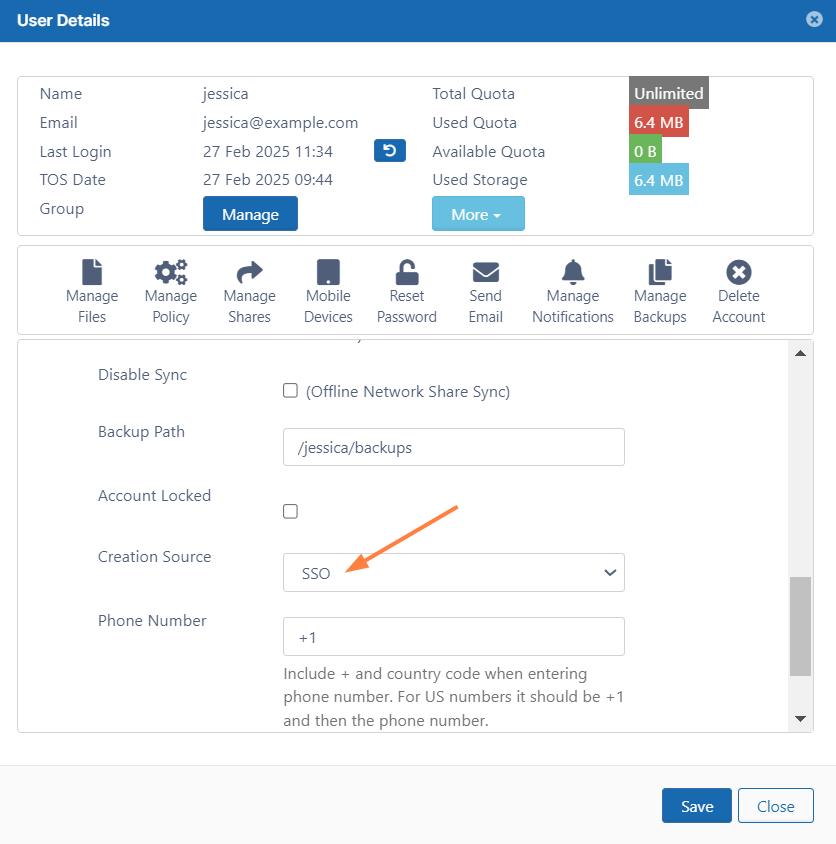
In the User Details dialog box, when Creation Source is set to SSO, the setting Change Password on Login, which does not apply, no longer appears.
-
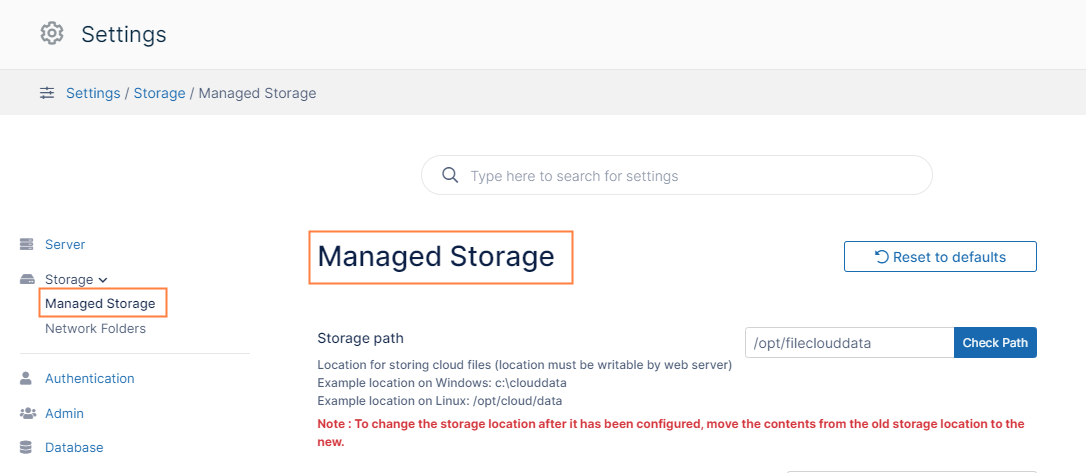
In previous versions of FileCloud, in Storage settings the Managed Storage page was titled My Files. Now it is titled Managed Storage.
Information for Admins
|

Enhancements
|
Reference Number |
Area |
Feature |
|
Server |
|
|
|
CL-14983 |
Composer |
Composer dependencies have been upgraded to current versions. |
|
CL-14978 |
LibreOffice |
LibreOffice has been upgraded to version 24.8.2.1 on Windows and to version 24.8.4.2 on Linux. |
|
CL-14979 |
Memcached |
Memcached has been upgraded from version 1.4.14, which is no longer supported, to version 1.6.x. |
|
CL-14976 |
MongoDB |
MongoDB has been upgraded from 6.0.11, which will no longer be supported later this year, to 7.0.16. |
|
CL-15257 |
New account/Security |
The setting Allow account creation through login form has been added to enable users to block the createprofile API endpoint from the admin portal. The endpoint is used for account signups in the New Account form. See Allow Users to Create and Approve Accounts - FileCloud Docs - Server. |
|
CL-14997 |
OpenSSL |
OpenSSL has been updated to version 3.4.0 for Windows, 3.2.24 for RHEL, and 3.0.2 for Ubuntu. |
|
CL-16256 |
Password |
The fields Public share default password length and Require complex public share passwords have been added. Shares created with passwords prior to this release maintain the passwords they were created with and are not required to comply with the new settings. See Configure Sharing Defaults - FileCloud Docs - Server. |
|
CL-14977 |
PHP |
PHP has been upgraded from version 8.2.20, which is no longer supported, to version 8.3. |
|
CL-15986 |
PHP |
The location of the PHP file can now be modified in the system to support preview in WebDRM. Please contact FileCloud support for help. |
|
CL-14920 |
Reports |
The parameter folder_path has been added to the Get downloaded files report. |
|
CL-14476 |
Shares, Passwords |
By default, Public share default password length is now set to 14, and Require complex public share passwords is now enabled. Complex passwords have at least one lowercase letter, one uppercase letter, one number, and one special character. See Configure Sharing Defaults - FileCloud Docs - Server. |
|
CL-13944 |
Translations |
Hungarian has been added as a user interface language choice for the admin portal and user portal. |
|
CL-14945 |
Workflows |
Users must now click Confirm in a message that appears when they click the icon to run a workflow. |
|
CL-15017 |
Workflows |
The "If a new user is created" workflow now includes a parameter for only including users in certain email domains. |
|
CL-15054 |
Workflows |
The email sent with the workflow that disables an account can now be customized in the Email Templates page. |
Server-only Enhancements
|
Reference Number |
Area |
Feature |
|
Server |
|
|
|
CL-12653 |
High availability |
There is now support for multiple instances of Memcached in a high availability system. |
|
CL-14549 |
Network Folders |
A problem causing users added to smart mount network shares to receive notifications for shares created by other users has been fixed. |
|
CL-15069 |
Network Folders |
An issue preventing users from adding Network Folders that end with "c$" has been fixed. |
|
CL-14437 |
Preview |
Preview of DICOM files now uses the Rubo DICOM viewer. |
Security Fixes
|
Reference Number |
Description |
|---|---|
|
CL-15687 |
Users were able to copy a file and change the extension to a forbidden one. This has been fixed. |
|
CL-15655 |
When users only had preview permission they were able to download files. This has been fixed. |
|
CL-15696 |
Error messages sent when usernames were valid and when they were invalid differed, creating an enumeration vulnerability. This has been fixed. |
|
CL-14610 |
jQuery has been removed to eliminate security issues. |
|
CL-14025 |
Cookies were not bonded to clients and could be reused. This has been fixed. |
|
CL-15577 |
Admins can now customize error message for 405 and 500 error codes. Please contact FileCloud support for help. |
|
CL-14985 |
It was possible for a malicious actor to craft emails originating from FileCloud which could lead to phishing attacks. This has been fixed. |
|
CL-15096 |
The twbs/bootstrap library has been upgraded to eliminate a security issue. |
|
CL-15654 |
The user search returned all users instead of those specified in the User account search mode setting. This has been fixed. |
|
CL-13808 |
Unauthenticated users were able to get other users' profile images. This has been fixed. |
|
CL-13806 |
An endpoint response noted that a password reset applied to a promoted user. This has been fixed so that the type of user is not specified. |
|
CL-16364 |
NodeJS has been upgraded to 22.13.1 to eliminate a security issue. |
|
CL-15123 |
UI dependencies have been updated to eliminate security issues. |
Bug Fixes
|
Reference Number |
Area |
Description |
|
Server |
|
|
|
CL-15877 |
AD |
An Active Directory issue causing logins to fail has been fixed. |
|
CL-15787 |
Audit |
The default setting for the Audit Logs listing was Common which should only have displayed records of common operations but displayed all audit records. This has been fixed, so that Common displays only Common operations. In addition, the default setting has been changed to All, which correctly displays all audit records. |
|
CL-16250 |
Audit |
An issue causing a file preview to appear as a download in the audit log has been fixed. |
|
CL-14098 |
Delete |
An issue causing deletion of a folder with 50,000 files from the recycle bin has been fixed. |
|
CL-15614 |
Download |
An issue causing PDFs to download as corrupted files has been fixed. |
|
CL-15243 |
Download |
An issue causing the download option to not appear when over 100 files were listed and the user checked Select All has been fixed. |
|
CL-15631 |
Error codes |
On an invalid URL error the system incorrectly returned a 200 response code. This has been fixed and now the system returns a 404 response code for the condition. |
|
CL-14394 |
Groups |
When a user attempted to add a group to a Team Folder share, only the first ten group choices were shown for selection. This has been fixed. |
|
CL-15933 |
Heuristic tool |
The file integrity workflow was raising some false positives. This has been fixed by reconfiguring the tool. |
|
CL-15095 |
LDAP |
A fix in 23.232 that required users to add the prefix ldap:// to the ldap_connect parameter was not made backwards compatible. It has now been made backwards compatible so users of 23.232 and earlier do not have to apply the change. |
|
CL-15890 |
ICAP |
An issue with ICAP responses timing out has been addressed by adding a setting for specifying response time. |
|
CL-16035 |
ICAP |
An issue causing ICAP integration to fail when storage encryption was enabled has been fixed. |
|
CL-15207 |
Login |
When Incorrect Attempts Before Account Lockout was set to 0, indicating no lockout, when a login failed, a confusing error message indicating the lockout occurred after 0 failed attempts appeared. The message no longer appears. |
|
CL-15497 |
MS Teams |
When users working in FileCloud in MS Teams logged in to FileCloud with SSO, they could not share FileCloud files in Teams messages. This has been fixed. |
|
CL-14607 |
Notifications |
A problem causing errors to occur when certain notification rules were deleted has been fixed. |
|
CL-14989 |
Password, SSO |
The "New accounts must change password" setting no longer applies to SSO logins. |
|
CL-15389 |
Password |
On account creation with automatic password generation, the system sometimes returned a message that the password required at least 1 special character. This has been fixed. |
|
CL-14242 |
Preview |
Signatures on PDFs did not appear when users viewed them using QuickJS preview from the user portal. This has been fixed. |
|
CL-16243 |
Preview |
EML files were not able to be previewed. This has been fixed. |
|
CL-14939 |
Search |
Search was not always returning results. This has been fixed. |
|
CL-16108 |
ServerSync |
When ServerSync tried to upload a file with an Arabic (non-NFC data exchange format) file it returned an error. This has been fixed. |
|
CL-15822 |
Shares |
A delete button was accessible for public shares although it should have been inaccessible. This has been fixed. |
|
CL-14722 |
Shares, Preview |
Shares of video files could not be previewed or played in mobile browsers. This has been fixed. |
|
CL-15713 |
SSO |
Users could not log in using SSO to the user portal with the IdP Thales. This has been fixed. |
|
CL-15490 |
Thumb cleanup |
An issue causing thumb cleanup to fail has been fixed. |
|
CL-15091 |
TOS |
On mobile browsers, if the TOS was lengthy, users could not access the Accept Terms of Service button. This has been fixed. |
|
CL-16545 |
Translations |
When German was chosen as the user portal language, some English text was shown for Team Folders. This has been fixed. |
|
CL-15385 |
Uploads |
Uploaded folders will now have the same date as the most recently updated file in the folder. |
|
CL-16213 |
Uploads |
An issue causing notifications that upload exceeded quota to appear when uploads were within quota has been fixed. |
|
CL-15674 |
User interface |
An issue causing long folder names to only partially appear at the top of the UI has been fixed by allowing more room for the folder name and adding ellipses to the end of the name if it cannot fully fit. |
|
CL-15597 |
User interface |
The Default Primary Color set in Customization was not used in the title of screen notifications. This has been fixed. |
|
CL-15154 |
Users |
An issue causing the Manage Users screen to fail to export users correctly when a filter was applied has been fixed. |
|
CL-15861 |
Workflows |
An issue causing the "If file was not modified for specified days" workflow to return an error has been fixed. |
|
CL-14681 |
Workflows |
A "delete file on download" workflow failed to delete a file due to lack of delete permission when a share recipient of a PDF tried to download it. This has been fixed. |
Client Bug Fixes
|
Reference Number |
Area |
Description |
|
Drive |
|
|
|
CL-15058 |
Login |
Drive sometimes failed to see that the password had changed, and continually tried to log in. This has been fixed. |
|
Drive, Sync |
|
|
|
CL-15188 |
Right-click |
In macOS and Windows, when users right-clicked on a file or folder on the mounted drive, the Drive and Sync options did not appear. This has been fixed. |
|
Drive, FileCloud for Office |
|
|
|
CL-15167 |
Drive |
When a user clicked the path of a file returned by a search, Drive opened the folder containing the file but did not highlight the file. This has been fixed. |
|
CL-15187 |
Drive, FileCloud for Office |
When FileCloud for Office was added to Drive, users could not log in to FileCloud for Office. This has been fixed. |
|
CL-15171 |
Login, settings |
Trust FileCloud for Office was not available on the first use of FileCloud for Office, and login from FileCloud for Office panel was not available. These issues have been fixed. |
|
FileCloud Desktop for macOS |
|
|
|
CL-15008 |
Sync |
An issue causing sync to fail in FileCloud Desktop for macOS has been fixed. |
Server-only Bug Fixes
|
Reference Number |
Area |
Description |
|---|---|---|
|
Server |
|
|
|
CL-15869 |
Backup |
Backup in multitenant environments was only backing up the default site. This has been fixed. |
|
CL-15195 |
File management |
The setting for disabling an admin to access user data did not prevent the admin from deleting user data. This has been fixed. |
|
CL-15658 |
Network Share |
An error occurred when listing a numerically named file in a network share. This has been fixed. |
|
CL-15632 |
S3 Network Shares |
When a folder and file in the same location had the same name, FileCloud returned and listed the file twice and did not return and list the folder. This has been fixed, |
|
CL-15797 |
Seeding tool |
The seeding tool was not deleting the local file after uploading to managed S3 storage. This has been fixed. |
|
CL-15519 |
ServerLink |
ServerLink synchronization was resetting the share approval workflow in policies. This has been fixed. |
|
CL-14845 |
ServerLink |
ServerLink failed to sync deleted files when versioning was disabled. This has been fixed. |