Breadcrumbs

More Examples

Scenario 1: Give folder permissions only to specific users or groups

In this scenario, an administrator gives two groups access to a folder, but only gives one group access to one of its subfolders.

Example of giving permissions to only specific users or groups

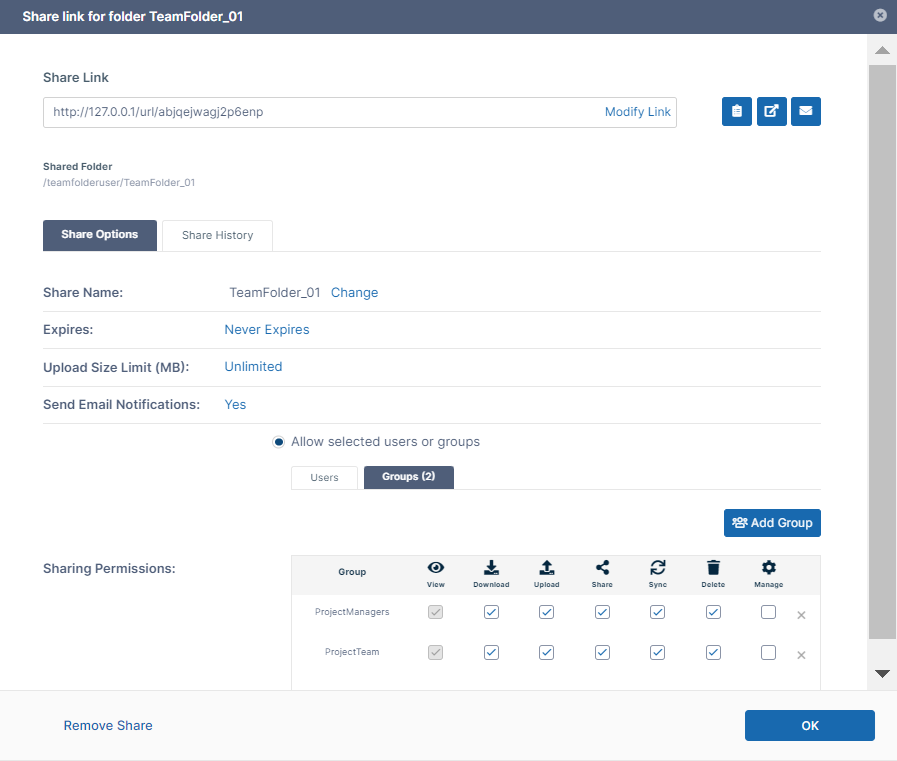
In this example, the folder TeamFolder_01 is only shared with the groups: 

  • ProjectManagers

  • ProjectTeam

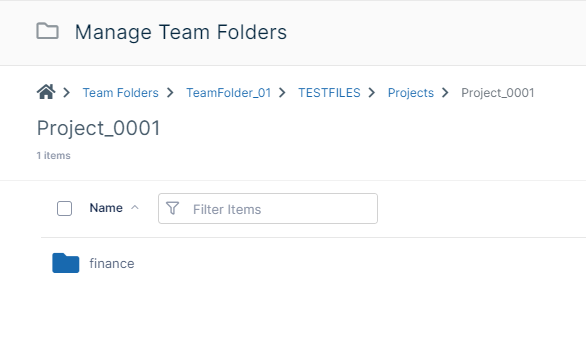
Only the group ProjectManagers is given access to the embedded subfolder Project_0001/finance.

FinanceSubfolder.png


To accomplish this, the administrator:

  1. Shares the folder TeamFolder_01 with the ProjectManagers and ProjectTeam groups only.

    ShareTeamFolder01.png


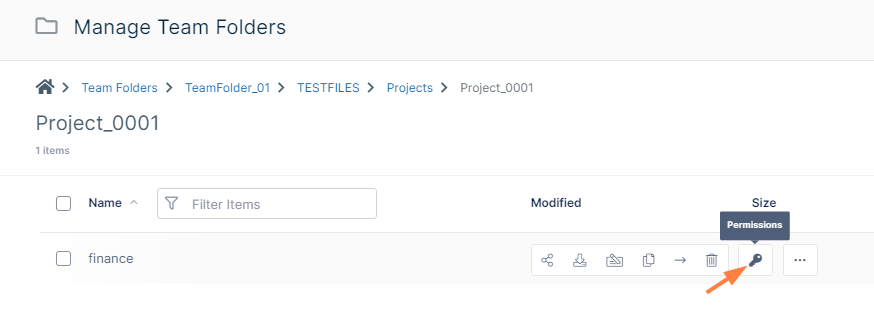
  2. Configures permissions on the finance subfolder:

    Permissions.png
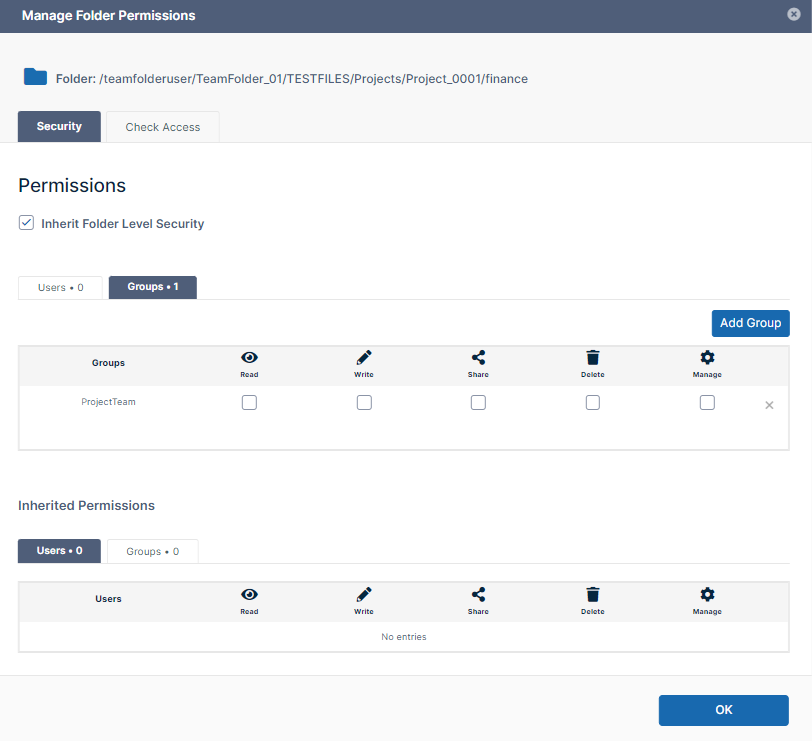
  3. Adds ProjectTeam group to the finance folder in Manage Folder Permissions. Then removes all permissions for the ProjectTeam group.
    DenyProjectTeam.png

Now, members of the ProjectManagers group are able to access the finance folder, but members of the ProjectTeam group are not.

Scenario 2: Remove access to specific folders for certain users

In this scenario, an administrator sets different permissions on parent and child folders.

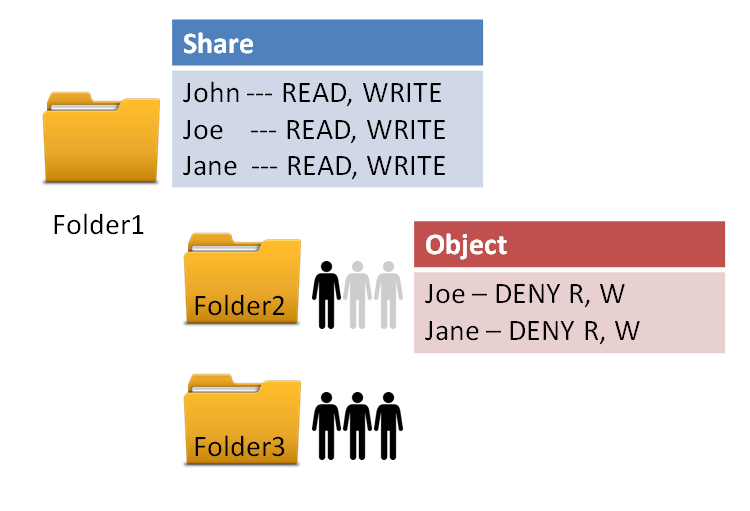
Example of a Sharing Scenario

image2016-8-9 13:49:39.png

In this example, Folder1 is shared with Read and Write permissions to the following users:

  • John

  • Joe

  • Jane

This means all three users can:

  • Read files in Folder1 

  • Write files in Folder1

In this example, the administrator wants to allow only John access to the subfolder, Folder2.

The administrator therefore wants the folder access to be the following:

  • Folder1 - accessible to John, Joe, and Jane

  • Folder2 - accessible to John

  • Folder3 - accessible to John

To accomplish this, the administrator:

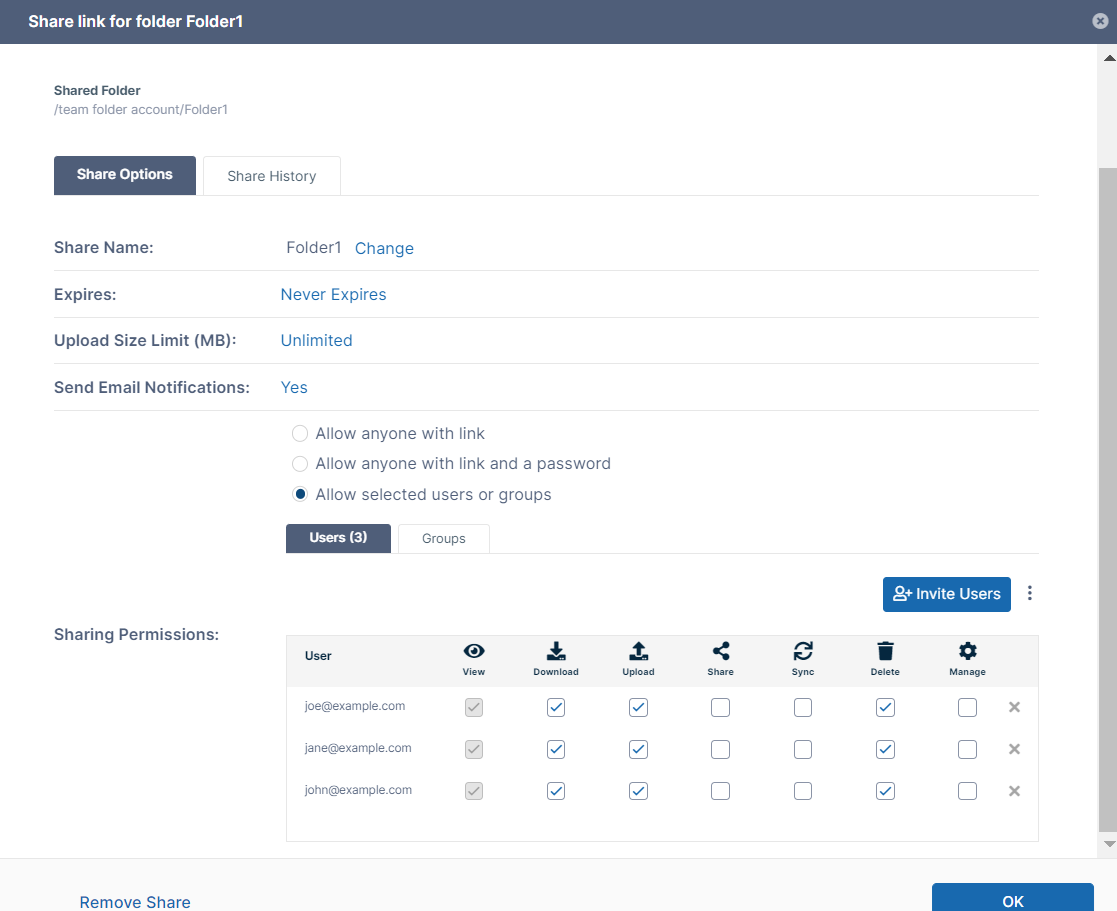
  1. Shares Folder1 with all three users, and gives them read (view) and write (upload and delete) access.
    ReadWriteShare.png

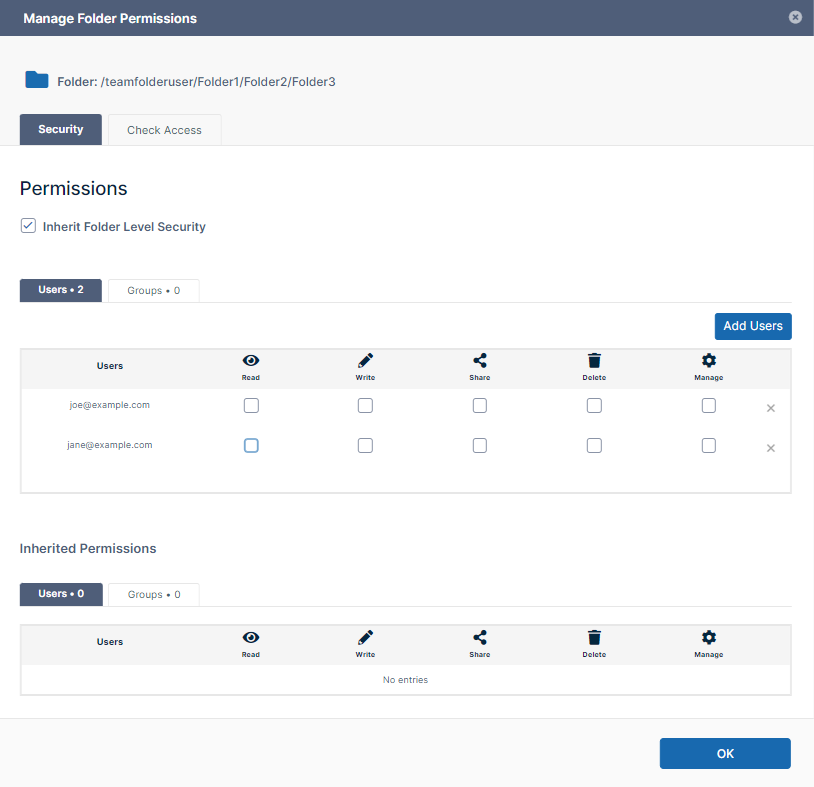
  2. Removes folder-level security permissions for the two users who will not have access to Folder2 removing all of their folder-level permissions.

    DenyAccess.png

 When John, Joe, and Jane access the folders:

User

Folder1

Folder2

Folder3 

John

https://fileclouddocs.atlassian.net/wiki/s/1623602073/6452/05f502871a457750e4d6a5e1f585bce5603b62b2/_/images/icons/emoticons/check.png See it listed

https://fileclouddocs.atlassian.net/wiki/s/1623602073/6452/05f502871a457750e4d6a5e1f585bce5603b62b2/_/images/icons/emoticons/check.png Access its content

https://fileclouddocs.atlassian.net/wiki/s/1623602073/6452/05f502871a457750e4d6a5e1f585bce5603b62b2/_/images/icons/emoticons/check.png See it listed

https://fileclouddocs.atlassian.net/wiki/s/1623602073/6452/05f502871a457750e4d6a5e1f585bce5603b62b2/_/images/icons/emoticons/check.png Access its content

https://fileclouddocs.atlassian.net/wiki/s/1623602073/6452/05f502871a457750e4d6a5e1f585bce5603b62b2/_/images/icons/emoticons/check.png See it listed

https://fileclouddocs.atlassian.net/wiki/s/1623602073/6452/05f502871a457750e4d6a5e1f585bce5603b62b2/_/images/icons/emoticons/check.png Access its content

Joe

https://fileclouddocs.atlassian.net/wiki/s/1623602073/6452/05f502871a457750e4d6a5e1f585bce5603b62b2/_/images/icons/emoticons/check.png See it listed

https://fileclouddocs.atlassian.net/wiki/s/1623602073/6452/05f502871a457750e4d6a5e1f585bce5603b62b2/_/images/icons/emoticons/check.png Access its content

https://fileclouddocs.atlassian.net/wiki/s/1623602073/6452/05f502871a457750e4d6a5e1f585bce5603b62b2/_/images/icons/emoticons/error.png  See it listed

https://fileclouddocs.atlassian.net/wiki/s/1623602073/6452/05f502871a457750e4d6a5e1f585bce5603b62b2/_/images/icons/emoticons/error.png  Access its content

https://fileclouddocs.atlassian.net/wiki/s/1623602073/6452/05f502871a457750e4d6a5e1f585bce5603b62b2/_/images/icons/emoticons/error.png See it listed

https://fileclouddocs.atlassian.net/wiki/s/1623602073/6452/05f502871a457750e4d6a5e1f585bce5603b62b2/_/images/icons/emoticons/error.png Access its content

Jane

https://fileclouddocs.atlassian.net/wiki/s/1623602073/6452/05f502871a457750e4d6a5e1f585bce5603b62b2/_/images/icons/emoticons/check.png See it listed

https://fileclouddocs.atlassian.net/wiki/s/1623602073/6452/05f502871a457750e4d6a5e1f585bce5603b62b2/_/images/icons/emoticons/check.png Access its content

https://fileclouddocs.atlassian.net/wiki/s/1623602073/6452/05f502871a457750e4d6a5e1f585bce5603b62b2/_/images/icons/emoticons/error.png See it listed

https://fileclouddocs.atlassian.net/wiki/s/1623602073/6452/05f502871a457750e4d6a5e1f585bce5603b62b2/_/images/icons/emoticons/error.png  Access its content

https://fileclouddocs.atlassian.net/wiki/s/1623602073/6452/05f502871a457750e4d6a5e1f585bce5603b62b2/_/images/icons/emoticons/error.png See it listed

https://fileclouddocs.atlassian.net/wiki/s/1623602073/6452/05f502871a457750e4d6a5e1f585bce5603b62b2/_/images/icons/emoticons/error.png Access its content