.svg)
Major Release
FileCloud server version 23.261.0.32752
GA release date: March 30, 2026
Installation and upgrade information
Installing FileCloud Server Upgrade Notes
SHA256 release checksums
-
filecloudupdate.zip a363b16e084094363fce2e35d93a8a9c5f95dd6bf31bf89a2f6fd353ffd93341
-
FileCloudSetup.exe f2399eaaf552d73a086cf8f38ae1c3546f69ae5e814aab2f3303557ee2f5d28d
Minor/Patch Releases
Major new features
Enhanced multi-factor authentication (MFA) options
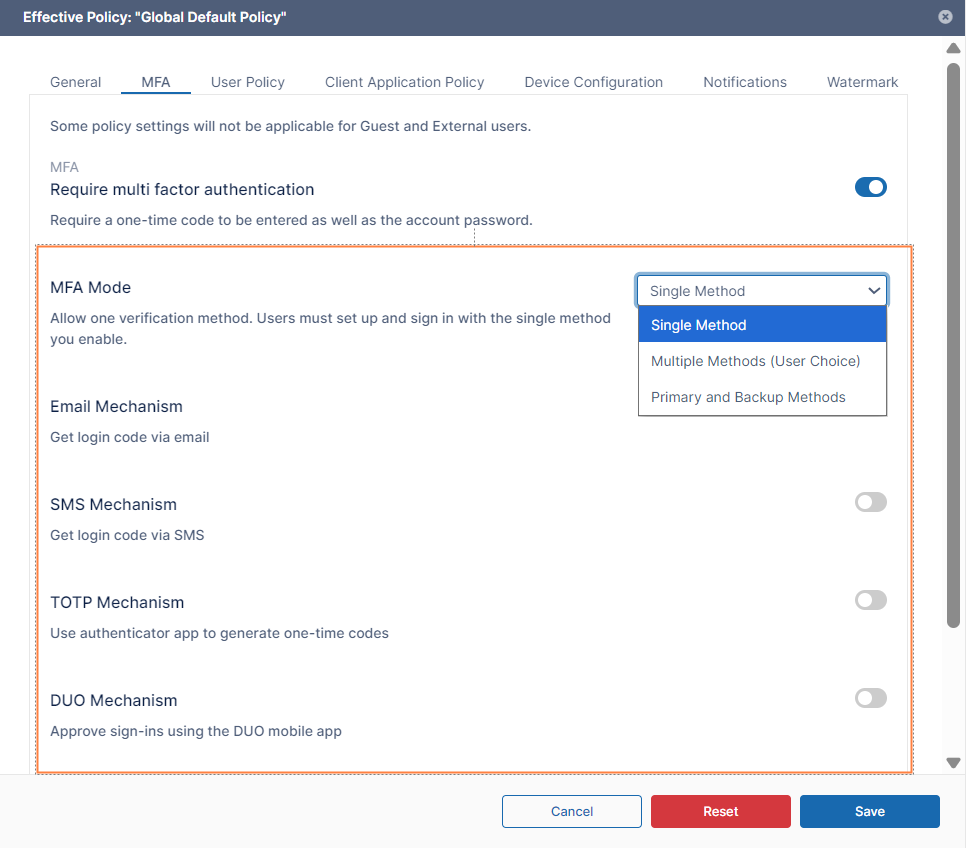
Previously, admins could enforce only a single global MFA method per user policy. With this enhancement, the admin can configure multiple MFA modes per policy and give users the option of choosing their preferred MFA method. The MFA methods are the following:
-
Single Method (existing behavior) Enforces one MFA mechanism specified by the admin for all users.
-
Multiple Methods (User Choice) Enables admins to select two or more MFA mechanisms and allows end users to choose one of those mechanisms
-
Primary + Backup Methods Enables admins to select two or more MFA mechanisms. Users are required to configure two of those mechanisms, one as a primary mechanism and one as a backup mechanism.
After the admin chooses a method in the MFA Mode drop-down list, they may choose one or more of the mechanisms listed below depending on the MFA mode selected by the admin.
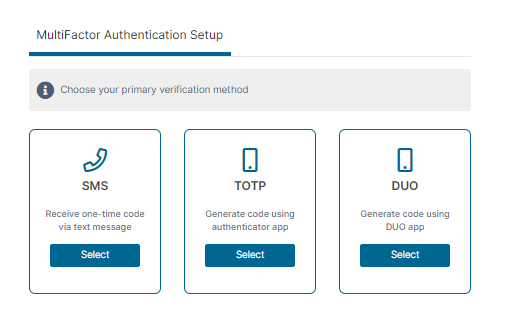
The login option(s) shown to the user during their initial login depend on both the MFA Mode and the MFA mechanism chosen.
For more information, see Multi-Factor Authentication for User Portal and Log in Using Multi-Factor Authentication.
Enhanced watermark feature including support for granular watermarks
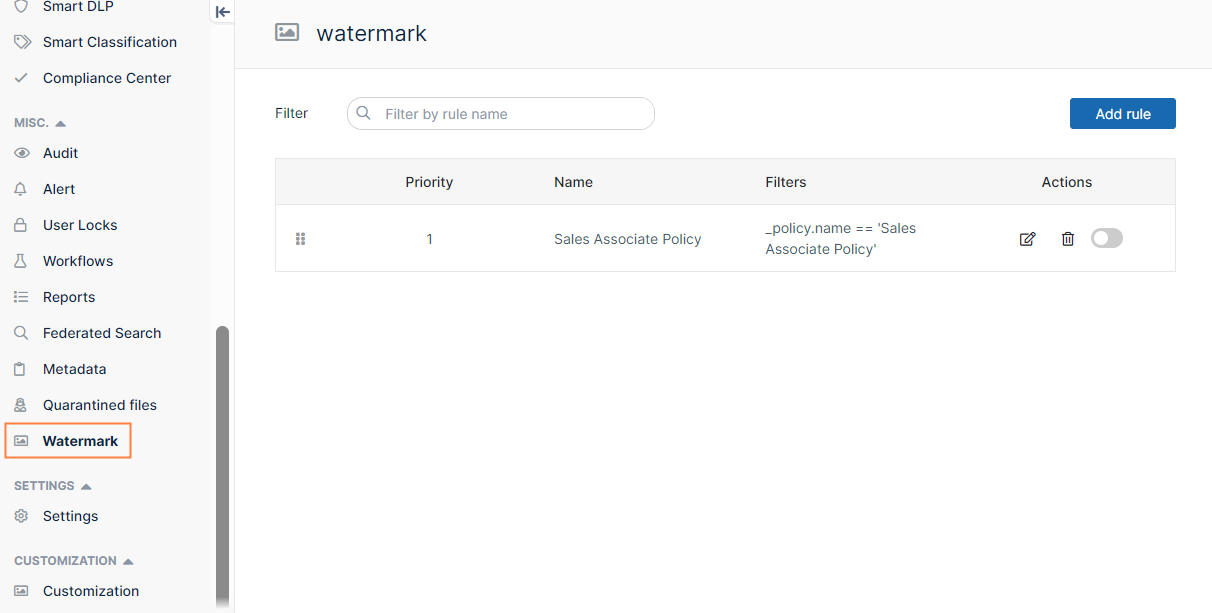
Previously, watermark settings appeared under preview settings in the admin portal and could not be customized by user and file features. This release introduces an easy to locate Watermark settings screen where administrators can define watermark rules depending on user and file features.
The new section appears in the main navigation panel of the admin portal:
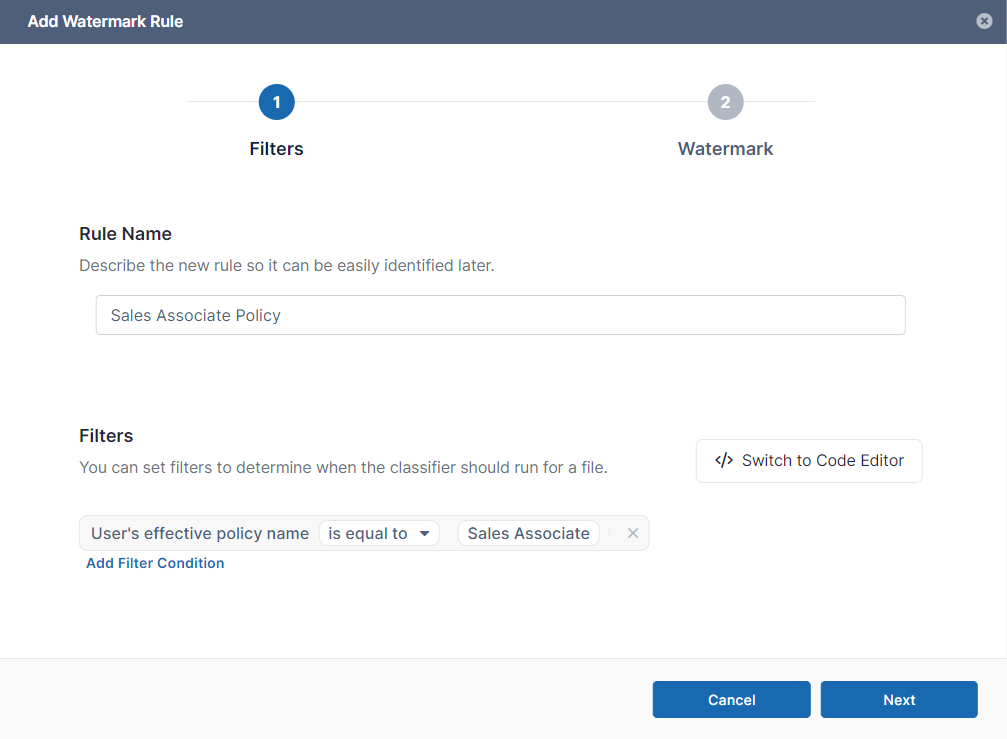
On the new Watermark page, admins can use a simple wizard to configure watermark rules based on file extensions, user groups, policies, and file metadata. The watermark content can be customized for the specific rule. For example, for file previews matching the rule User’s effective policy name is equal to Sales Associate, the watermark Policy name: Sales Associate Username: ^USERNAME^ Date: ^DATE^ (where ^USERNAME^ and ^DATE^ are available parameters) could be applied.
In the first window of the wizard, the filter condition is specified. Here, the condition is User’s effective policy name is equal to Sales Associate.
In the second window, watermark text, template, and font size are entered, and a watermark preview is shown.
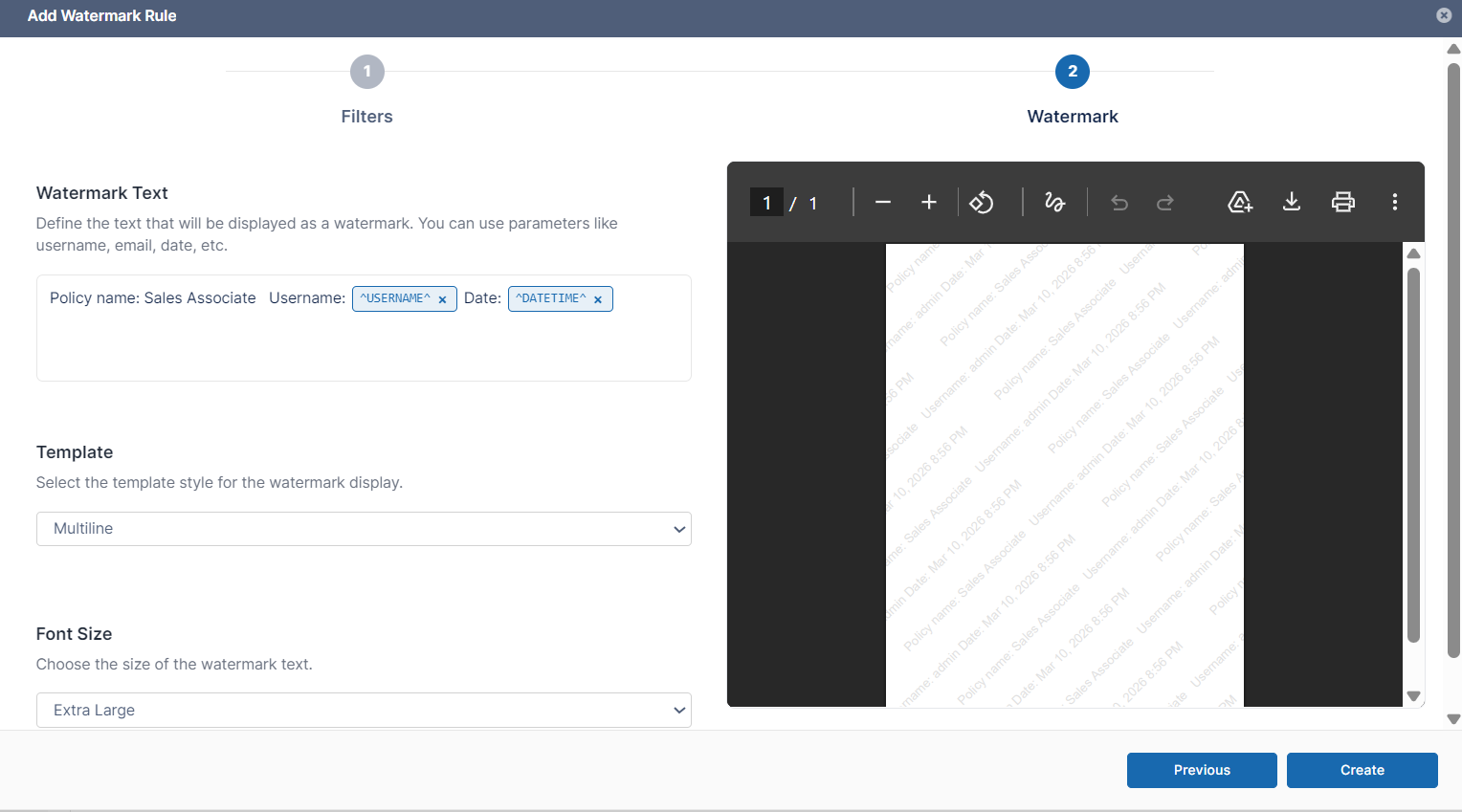
Once the watermark rule is created and enabled, if a preview request matches the rule, a watermark is applied to the preview.
For more information, see Watermark Settings.
Minimum Rejection Count Added to Share Approval workflows
Users can now set a Minimum rejection count, which defines how many rejections are needed to reject a share request. This enables FileCloud to mark a share request as rejected, notify the requestor that it has been rejected, and remove it from the system once the Minimum rejection count is reached.
The Approval count number field has been renamed Minimum approval count for clarity.
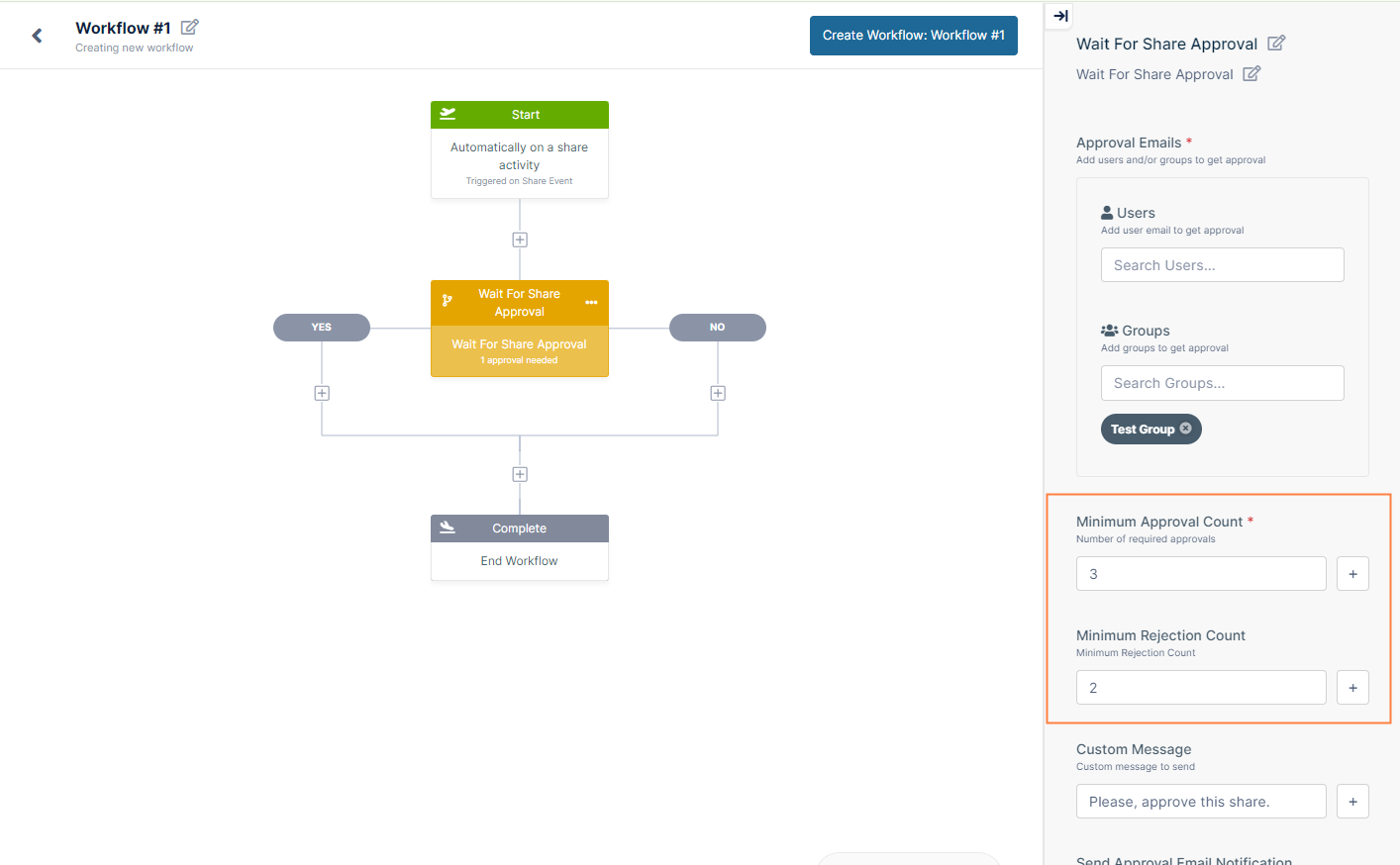
If the Minimum approval count is reached first, the share request is approved, and if the Minimum rejection count is reached first, the share request is rejected. When either is reached, the share request is removed from the system and the requestor receives a notification about the status.
In existing workflows, Minimum rejection count is set to the minimum approval count.
For more information, see Share Approval Workflows.
Run Network Share Scanner Services through the FileCloud Control Panel (Beta)
The FileCloud Network Share Scanner is a Beta feature which efficiently monitors file system events on LAN-based Network Folders, enabling use of advanced FileCloud features with files in Network Folders including user workflows, CDR, antivirus integration, metadata rules, DLP, and content classification. It was introduced in FileCloud 23.251.1, at which point it could only be run through the command line.
In FileCloud 23.261, the services Events API, Network Share Scanner, and Etcd have been added to the control panel. You can now start each of these services and the Memcache service to run the Network Share Scanner.
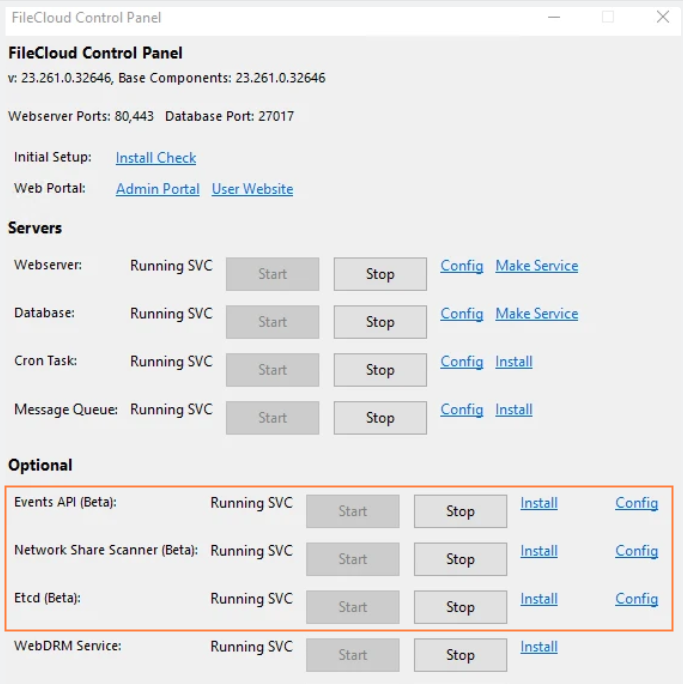
For more information, see Running the Network Share Scanner (Beta).
UI Changes in FileCloud 23.261
Admin Portal
In the Audit Logs screen, in the Operation Filter drop-down list, the SSO option is no longer available, and the Automation Workflow option, which shows logs of share approvals or rejections associated with share approval workflows, has been added
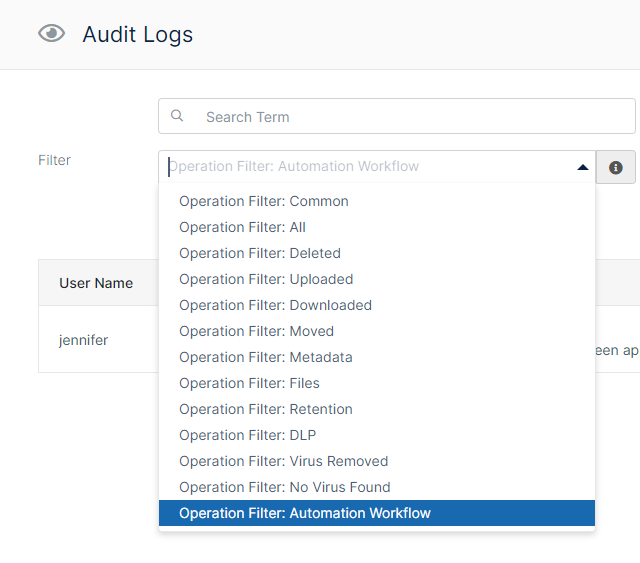
The record message includes the details: share owner, share path, share link, share type, share date, and share approver or rejector.

Information for Admins
-
FileCloud Server is now supported on Windows Server 2025.
-
In new installations of FileCloud, Solr metadata extraction is now turned off by default in FileCloud to improve performance. If you are upgrading to 23.261+ and want to turn off metadata extraction, reset and reconfigure Content Search.
-
Network Share Scanner configuration if you are upgrading FileCloud from version 23.251 or a later version:
Windows systems admins: If you are planning to use the Network Share Scanner, please see the upgrade notes for configuration file changes.
Linux systems admins: If you have installed the Network Share Scanner in a previous version, please see the upgrade notes for configuration file changes. -
If you are upgrading from a version prior to 23.253.0, any custom settings in the .htaccess file will be overridden by the dynamic CSP feature. Please see the upgrade notes for instructions for preventing these overrides.
-
After installation or upgrade of FileCloud to version 23.261, FileCloud on iOS will not work unless iOS users upgrade to iOS 16+ and FileCloud 23.261.
Enhancements
|
Reference Number |
Area |
Feature |
|
Server |
|
|
|
FCL-6423 |
Audit log |
Automation Workflow audit logs, which show details of share approvals or rejections associated with share approval workflows, have been added. |
|
FCL-6621 |
Collabora, watermarks |
Watermarks configured in FileCloud now appear when users are editing with Collabora |
|
FCL-5566 |
File type detection tool |
The definitions file of the file type detection tool has been updated to the latest version. |
|
FCL-5255 |
OCR |
Enabling OCR on the Settings > Content Search page now automatically enables PDF OCR also, so the separate button for enabling PDF OCR has been removed. |
|
FCL-7239 |
Performance |
Performance was optimized for customers with mid-size environments for queries related to retention and metadata. |
|
FCL-5058 |
S3 |
In S3 storage, the default download expiry time for non-video files has been changed from 2 minutes to 120 minutes. This value can be modified in the Number of minutes pre-signed URL is valid setting. |
|
FCL-6863 |
Solr |
In new installations of FileCloud, Solr metadata extraction is now turned off by default in FileCloud to improve performance. If you are upgrading to 23.261+ and want to turn off metadata extraction, reset and reconfigure Content Search. |
|
FCL-5883 |
User interface |
A hint has been added to the Users with Lowest Quota Remaining widget to inform users that file count and size includes files in the user’s deleted folder. |
|
FCL-2993 |
User interface |
The Customization screen in the admin portal has a new, updated design. |
|
FCL-2989 |
User interface |
The Governance Dashboard in the admin portal has a new, updated design. |
Security Fixes
|
Reference Number |
Description |
|---|---|
|
FCL-7818 |
MongoDB has been upgraded to version 7.0.30 to fix a security issue. |
|
FCL-6964 |
A relative path overwrite vulnerability in install/installhelp.php has been fixed. |
|
FCL-6782 |
A host header injection vulnerability has been fixed. |
|
FCL-6781 |
An enumeration vulnerability for the /core/createprofile endpoint has been fixed. |
|
FCL-6460 |
A vulnerability that enabled users who previewed a malicious PDF to be redirected to an arbitrary external website has been fixed. |
|
FCL-6457 |
The aws/aws-sdk-php composer library has been upgraded to version 3.369.4. |
|
FCL-5987 |
GET method support was removed for a number of public admin and core endpoints. |
|
FCL-5686 |
A broken authorization vulnerability that existed when applying ACL permissions has been fixed. |
|
FCL-5241 |
NodeJS has been upgraded to 24.13.0 to fix a security issue. |
|
FCL-5663 |
Cache control header values have been improved. |
|
FCL-5239 |
Vue.js has been upgraded to version 3.5.22. |
|
FCL-4992 |
The overall attack surface has been reduced by adding recommended safe directives. |
|
FCL-4153 |
The /core/logoutprofile endpoint has been removed to improve security. |
|
FCL-1309 |
JavaScript has been disabled in MongoDB to improve security. |
|
FCL-5236 |
CSRF improvements have been made on endpoints. |
|
FCL-5658 |
Enhancements have been made to the CSP policy. |
Bug Fixes
|
Reference Number |
Area |
Description |
|
Server |
|
|
|
FCL-7680 |
Admin portal UI |
When a phone number was added to a user account in the Users page, if the country code was not changed, the country code was updated with the first few digits of the phone number entered. This has been fixed. |
|
FCL6082 |
Antivirus |
Clam AV did not detect all infected files that were uploaded into a zip file created in FileCloud. This has been fixed. |
|
FCL-5036 |
Audit |
The audit export file was not filtered on the search term if it was entered. This has been fixed. |
|
FCL-5944 |
Audit logs |
In the Audit Logs screen, the option for filtering by the SSO operation filter has been removed. |
|
FCL-4595 |
Audit logs |
The csv export file for all audit log entries did not include all entries. This has been fixed. |
|
FCL-6425 |
Audit settings |
In the Admin settings, the setting Storage Path for Archived Audit Records did not show the Check Path button. This has been fixed, and the button now appears. |
|
FCL-3129 |
CASB integration |
To prevent files that are 5GB+ from failing CASB integration with S3 storage and other storage types, chunked upload has been implemented. |
|
FCL-1803, FCL-1843 |
Comments |
When a user tagged a group in a comment on a file or folder, users in the group did not receive a notification about the comment. This has been fixed. |
|
FCL-2288 |
Copy |
Folder copying failed when a setup included a list of allowable extensions. This has been fixed. |
|
FCL-5095 |
Database, upgrade |
In ServerLink environments, migrating databases during upgrade could fail if upgraded ServerLink nodes prompted non-upgraded notes to synchronize. This has been fixed by pausing synchronization during database migration. |
|
FCL-1926 |
Disallow file names |
FileCloud only failed to upload files with disallowed names if the disallowed filename entered included the extension. This has been fixed. |
|
FCL-1876 |
Downloads |
When a CSV file was downloaded from Team Folders in the admin portal, an empty zipped file was downloaded. This has been fixed.
|
|
FCL-6430 |
Downloads |
When an admin tried to download a user’s My Files folder. the downloaded zip file was empty. This has been fixed. |
|
FCL-3359 |
Folder permissions |
The Manage Folder Permissions dialog box showed inherited read permissions checked although they should have been unchecked. This has been fixed. |
|
FCL-5192 |
Heuristic engine |
The heuristic engine had false positives which resulted in files being removed. This has been fixed. |
|
FCL-6434 |
Locks |
When an account was locked due to multiple invalid 2FA codes, on FileCloud Online, it could not be unlocked in the admin portal, and on FileCloud Server, it appeared unlocked in the user details although it was locked. These issues have been fixed. |
|
FCL-7542 |
MFA |
If a 0 preceded a phone number for India, it was included as part of the phone number the SMS code was sent to. This has been fixed; it is no longer included as part of the phone number. |
|
FCL-7664 |
MongoDB |
Absolute paths in the MongoDB config file have been replaced with relative paths. |
|
FCL-4299 |
OCR |
When Solr authentication was enabled, FileCloud could not set up OCR. This has been fixed. |
|
FCL-6827 |
PDFs |
In FileCloud’s native PDF viewer, the print button was not working. This has been fixed. |
|
FCL-5878 |
Reports |
The Realtime DLP Statistics widget in the admin portal dashboard showed values that were not in sync with the values in the reports shown when the hyperlinks were clicked. Now the summary and the linked reports both show statistics from the last 7 days. |
|
FCL-479 |
Reports |
The Folder Properties report showed 0 bytes if it only contained subfolders, even if the subfolders had content. This has been fixed; now the report includes the contents of subfolders when computing bytes. |
|
FCL-7637 |
SSO |
When admins configured SAML-SSO with SCIM, on initial login, some users saw a blank page. This has been fixed. |
|
FCL-8101 |
Server |
When the setting “Allow comments for external users” was enabled, external users received an error message when they tried to view the folders shared with them. This has been fixed. |
|
FCL-7681 |
Shares |
When a new user was added to a share and the new user’s phone number was added, it appeared not to be saved. This has been fixed. |
|
FCL-6414 |
Shares |
An issue preventing a user from inviting a user to a private share has been fixed. |
|
FCL-7243 |
SSO API |
SSO API connection failed when a proxy server was configured. This has been fixed. |
|
FCL-7033 |
SSO API |
In large-scale environments, Azure SSO failed to list groups due to timing out. This has been fixed. |
|
FCL-7768 |
SSO API |
SSO API imported group users in uppercase, which caused duplicate users in lowercase to be created on login. This has been fixed. |
|
FCL-6433 |
User interface |
The Reset 2FA setting was missing in the Settings > Policies > 2FA tab. This has been fixed. |
|
FCL-5986 |
Workflow |
The admin workflow action "Copy the file(s) to some location" was not copying the files inside a folder to target folder. This has been fixed.
|
|
FCL-1359 |
Workflow |
Admin workflows created by promoted admins were not working correctly. This has been fixed. |
|
FCL-6461 |
Workflow |
The admin workflow “If a comment is added” did not send notification emails. This has been fixed. |
|
FCL-6643 |
Workflow |
The disable user workflow disabled a user, and the admin re-enabled it, then the workflow disabled it again. This has been fixed. |
|
FCL-7237 |
Workflow |
An admin was unable to create a workflow with the “If” statement “If any new client app connects” with no parameters filled in. This has been fixed. |
|
FCL-4899 |
Zapier |
An issue causing authentication to fail when users logged in to FileCloud from Zapier has been fixed. |
Server-only Bug Fixes
|
Reference Number |
Area |
Description |
|---|---|---|
|
Server |
|
|
|
FCL-6691 |
Push service |
When encrypted MongoDB passwords were used with Push Service DB config, the passwords were not effective and the Push Service sometimes failed to start. This has been fixed. |
|
FCL-4341 |
ServerLink |
File lock status was not being synced between primary and secondary servers. This has been fixed. |
|
FCL-6240 |
Solr |
After FileCloud was updated to the previous version, Solr errors relating to a missing VelocityResponseWriter class occurred. This has been fixed. |