.svg)
Major Release
FileCloud server version 23.252.0.31122
GA release date: October 6, 2025
Online release date: October 4, 2025
Minor/Patch Releases
Major new features
SCIM 2.0 support for central management of users and groups from your IdP
FileCloud now supports SCIM (System for Cross-domain Identity Management) 2.0, making it easy for admins to streamline user management across their organizations. With SCIM, you can automatically sync users and groups from identity providers like Okta, Entra ID, and Google with FileCloud and your other service providers. This eliminates the need to log in to FileCloud and manually request an update from your IdP.
A new Misc settings section is available in the admin portal for configuring SCIM access.
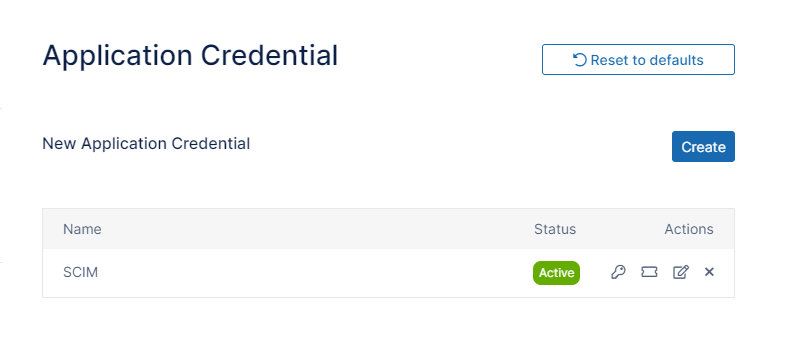
For more information, see Configuring OAuth for SCIM Integration.
Functionality added for using dynamic user codes in watermarks
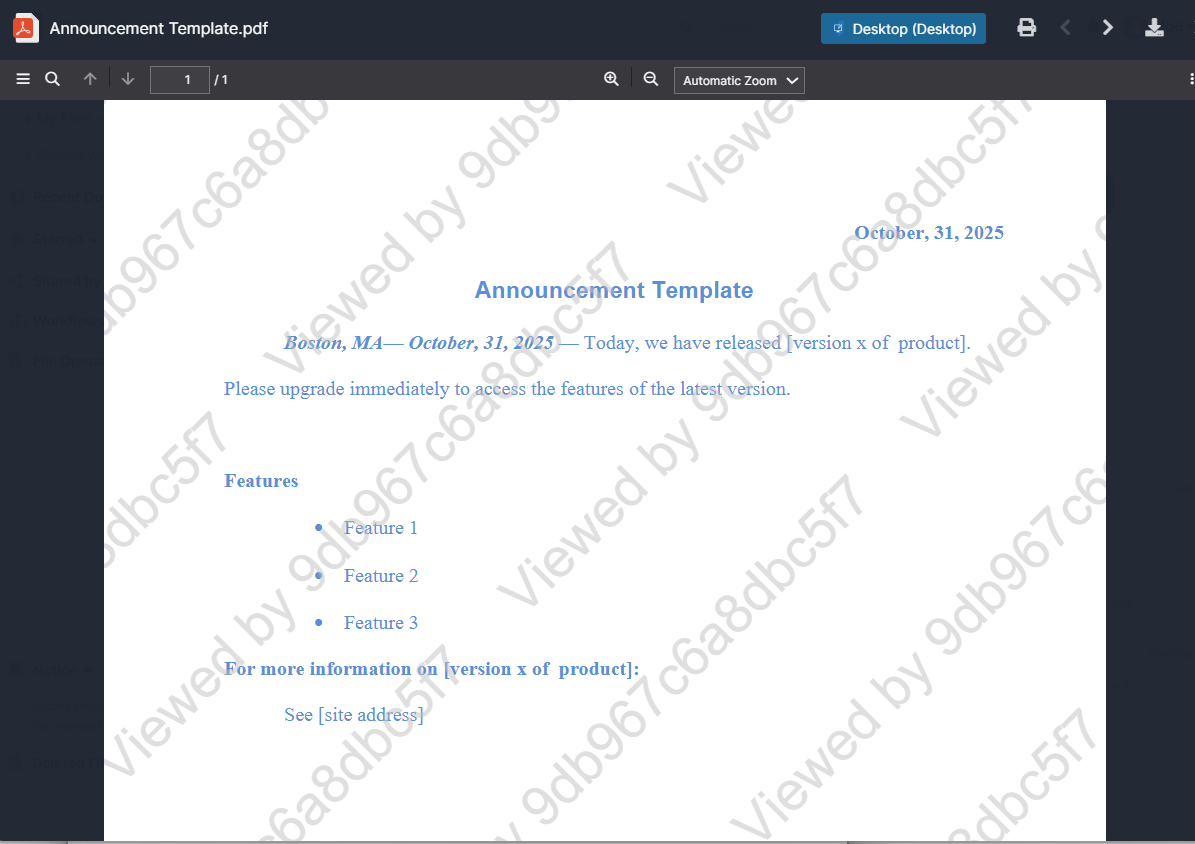
Admins can now configure a dynamic watermark placeholder that generates a unique, non-identifiable code for each document preview. These preview IDs do not expose usernames or timestamps in the preview:
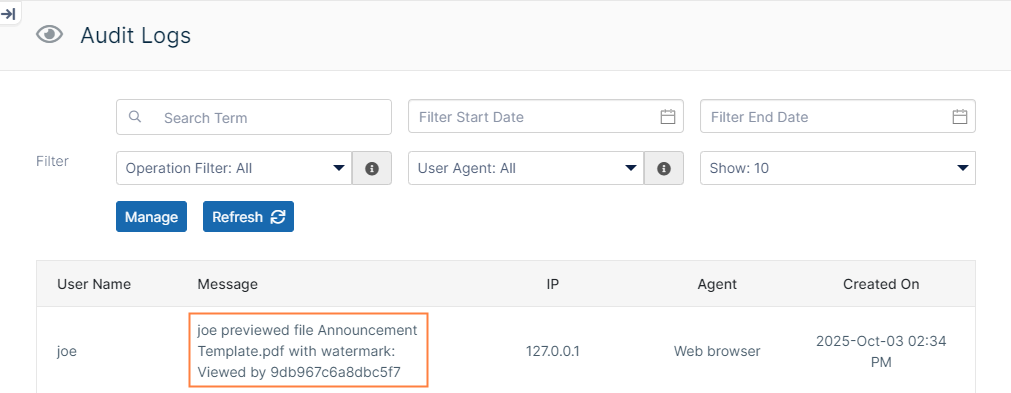
To enable you to trace activity and investigate potential data leaks. the coded preview IDs are listed with the corresponding usernames in the audit logs:
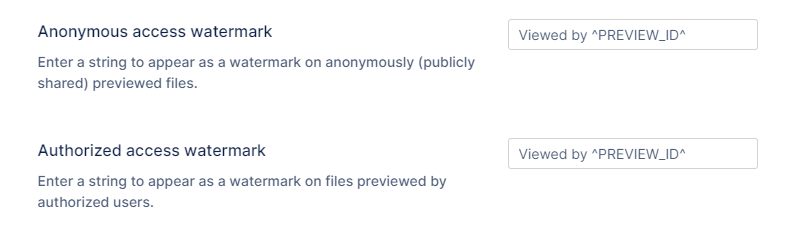
To specify use of an encoded preview ID, place the new PREVIEW_ID parameter into the watermark fields in the Preview settings screen:
For more information see Enabling Watermarks On Previews.
Support for user authentication across multiple AD domains
Admins can now enable user authentication across multiple trusted AD domains that are managed by a Global Catalog (GC). Users across all of your trusted domains can sign in with their email addresses; you are not required to create separate setups for each AD domain within this group. FileCloud's AD authentication settings now include the Enable multiple AD domains setting for enabling this feature.
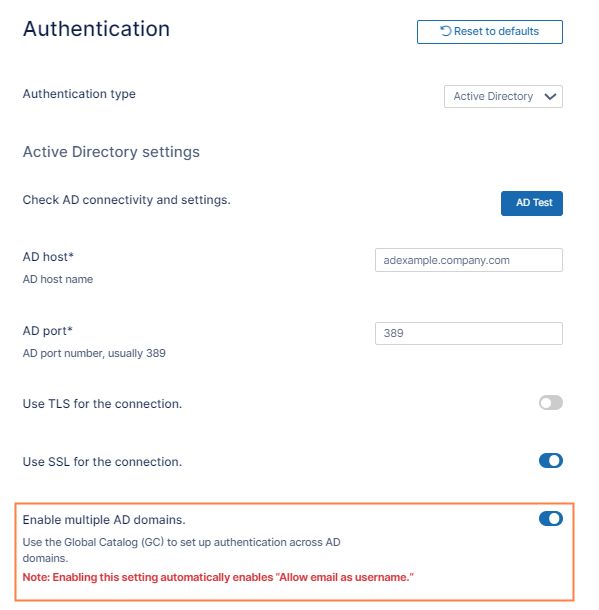
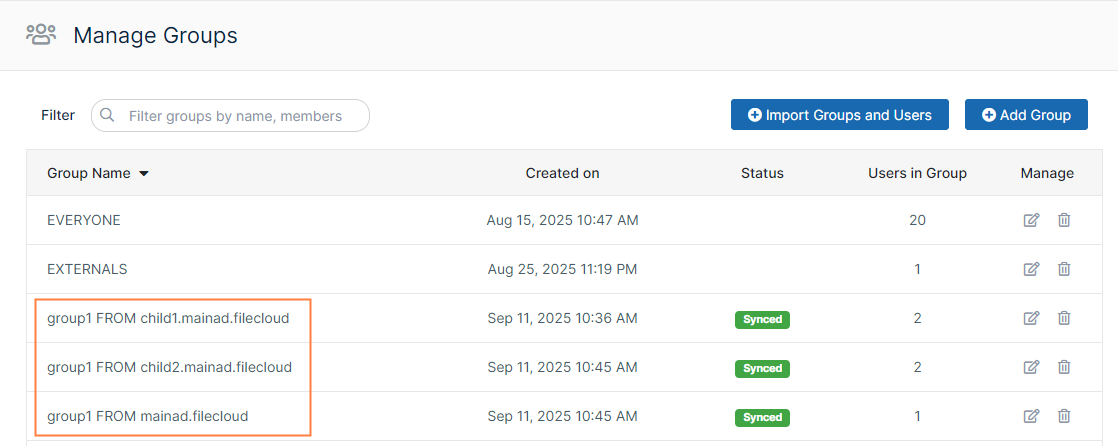
Groups that are imported using this configuration are named with the group name + the domain name to avoid confusion if different domains have groups with the same name:
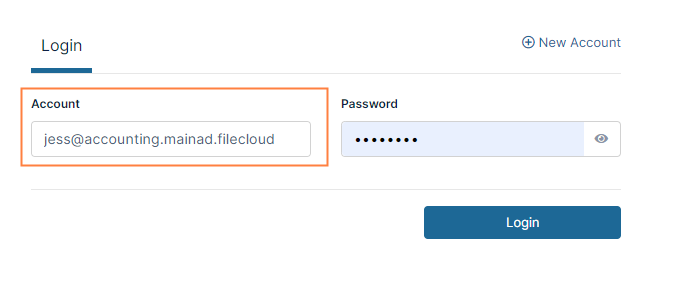
When users imported from these domains log in, they must use their full email address (the UPN) as their username:
For more information see Authenticate Users Across Trusted AD Domains.
Private Secure Web Viewer Shares
Users can now create private as well as public Secure Web Viewer shares. Private Secure Web Viewer shares can only be shared with members of your organization, and share permission is always view-only. Note that this type of private share is primarily intended for external users.
The Secure Web Viewer option has been changed from Allow anyone with Secure Web Viewer link and a password to Secure Web Viewer, and now includes the additional setting Allow selected users or groups.
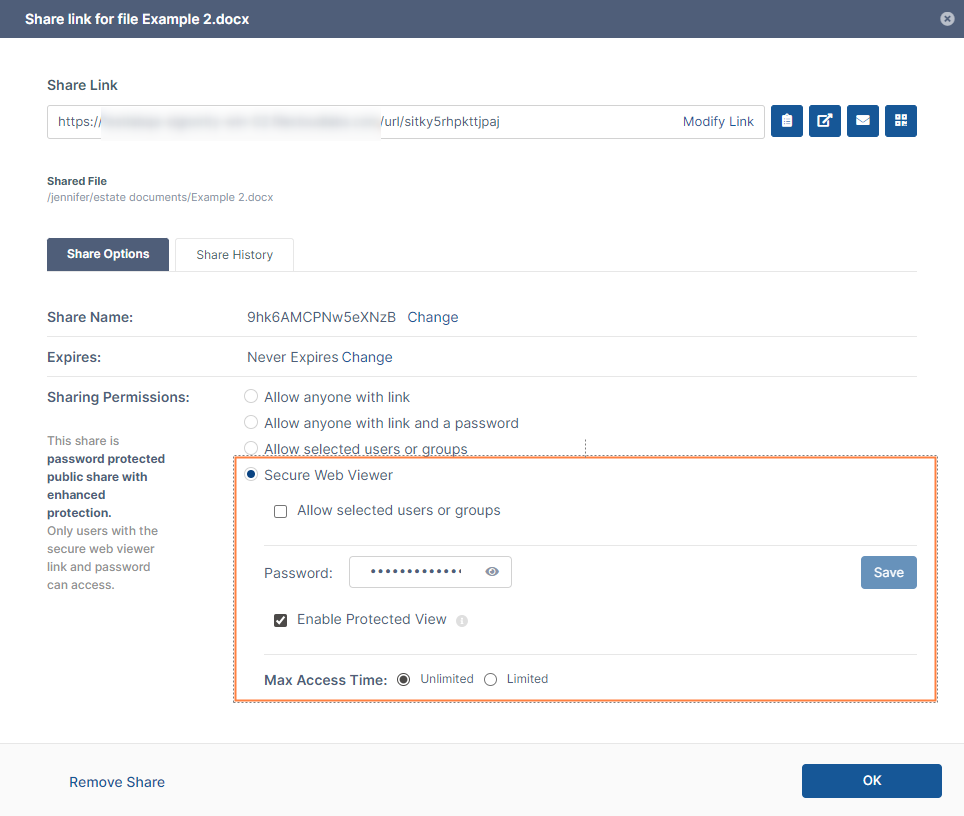
Configuration for a Secure Web Viewer public share
When Allow selected users or groups is checked, the Password field no longer appears and a selector for adding users or groups becomes visible.
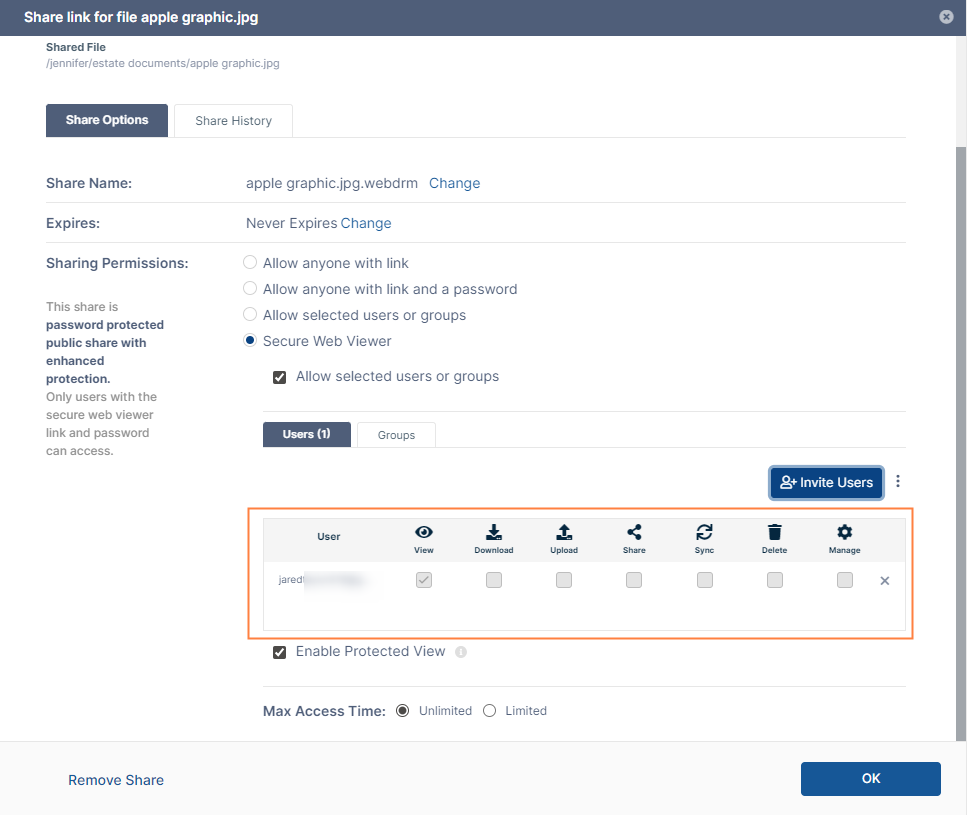
Secure Web Viewer share configuration for a private share
For more information, see Private File Sharing with Secure Web Viewer Protection.
UI Changes in FileCloud 23.252
Admin Portal
-
Custom Azure auth and graph domain settings for Azure SSO API
Azure GovCloud admins can now enter their custom domain URLs to enable integration with Azure SSO API. When admins go to Settings > Third Party Integrations > SSO API and click Add Integration and then Azure, the settings now include the fields oAuth Azure Auth URL and oAuth Azure Graph URL.
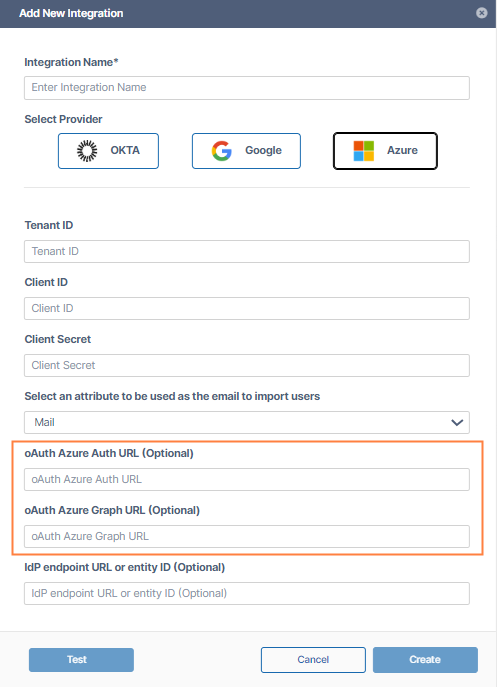
Information for Admins
|
Enhancements
|
Reference Number |
Area |
Feature |
|
Server |
|
|
|
FCL-2933 |
Admin workflows |
To prevent potential errors and ensure smooth workflow execution without manual intervention, FileCloud now automatically substitutes an empty object when all parameters in a required section are optional and left blank. The enhancement applies to both new and edited workflows. |
|
FCL-2122 |
Azure SSO API |
Azure GovCloud users can now add custom values for their Azure auth and graph domains to enable them to integrate with the Azure SSO API. |
|
FCL-127 |
Groups |
A new group named Externals has been added. This group automatically includes all External users. Now, External users are not included in the Everyone group. |
|
FCL-1879 |
Metadata |
A new inline metadata set for identifying ITAR information in files has been added. |
|
FCL-1878 |
Metadata |
A new inline metadata set for identifying CUI information in files has been added. |
|
FCL-2623 |
PHP |
PHP has been upgraded from version 8.3 to version 8.4. |
|
FCL-2047 |
Preview |
Preview support has been added for Apple iWork Suite file types (.pages, .numbers, .key). |
Online-only Enhancements
|
Reference Number |
Area |
Feature |
|
Server |
|
|
|
FCL-195 |
eSignature |
Steps for using the eSignature feature have been added to the in-product tutorial. |
Security Fixes
|
Reference Number |
Description |
|---|---|
|
FCL-3620 |
Solr has been upgraded to 9.9.0 to fix several security vulnerabilities. |
Bug Fixes
|
Reference Number |
Area |
Description |
|
Server |
|
|
|
FCL-2138 |
Cron |
A problem causing the Cron job that cleans up thumbnails to run slowly has been fixed. |
|
FCL-1817 |
FileCloud DocConverter |
An issue causing FileCloud DocConverter to use excessive memory has been fixed. |
|
FCL-3684 |
MongoDB, Cron |
A problem causing a MongoDB exception during a Cron quota calculation step has been fixed. |
|
FCL-3015 |
|
When metadata was extracted repeatedly from large PDFs, excessive memory was used. This has been fixed. |
|
FCL-4018 |
Preview |
After upgrade to FileCloud 23.251.1, file previews failed. This has been fixed. |
|
FCL-2487 |
Reports |
The Get Effective Permissions for Teams report was not returning results correctly. This has been fixed. |
|
FCL-3365 |
SSO API |
An issue causing only the first Azure group to appear in the Import SSO Groups dialog box has been fixed. |
Client Bug Fixes
|
Reference Number |
Area |
Description |
|
Drive |
|
|
|
FCL-3180 |
Login |
An issue preventing users from logging in to Drive has been fixed. |
|
FCL-804 |
SSO |
When the admin set login to SSO-only, other authentication methods were allowed on clients. This has been fixed. |