.svg)
You can use SAML SSO to control the authorization and authentication of hosted user accounts that can access FileCloud Web based interface.
-
SAML is an XML-based open standard data format for exchanging authentication and authorization data between parties.
-
FileCloud supports SAML (Security Assertion Markup Language) based web browser Single Sign On (SSO) service
-
FileCloud acts as a Service Provider (SP) while the Customer or Partner acts as the identity provider (IdP). FileCloud SAML SSO service is based on SAML v2.0 specifications.
SSO Login Diagram
SSO Login Diagram
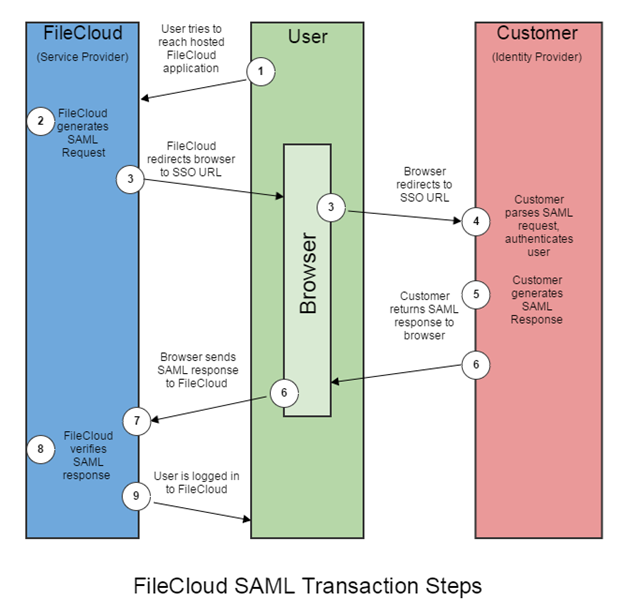
The following process explains how the user logs into a hosted FileCloud application through customer-operated SAML based SSO service.
-
The user attempts to reach the hosted FileCloud application through the URL.
-
FileCloud generates a SAML authentication request. The SAML request is embedded into the URL for the customer’s SSO Service.
-
FileCloud sends a redirect to the user’s browser. The redirect URL includes the SAML authentication request and is submitted to customer’s SSO Service.
-
The Customer’s SSO Service authenticates the user based on valid login credentials.
-
The customer generates a valid SAML response and returns the information to the user’s browser.
-
The customer SAML response is redirected to FileCloud.
-
The FileCloud authentication module verifies the SAML response.
-
If the user is successfully authenticated, the user will be successfully logged into FileCloud.
When the IdP successfully authenticates the user account, the FileCloud (SP) authentication module verifies that the user account exists in FileCloud.
If the user account does not exist in FileCloud, then a new user account is created and the user is logged into FileCloud.
SSO Configuration Steps
In order to successfully configure SAML SSO, the following steps must be followed.
-
Configure Apache Webserver.
To configure Apache Webserver for SAML SSO, please Contact FileCloud Support.
2. Ensure the correct FileCloud URL is set and uses HTTPS
-
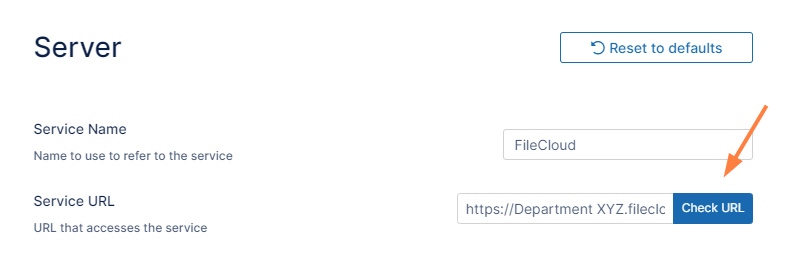
In the FileCloud admin portal's left navigation bar, scroll down and click Settings. Then, on the Settings navigation page, click Server

The Server settings page opens. -
In the Server URL field, confirm that your URL begins with HTTPS.
-
Click Check URL to make sure your URL is valid.
3. Set SAML as the default single sign-on method in FileCloud
To set the SSO type in FileCloud:
-
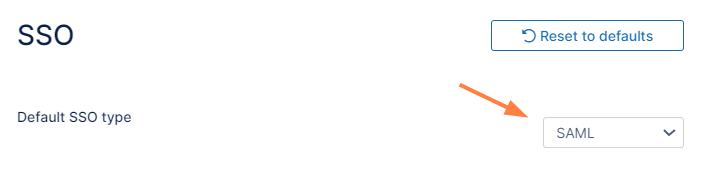
In the FileCloud admin portal's left navigation bar, scroll down and click Settings. Then, on the Settings navigation page, click SSO

The SSO page opens. -
In Default SSO Type, select SAML.
4. Configure IdP settings in FileCloud
Note: If you are using Active Directory Federation Services (ADFS) Support for authentication, see ADFS Single Sign-On Support.
To configure IdP settings in FileCloud:
-
In the FileCloud admin portal SSO settings page, fill in the settings under SAML Settings.
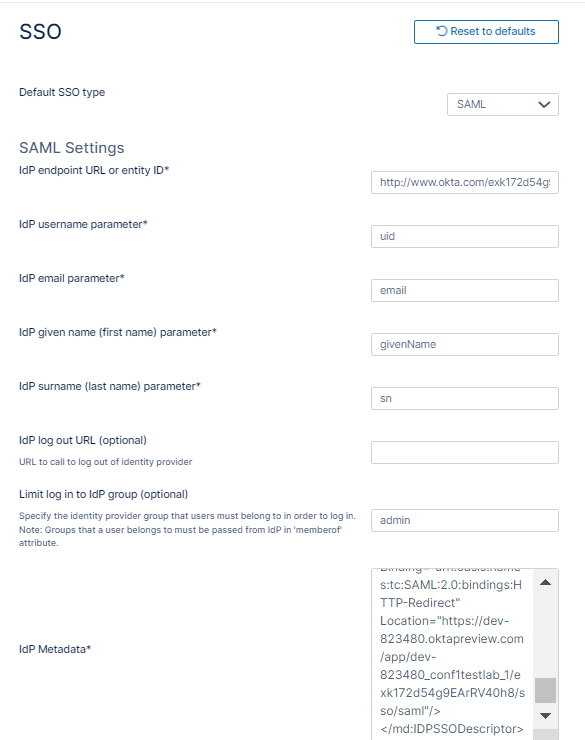
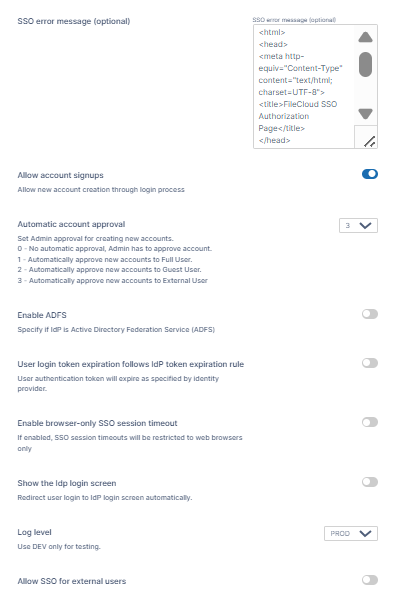
Use the following table to understand the IdP settings.
|
FileCloud Parameters |
IdP Settings |
|---|---|
|
IdP End Point URL |
Identity Provider URL |
|
IdP Username Parameter |
Identifies the Username (must be unique for each user)
NOTE: The username must be unique. If username sent by Idp is in email format, the email prefix will be used for username. The email prefix in this case must be
|
|
IdP Email Parameter |
Identifies the email of the user (must be unique) Default value: mail |
|
IdP Given Name Parameter |
Identifies the given name of the user Default value: givenName |
|
IdP Surname Parameter |
Identifies the surname of the user Default value: sn |
|
IdP Log Out URL (Optional) |
URL for logging out of IdP |
|
Limit Logon to IdP Group |
IdP Group Name
|
|
Show the IdP login screen |
Identifies which Logon screen the user will see:
|
|
IdP Metadata |
Identity Provider metadata in XML Format |
|
SSO Error Message (Optional) |
Custom error message that appears when a login is invalid. Enter in HTML format, and use the variable ^MESSAGE^, which shows error details when SSO login fails.
<h1>^MESSAGE^</h1>
|
|
Allow Account Signups |
When TRUE, during the login process, if the user account does not exist, a new FileCloud user account is created automatically. |
|
Automatic Account Approval |
This setting works with the Allow Account Signups setting to determine:
|
|
Enable ADFS |
If enabled, identifies IdP as Active Directory Federation Service. |
|
User login token expiration match IdP expiration |
If enabled the user token expiration will be set based on Idp expiration settings If not enabled user token expiration will be set based on FileCloud Session Timeout
Default: No (Not enabled) |
|
Enable Browser-Only SSO Session Timeout
|
If enabled, SSO session timeouts apply to browser sessions but not to client sessions. |
|
Show the IdP login screen |
If enabled, automatically redirect user to Idp log-in screen. |
|
Log Level |
Set the Log mode for the SAML Calls. Default Value: prod (Do not use DEV for production systems) |
|
Allow SSO for external users
|
Only appears if feature is included in license.
|
6. Enable the SSO link on the login page
You can customize the user log-in screen to display the SSO log-in option along with the direct log-in option or to only display the SSO log-in.
To display the SSO log-in option along with the direct log-in option:
-
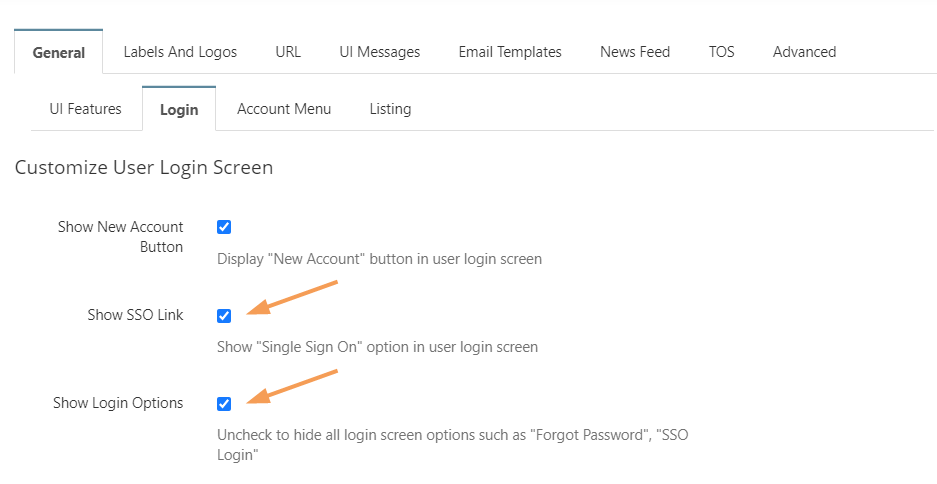
From the left navigation pane, click Customization.
-
Select the General tab, and then the Login sub-tab.
-
Check Show SSO Link and Show Login Options.
-
Save your changes.
Now, when users access the user portal log-in page, they will see:
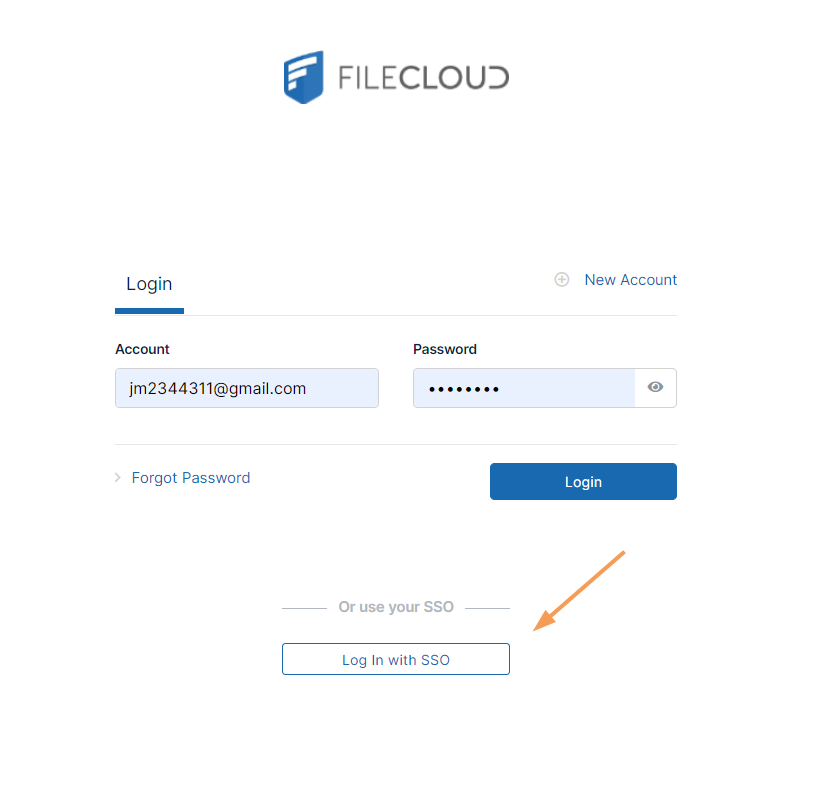
On clicking the Single Sign-On link on the login page, the user is redirected to the SAML SSO Service web page.
To only display the SSO log-in the user portal or the admin portal, please Contact FileCloud Support.