.svg)
FileCloud supports NTLM for User Login through SSO.
Prerequisites
For NTLM SSO to work, the FileCloud Server must be connected to the AD domain.
Web Server Settings
To configure your Web server for NTLM SSO, please Contact FileCloud Support.
Browser Settings to Enable Domain User SSO Login
For Internet Explorer and Google Chrome
-
Add the site URL to trusted site.
-
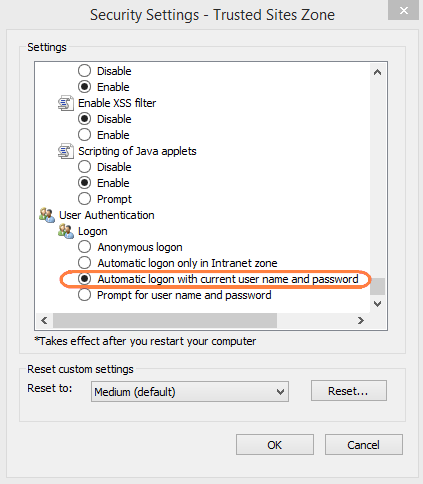
In the settings for trusted sites, enable user login to be sent, see screenshot below.
Troubleshooting
In some environments, additional code may be needed to complete authentication from the server.
After configuration, if you attempt to login with the AD username and password and are repeatedly prompted to enter your AD credentials instead of being transferred to the user portal:
-
Edit the file at c:\xampp\htdocs\.htaccess
-
Locate this section:
#-------------------------------------------------- # ADVANCED CUSTOMIZATION SECTION - END #-------------------------------------------------- #Route all requests to our handler RewriteRule ^(.*)/?$ public/index.php [L] -
Above the line:
#Route all requests to our handleradd the code:
RewriteRule ^auth/index\.php$ - [L]