.svg)
If you are an advanced user, you can use the code editor in the Add Watermark Rule wizard to write your conditions for adding watermarks to files. With the code editor, you can create conditions that are more complex and can use a wider range of parameters.
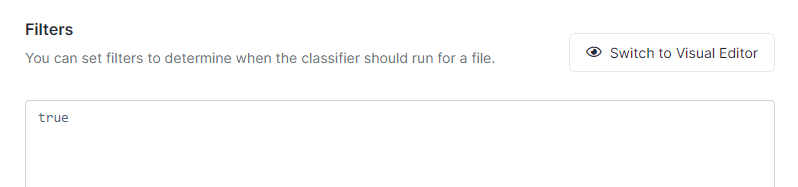
Note: To indicate in the code editor that you want to include the watermark on all files, enter the word true
|
Parameter |
Description |
Sample returned value |
|---|---|---|
|
File Information |
|
|
|
‘_file.path’ |
The full path of the file being accessed |
'_file.path == ‘/myuser/mydir/myfile.pdf'’ |
|
‘_file.pathStartsWith(start)’ |
Returns |
‘_file.pathStartsWith('/confidential/')’ |
|
‘_file.ext’ |
The file extension (without the dot) |
‘_file.ext == 'pdf'’ |
|
‘_file.extIs(extensions)’ |
Returns |
‘_file.extIs(['pdf', ‘docx’])' |
|
‘_file.pathContains(text)’ |
Returns |
‘_file.pathContains('/legal/')’ |
|
‘_file.pathMatches(pattern)’ |
Returns |
`_file.pathMatches('/myuser/reports/*')` |
|
‘_file.fileNameContains(text)’ |
Returns |
‘_file.fileNameContains('mrn')’ |
|
User information |
|
|
|
‘_user.anonymous’ |
Returns |
‘_user.anonymous == true’ |
|
‘_user.username’ |
The username of the authenticated user |
‘_user.username == 'john.doe'’ |
|
‘_user.email’ |
The email address of the authenticated user |
‘_user.email == 'john.doe@mail.com'’ |
|
‘_user.userType’ |
The user's account type. Possible values: ‘Full Access’, ‘Limited Access’, ‘Guest Access’, ‘Master Admin’
|
‘_user.userType == 'Guest Access'’ |
|
'_user.groups' |
Array of group names the user belongs to |
‘'Finance’ in _user.groups' |
|
‘_user.inGroup(groupName)’ |
Returns |
‘_user.inGroup('managers')’ |
|
‘_user.isMasterAdmin’ |
Returns |
'_user.isMasterAdmin == false' |
|
‘user.isEmailInDomain(domain1, domain2, . . .)’ |
Returns |
‘_user.isEmailInDomain('example.com', 'mail.com')’ |
|
Request information |
|
|
|
‘_request.remoteIp’ |
Returns the IP address of the incoming request |
‘_request.remoteIp == '43.12.45.78'’ |
|
‘_request.isAdminLogin’ |
Returns |
'_request.isAdminLogin == true' |
|
‘_request.agent’ |
The client agent type. Possible values: ‘Cloud Drive’, ‘Cloud Sync’, ‘Web browser’, ‘Android’, ‘iOS’, ‘MS Outlook’, ‘MS Office’, ‘Unknown’ |
'_request.agent == ‘Web browser'’ |
|
‘_request.inIpv4Range(lowIp, highIp)’ |
Returns |
‘_request.inIpv4Range('138.204.26.254', '138.204.26.1')’ |
|
‘_request.inIpV4CidrRange(cidrRange)’ |
Returns |
‘_request.inIpV4CidrRange('138.204.26.254/24')’ |
|
‘_request.remoteCountryCode’ |
Two-character ISO country code of the requester Note: To use this expression, the Show Geo IP Chart setting in the Settings > Admin screen must be set to TRUE. |
‘_request.remoteCountryCode == 'US'’ |
|
User policy information |
|
|
|
‘_policy.id’ |
The ID of the policy applied to the user |
‘_policy.id == ‘abc123’’ |
|
‘_policy.name’ |
The name of the policy applied to the user |
‘_policy.name == ‘Human Resources’’ |
|
‘_policy.default’ |
Returns |
‘_policy.default == true’ |
|
‘_policy.exists(policyKey)’ |
Returns |
‘_policy.exists('SHARE_ALLOW_PUBLIC')’ |
|
‘_policy.getValue(policyKey)’ |
Returns the string value of the policy key, or an empty string if not found |
‘_policy.getValue('MAX_UPLOAD_SIZE') == '100'’ |
|
‘_policy.getFlag(policyKey)’ |
Returns the boolean value of the policy key, or |
‘_policy.getFlag('ALLOW_DOWNLOAD') == false’ |
|
Share information |
|
|
|
Note: In any of the expressions including share.path, specify the original path of the shared file (for example /user1/textfile1.txt), not the path in the Shared with Me folder (for example, /SHARED/user1/textfile1.txt) |
||
|
'_share.path' |
The path of the share |
'_share.path == ‘/myuser/mydir'’ |
|
'_share.owner' |
The username of the share owner |
‘_share.owner == 'alice'’ |
|
‘_share.public’ |
Returns true if the share is public (no authentication required) |
'_share.public == true' |
|
'_share.onlyAllowedEmails(email1, email2, ...)` |
Returns |
‘_share.onlyAllowedEmails('*@acme.com', 'partner@external.com')’ |
|
‘_share.allowedUsers’ |
Array of email addresses of users explicitly allowed in the share |
‘'john.snow@mail.com' in _share.allowedUsers’ |
|
‘_share.allowedGroups’ |
Array of group names allowed in the share |
‘'Contracors' in _share.allowedGroups’ |
|
‘_share.hasUsersFromDomain(domain1, domain2, . . .)’ |
Returns |
‘_share.hasUsersFromDomain('gmail.com')’ |
|
‘_share.onlyUsersFromDomain(domain1, domain2, . . .)’ |
Returns Do not use this expression in an OR condition with another expression; this could cause shares to be denied unintentionally. Instead use _share.onlyAllowedEmails with a wildcard. For example, instead of: (_share.onlyUsersFromDomain('gmail.com') || _share.onlyAllowedEmails('testuser@test.com')) use:
_share.onlyAllowedEmails('*@gmail.com','testuser@test.com') |
‘_share.onlyUsersFromDomain('mycompany.com')’ |
|
‘_share.pathStartsWith(start)’ |
Returns |
‘_share.pathStartsWith('/myuser/mydir')’ |
|
‘_share.pathContains(text)’ |
Returns |
‘_share.pathContains('/reports/')’ |
|
‘_share.pathMatches(pattern)’ |
Returns |
‘_share.pathMatches('/myuser/*/public')’ |
|
File metadata |
|
|
|
Note: When you set a _metadata rule, the metadata set and the attribute specified cannot contain periods within their names. For example, cce.pii is valid, but cce.x.pii.y is not valid. |
||
|
‘_metadata.exists(metadataPath)’ |
Returns |
‘_metadata.exists('cce.pii')’ |
|
‘_metadata.existsAll(metadataPath)’ |
Returns |
‘_metadata.existsAll('cce.sensitive')’ |
|
‘_metadata.existsWithValue(metadataPath, value)’ |
Returns |
‘_metadata.existsWithValue('content.category', 'confidential')’ |
|
‘_metadata.existsWithValueInArray(metadataPath, value)’ |
Returns |
‘_metadata.existsWithValueInArray('content.categories', 'pii')’ |
|
‘_metadata.existsWithCondition(metadataPath, operator, value)’ |
Returns |
'_metadata.existsWithCondition('cce.score', ‘>=', '80')’ |
|
Signed files |
|
|
|
_metadata.exists("Signority eSignature.Digital Signature") |
Returns |
_metadata.exists("Signority eSignature.Digital Signature") == false |
|
_metadata.existsWithValue("Signority eSignature.Digital Signature", true) |
Returns Used to prevent watermarks on digitally signed files to enable download. |
_metadata.existsWithValue("Signority eSignature.Digital Signature", true) == false |