.svg)
The current version of FileCloud is FIPS 140-3 compliant when running in FIPS mode on Ubuntu Pro 22.04.
Prior to upgrade, confirm that your SSL certificate and your SSL private key are in the correct directory:
Ubuntu: /etc/apache2/ssl
RHEL: /etc/httpd/ssl
See Install an SSL Certificate on Linux.
If you are running FileCloud in a high availability environment, to upgrade to the latest version, please Contact FileCloud Support.
FileCloud Support can help you upgrade or can provide a PDF with instructions if you would like to perform the upgrade without assistance.
Pre-upgrade
-
As always, make a full backup of your existing installation before upgrading.
Backup on Linux -
If you are running in a high-availability environment with separate MongoDB servers, upgrade to MongoDB version 8 if you have not upgraded already. Please Contact FileCloud Support if you need more information.
-
When users upgrade from FileCloud version 23.262 or earlier to versions 23.263 and later, the upgrade process restructures storage in FileCloud. It is particularly important that you back up MongoDB prior to this upgrade. Due to changes in the way FileCloud stores folders, redundant values and inconsistent records are permanently removed from the storage database.
To perform the necessary prerequisites and access troubleshooting information, please review:
FileCloud Storage Upgrade Guide 10-1-2026.pdf . -
If you initially installed FileCloud before version 23.242
AND
You have not upgraded to FileCloud version 23.261.1 or 23.261.2
You must change your MongoDB Feature Compatibility Version from 6.0 to 7.0 by running the applicable command below, or MongoDB will not start.If MongoDB authentication is not enabled:
mongosh --eval 'db.adminCommand({setFeatureCompatibilityVersion: "7.0"})'
If MongoDB authentication is enabled:
(Replace PASSWORD with your MongoDB admin password)mongosh -u admin -p 'PASSWORD' --authenticationDatabase admin \ --eval 'db.adminCommand({setFeatureCompatibilityVersion: "7.0"})'
After you run one of the above commands, verify that the current Feature Compatibility Version is 7.0 by running the following command and checking the value it returns:
mongosh --quiet --eval 'db.adminCommand({getParameter:1,featureCompatibilityVersion:1})' -
If you are using native LDAP for authentication and using non-TLS connections set the LDAP Host value to ldap://hostname. Older FileCloud versions supported host value without the protocol definition ldap://
-
Beginning in FileCloud 23.253, by default, a more granular dynamic content security policy replaces the existing content security policy in the .htaccess file. If you are upgrading, to make this change effective, you must make a small change to the Content-Security-Policy header in the .htaccess file:
-
Open the .htaccess file.
in Windows:
C:\xampp\htdocs\.htaccessin Linux:
/var/www/html/.htaccess -
Find the line that begins:
Header set Content-Security-Policy: -
Change set to setifempty:
Header setifempty Content-Security-Policy: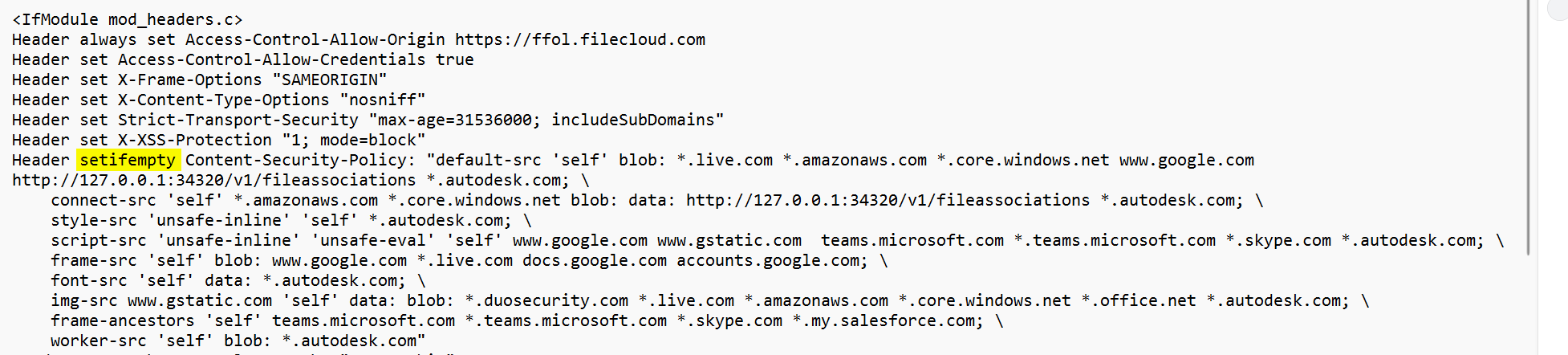
-
-
If you have added custom rules to the .htaccess file, they will be overridden by the dynamic CSP feature. To solve this:
Either:
Disable the dynamic CSP feature with the setting TONIDOCLOUD_DYNAMIC_CSP_ENABLED. See Dynamic CSP in FileCloud.Or:
Add the custom rules to the setting TONIDOCLOUD_DYNAMIC_CSP_EXTEND.To add the custom rules:
-
On the FileCloud Server, open the cloudconfig file:
In Windows:
C:\xampp\htdocs\config\cloudconfig.phpIn Linux:
/var/www/html/config/cloudconfig.php
-
Add the setting in the format:
define("TONIDOCLOUD_DYNAMIC_CSP_EXTEND",directive:source,source;[directive:source,source;]);
for example:
define("TONIDOCLOUD_DYNAMIC_CSP_EXTEND", "script-src:amazon.com;worker-src:amazon.com,google.com;");
-
-
If your system uses ServerLink, follow these steps:
-
Before upgrade, ensure all ServerLink nodes are fully synced and are at the same state.
-
Make backups of all nodes as needed.
-
Stop the FileCloud ServerLink client service in secondary nodes.
-
Upgrade the primary node first.
-
Upgrade each secondary node after upgrading the primary node.
-
Start the FileCloud ServerLink client service in secondary nodes. (In HA setups, client service must run only in one of the servers from each secondary node.)
-
Note: All connected ServerLink nodes, both primary and secondary, must be upgraded to the same FileCloud version before enabling access to the site again.
Upgrade instructions
-
Upgrade using the steps at Upgrade FileCloud on Linux.
Post-upgrade
Add ../scratch/tmp folder
The folder ..\scratch\tmp is not recreated in FileCloud, causing the system to fail to save necessary short-term data. After FileCloud is upgraded, add the folder /var/www/html/scratch/tmp to avoid any issues.
FileCloud iOS mobile users
Beginning with FileCloud Server version 23.261, iOS users must be on iOS 16+ and app version 23.261+.